
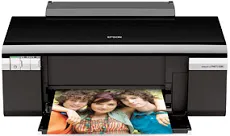
Epson Stylus Photo R280 is an excellent printer choice among the Stylus category of print machines with a friction paper feed. It also uses the Epson MicroPiezo head with the DX5 variable droplets with a sheet feeder and a top entry. The sheet feeder can again load up to 120 sheets of plain paper with an average paper weight of 20 lbs. When printing, the machine has a width of 17.7 inches and a depth of about 22.5 inches. At the same time, the height is approximately 11.3 inches.
Epson Stylus Photo R280 Drivers for Windows
63bf236c329f8dabc4309412708f22009b3e577e2543f8a922970f064d06ee4689ff3244492ea81acc8d9e5d2e63c9941062e02d6f0f4105254426db6236a66a9ebeb6263b0c20232947122b4d8083c26d20edadd595463e8befad0cc5d0f7da163f5fb2e3b468773244953162eb0e3d4f7bb7a0a8d43d3d89a0fdef86870829a5a5b9528741090630504bf892eefe858159d71d4138ad7d42ed9ed9398b101bc1d2b9f11591d1618cf6866a434126c5d22449908dd03f5d6d0767d6970444968e34332fa8129ed80ae881c3456e26bde85536ba8b57681c09def80bb4e95a5d18892445830073c7b3de11171ad1c9394c1b7b6057f2d66f206d94bc7acbaa33Epson Stylus Photo R280 Drivers for macOS
bf9d36624f06bf3b288a2cbd816bf80c0877aeaa98d428e306622e4ffb9dc5070707e281cf5c14763505e0fde342424c7fc0e49e3827a08ec8645f7c66a8b90d8bfe7609c15062b61245b449488f3e02397c3af558d235d69ce28523f2e9cc7aEpson Stylus Photo R280 Specifications
This machine also has a net weight of 11.9 lbs, about 5.4 kg without ink cartridges. The compatible ink cartridges are combinable with colors such as black, cyan, yellow, light cyan, light magenta, and black. The Epson Stylus Photo R280 machine requires some environmental conditions to perform at an optimum level. For instance, the operation mode requires a temperature between 10 and 35°C, while the storage range is between -20 and 40°C.
However, for the sake of the relative humidity, the operation range is between 20 and 80% with no condensation. On the other hand, the storage range for relative humidity is between 5 and 85%. It can also connect through the standard USB 2.0 hi-speed port with a unique device class for computers. The compatible paper sizes include A4, B5, A5, B6, legal, letter, photo paper sizes, and some user-defined sizes.
Epson Stylus Photo R280 model can work with various paper types, including the bright white paper, paper matte, ultra-premium photo paper glossy, and premium presentation paper matte for double-sided printing. Others are the iron-on cool peel transfer paper and photo quality self-adhesive sheets. Each of these standard paper types has varying capacities to fill up the paper loading tray space. For instance, the machine can accommodate 120 sheets of bright white paper.
Technical Details
| Title | Epson Stylus Photo R280 Drivers |
|---|---|
| Device Type | Printer |
| Driver Version | Varies by driver and operating system |
| Available Downloads | Drivers |
| License | Free |
| Manufacturer | Seiko Epson Corporation |