
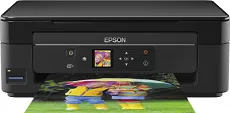
The Epson Expression Home XP-342 model runs on the modern Epson Micro Piezo print head with a high-quality production value. The print system has up to 180 nozzles for monochrome printing in addition to 59 nozzles for color printing. Its minimum ink droplet size is also about three picoliters, despite variable-sized droplet technology. At the same time, it uses the Claria home ink type that ensures the best quality of output at great speed.
Epson Expression Home XP-342 Drivers for Windows
98925effa81f04dbe88b5caf2c5e5b0810dc055a347b9a88d2b102e850a289bf626dbe56a5d5f3e0b9989342df13b8630e5adb4317a4cd329ffc1594dfb65fac1c09405367d5c5e3498637283c9ff21551186ae3f5ce944a7f2c8acee5d985b7e296b0dd6f562045ca62037185b78ea08935c2397617465e6551a239e6f13b6cfa5b5b16613222e7e58b0e6ee417a15601df4dd00148222a8095908bcf3fc4feEpson Expression Home XP-342 Drivers for macOS
330d1d1f351e38f8b71b4682e62dd6550f4e2858e79ced8cd79768635aeedb68d1daefdbcada62e8a90fbe06caed43fc93c8fd9b9a6e76481ca2aca8d7fc3e2d0e2413554f967041bcf1058c9317203cdaca60f42a8fc896d9253c1fc9d10cfa90071b11984600791b1ab1b58f654ee83a3a90fed5e5b6be2162f41461badfc7Epson Expression Home XP-342 Specifications
This machine can also produce a print quality resolution of 5760 x 1440 dots per inch (dpi) at the optimum level. And as a multifunctioning printer, the Epson Expression Home XP-342 device can print, scan, and copy documents at its best quality yield. There are two possible modes in which this printer works: the normal mode and the ISO/IEC 24734 standard mode.
Therefore, when in the latter mode, the print speed is about ten pages per minute (ppm) for monochrome or black and white documents. But when printing in color, the print rate is about 4.5 ppm. However, standard printing on plain paper has a print rate of 33 ppm for black and white documents. On the other hand, color printing has a print rate of 15 ppm under the same conditions. Scanning with this machine depends on a contact image sensor (CIS) element.
When working on monochrome documents, the speed of the scanning process is 2.4 milliseconds per line. On the other hand, when scanning in color, the work rate is about 9.5 milliseconds per line. At the same time, its optical scanning resolution is up to 1200 x 2400 dpi for both horizontal and vertical dimensions. The machine is also compatible with standard paper sizes such as A4, A5, B5, A6, C6, photo paper sizes, letter, and legal.
Technical Details
| Title | Epson Expression Home XP-342 Drivers |
|---|---|
| Device Type | All-in-one printer |
| Driver Version | Varies by driver and operating system |
| Available Downloads | Drivers |
| License | Free |
| Manufacturer | Seiko Epson Corporation |