
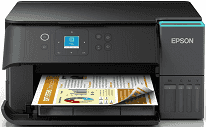
Epson EcoTank ET-2951 Driver lets the computer identify the printer and send the correct instructions for each task. Print jobs travel to the printhead, and scanned pages return to the computer through the active connection. Copying takes place at the printer, although the installed software helps keep its print and scan functions recognised. A USB cable serves one nearby computer, while a wireless setup lets devices communicate over the network.
Epson EcoTank ET-2951 Drivers for Windows
57fcb9ea47c9e52eee39b41cb6538e18a1dad3bb6db87b3a516f3258ae0f99abcb26f52aa72693332e7f354c022b327f0ab0de737b607bbdaf986a27d4811c39727ffa604e8890852dd64be97d5055a782885f0be7d3cbac402761301b78dd7ce296b0dd6f562045ca62037185b78ea08935c2397617465e6551a239e6f13b6cEpson EcoTank ET-2951 Drivers for macOS
51b9f261f7c15bb353d92b1d8143bdf4eb23f588cee58389759ca1c7f9485f135ff2dc93d27cbe31873055589c7c7eff55e3dbdab79dd78e6ef0e56e55bf1817Epson EcoTank ET-2951 Specifications
Epson EcoTank ET-2951 is an A4 ink-tank multifunction inkjet built for printing, scanning, and copying, with no fax hardware. Printing comes from a PrecisionCore print head: 400 nozzles are used for black, and each colour has 128 nozzles. The tank set uses pigment black ink, then dye-based cyan, magenta, and yellow for colour work. A 3.7 cm colour panel sits on the body, but Epson does not list it as a touchscreen.
Print resolution reaches 4,800 x 1,200 DPI at its maximum setting. ISO speeds are 15 pages per minute in mono and 8 pages per minute in colour; draft mode is much faster on 75 g/m² plain paper. First-page output takes 9 seconds in black and 15 seconds in colour, so short jobs still have a small startup delay. Scanning relies on a CIS flatbed at 1,200 x 2,400 DPI. Originals go on the glass one at a time because no automatic document feeder is part of this model.
Paper feeds from a 100-sheet rear tray, and finished sheets collect in a 30-sheet output tray. The rear feed takes common document sizes such as A4, A5, A6, Letter, B5, and B6. Number 10, DL, and C6 envelopes use the same path, so envelope printing is still a manual rear-feed job. Photo sheets can be 10 x 15 cm or 13 x 18 cm. Automatic duplexing is limited to A4 plain paper, and borderless output depends on Epson’s supported zero-margin modes.
A nearby computer can connect through USB. Wireless jobs can travel over Wi-Fi Direct or a wireless LAN up to Wi-Fi 5, with 802.11a/b/g/n/ac listed along with k, v, and r support. Phone and cloud printing use Apple AirPrint, Mopria Print Service, Mopria Scan, Epson Smart Panel, and Epson Connect features. With the trays closed, the body measures 375 x 347 x 187 mm and weighs 5.2 kg. Standalone copying draws 13 watts during operation.
Technical Details
| Title | Epson EcoTank ET-2951 Drivers |
|---|---|
| Device Type | All-in-one printer |
| Driver Version | Varies by driver and operating system |
| Available Downloads | Drivers |
| License | Free |
| Manufacturer | Seiko Epson Corporation |