
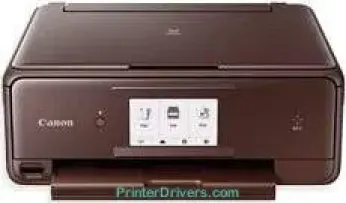
The Canon PIXMA TS8053 printer model belongs to the same series of printers as the PIXMA TS8050 and PIXMA TS8052. Each of the printers in this series has different colors that differentiate them from one another. These machines are notable for their multiple functions, including printing, copying, scanning, wireless, and cloud link features. It can also produce a maximum print resolution of up to 9600 x 2400 dots per inch (dpi).
Canon PIXMA TS8053 driver Downloads for Microsoft Windows 32-bit – 64-bit and Macintosh Operating System.
Canon PIXMA TS8053 Drivers for Windows
849639b608cdb43858994955d5271d532f79d1da2999444828ae1e2f08070ecbf64472f1975115dbe5ae88bc4551c6c86346af3b51c4ef7cfd473fcbb5da2ea8ba872ab74e47a5916196ee7c5892c8a5647a08a44b1ed013540ef5768a360ac28dd427942e8e31c574841b714286f9171dafe7b49dd781ec9b62ff0cc61cf1a415e26104a051d3f79061242bb8114e3d81f35bbe709d14bb07a6284eb01471d0Canon PIXMA TS8053 Drivers for macOS
8f8e63b8dbd57dc9ead8385557995f640fee0a11486a2ecf83966108ddd65c175acbf7df3052a220ac4e6fa95989da97535a91838a966f750cbb6a2b224af4f0d086ba1817864ec0cb61677d030e46c1cf96beab18fa2533c796bc449f191e2f05fd9c59ffd568e0c41d201e512443bdc7912d4404afb84f877bd377e5fa8c61Canon PIXMA TS8053 Drivers for Linux
3b298716ad8b806fad72ed52714838921dea6f84253446a02d0e669afbc13804559acc98851ecf86000724ee268b473818b395c6b87524dc0d82ead6263a6ab598ba823924fb7835d6f2697a2561e0e92c44b64fc10b6f8086a7bbbe5ee998eabb8d108b2c3557f3dc258d47b560ce96608a006ec7b052a630e0a5f911da2413da7fddf03d95b487b55795812c9a27a00aa027a8f3bbcc76ead54ce07108976bcfb2af683f1d1ed0431948967bae872798d8b75da9eac1bfbf30aa8394220ab0Canon PIXMA TS8053 Specifications
Concerning the print technology, it comprises 6 individual ink tanks for pigment black, cyan, magenta, grey, black and yellow. Also, the compatible ink type in the machine is ChromaLife100 ink for the best print output for the users. The monochrome or black printing runs at the rate of 15.0 images per minute (ipm). Conversely, the color printing rate is up to 10.0 ipm on average production.
When carrying out borderless printing on a 10×15 cm photo paper size, PIXMA TS8053 runs at 21 seconds per page. It also has automatic duplex printing for optimizing both sides of the paper and for standard sizes. With the aid of software, the machine supports a direct disc printing procedure. The two basic standard cartridge types for the device include PGI-570PGBK for pigment black and CLI-571BK/C/M/Y/GY for diverse colors.
There are also XL variations of the cartridges that produce slightly more pages than the conventional printer cartridge. Whereas, the supported paper types include plain paper, envelopes, Canon Pro Platinum, Pro luster, Plus Glossy II plus Semi-gloss. Other media types include matte paper, high-resolution paper, and other Fine Art papers with printable discs. The rear paper input tray of the printer will hold about 20 sheets of photo paper.
On the other hand, the front cassette can take about 100 sheets of plain paper, not exceeding the average weight. It also has a direct disc print tray that makes one CD, DVD, or Blu-ray disc.
Technical Details
| Title | Canon PIXMA TS8053 Drivers |
|---|---|
| Device Type | All-in-one printer |
| Driver Version | Varies by driver and operating system |
| Available Downloads | Drivers |
| License | Free |
| Manufacturer | Canon Inc. |