
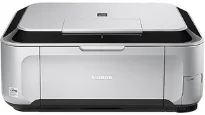
The Canon PIXMA MP996 printer model is a fantastic product with excellent qualities that maximize users’ interests. In terms of the general specifications of the Canon PIXMA MP996 model, it can print, copy, scan, and fax messages. Also, the printing resolution of the device is about 9600 (horizontal) x 2400 (vertical) dots per inch (dpi). Then, there are ink droplets that can lie within the pitch of 1/9600 inch at a minimum level.
Canon PIXMA MP996 Drivers for Windows
2d0e8ab74aef85544f62b88a34e2c3b7950bd297bf50ccfff0d5675a41d861374ac8151ea0c1e323d7c74206d00116b9963580f28b4a416eb27b79c763cc4d06Canon PIXMA MP996 Drivers for macOS
9a5eb7913941e671814b4e599c8913ca96521c6c8ace7a8b0dab1292e8570f4d4624d65ed372d5e5850209b46114ca4ef6206116f03dcd8c00c437963f7e30b346f2ee20e30775cc10b101c189700f18b5a8386f688a1fa939ff7cd3b9f2a6a37ab0bc63afceaf3b0c1dda0ff3ad58c532012347e9d801c3e4daffed22624f010ace023023563d8ef0e6afd5ea2b5724d504a518a22bf97206f97372083830cb5676576ac59bcf010230b04e385525a8eaa737c040a6f5f502735a087016c3ffbf089bce6e1084cef948733271bac270a0f430d921fe9123266f95203fb2bb9cCanon PIXMA MP996 driver Downloads for Microsoft Windows 32-bit – 64-bit and Macintosh Operating System.
Besides, the connectivity interface options include a USB port, using a hi-speed USB 2.0 port, and a direct print port. Within the direct print port are the PictBridge, IrDA IR, Bluetooth v2.0 with a USB flash drive. The Canon PIXMA MP996 also has a LAN port that supports both wired LAN and wireless components, including the IEEE 802.11b/g part. Besides, the computer in use must comply with the hi-speed USB standard and the other versions.
The maximum speed of the machine Canon PIXMA MP996 is about 1.4 Mbps while it supports the JPEG and PNG formats. Also, users should note that the Bluetooth connection is only compatible with the printing mode. However, the setup is possible through Wi-Fi Protected Setup (WPS), Windows Connect Now (WCN), and Easy settings. During bordered printing, the supported width is about 8 inches, which is about 203.2 mm.
However, borderless printing allows a print width of 8.5 inches, which is about 216 mm. In a typical operating environment, the recommended temperature is between five and 35°C. But this same condition demands a relative humidity between 10 and 90% with no condensation. However, the storage environment will indicate a temperature range between 0 and 40°C. Besides, the relative humidity is between 5 and 95%, with no condensation.
The external body of the machine has a width of 18.5 inches and a depth of 15.2 inches. The height is up to 7.9 inches, while the weight is 10.7 kg.
Technical Details
| Title | Canon PIXMA MP996 Drivers |
|---|---|
| Device Type | All-in-one printer |
| Driver Version | Varies by driver and operating system |
| Available Downloads | Drivers |
| License | Free |
| Manufacturer | Canon Inc. |