
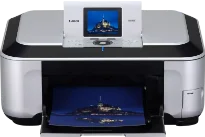
In the world of individual printers with exceptional qualities, the Canon PIXMA MP980 model possesses outstanding attributes for users. For instance, the machine can print in the borderless photo mode at the rate of 20 seconds per page. However, black document printing at an average speed runs at 26 pages per minute (ppm). In other words, this rate is equivalent to 2.3 seconds per page.
Canon PIXMA MP980 Drivers for Windows
8f73b382920c6e5109e3e8b36dbaab8b86b04e173b1a9ae0f9e584652a4cd008eef96de9a14a95ea9d0f4cdfa4b1c4efb11bd5e1312bfd9739e714c8d38e44c12b71c7d143c055060a9d4cad8975cf37a50d0cb16e084cdbc0b0a518cea69a1d8be5d5f9fc2c55f58472ecbc701baafcd0b18835738f3fd0dfcfa8ca24f2994bd0e43b4b61f8588491bbc6a66a946b32a3670fab8ef3c1499c613057e0f07218a2957978374f9cec5167683e858d4f5b732bc16ef6451ce7904de4b6f1d285ecCanon PIXMA MP980 Drivers for macOS
0e4a6294e5cbceb988fd72364b32956bc4e55ffa5a204f89664b4a4c98616aca6ce9f47551713341953c5725f847ddf7155e0f15c0ebeff12dabfc26dca319148485044f684de81561ac5376e80aaca6b3f053468330412abe603b820857fb38Canon PIXMA MP980 driver Downloads for Microsoft Windows 32-bit – 64-bit and Macintosh Operating System.
Ink Cartridge Details: PGI-220 Pigment Black Ink Cartridge, CLI-221 Cyan Ink Cartridge, CLI-221 Magenta Ink Cartridge, CLI-221 Yellow Ink Cartridge, CLI-221 Black Ink Cartridge, CLI-221 Gray Ink Cartridge
Conversely, color printing with this machine has a print rate of 21 ppm, which is as fast as 2.9 seconds per page. This machine also contains up to 6144 nozzles, which include 512 black nozzles and 5632 color nozzles. Simultaneously, the device’s minimum ink droplet size consists of 1, 2, and 5 picolitres. The average resolution is up to 600 x 600 dots per inch (dpi) under normal print conditions.
On the other hand, the maximum print quality resolution is up to 9600 x 2400 dpi. It can be compatible with the letter, legal, US envelopes, and photo sizes of paper. It can also use an automatic sheet feeder that will accommodate up to 150 pages of plain paper. Under copying, this Canon PIXMA MP980 printer has a print rate of 24 copies per minute (CPM) for black documents. In other words, this rate is about 2.5 seconds per page.
Simultaneously, the color pages copy at the rate of 19 CPM, which is as fast as 3.2 seconds per page. It can also enlarge or reduce within a range of 25 to 400% of the document’s original size. The other notable features of the copying process include multiple copies, auto duplex copy, auto exposure or intensity copy, continuous copy, face brightener, fading correction, and film copy. Also, when scanning with this machine, the process runs using the charge-coupled device (CCD).
Technical Details
| Title | Canon PIXMA MP980 Drivers |
|---|---|
| Device Type | All-in-one printer |
| Driver Version | Varies by driver and operating system |
| Available Downloads | Drivers |
| License | Free |
| Manufacturer | Canon Inc. |