
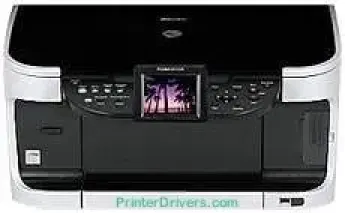
Printing with the Canon PIXMA MP800R printer model comes with an average speed of 36 seconds for the borderless photo printing mode. However, standard printing for black and white documents has a print rate of up to 30 pages per minute (ppm). At the same time, this rate is approximately 2.0 seconds per page for monochrome documents. However, color printing with the same device is up to 24 ppm, about 2.5 seconds per page.
Canon PIXMA MP800R driver Downloads for Microsoft Windows 32-bit – 64-bit and Macintosh Operating System.
Supported Ink Cartridges
PGI-5Bk Black Ink Cartridge, CLI-8 Black Ink Cartridge, CLI-8 Cyan Ink Cartridge, CLI-8 Magenta Ink Cartridge, CLI-8 Yellow Ink Cartridge
Canon PIXMA MP800R Drivers for Windows
137d40b3c198c589c37754062fbf14d6e1c6fe17de5a7bb439ddf207a5d084762775cce246e09f2e8aa312a3dc31481348b5b01bf9a4b43e8269f9553145b52c1f510ee7d8b7cab4d05d1fc018b27df892f00f98048e70f9be3c3f1e663ef03affab51e27bcbd93a02e6e5826c6319e11f58f83bc96ea176aba09e25e7b16db9Canon PIXMA MP800R Drivers for macOS
4234abf76270343fb7a8d02cb750b415e419372a1c06502ebc86700e7ffe51e2806c63078b904887726d7e376acd56d920d3463613862eb58ff23aa23f27135eCanon PIXMA MP800R Specifications
The total number of print nozzles reaches 3584 for the full maximum print capacity. Black document printing comprises 512 nozzles, while color printing with yellow and black pigments also has 512 nozzles. But the cyan and magenta category has up to 1024 nozzles for each of the colors. Moreover, when printing in color, the minimum ink droplet sizes include 1 and 5 picoliters.
The Canon PIXMA MP800R printer model can also produce a quality resolution of 600 x 600 dots per inch (dpi) on average. However, the maximum print resolution is up to 9600 x 2400 dpi, which characterizes the top qualities. The standard paper sizes include letter, legal, credit card sizes, and photo paper sizes. In the copying function, black copies reproduce at 30 copies per minute (CPM). This rate is approximately 2.0 seconds per page.
Similarly, color copying has an approximate reproduction rate of 2.5 seconds per page, similar to 24 CPM. Some notable copy features include borderless copy, auto-exposure (AE), 4-on-1, 2-on1, fit-to-page, and an image repeat. Scanning with this machine uses the charged-coupled device (CCD). But the maximum optical resolution reaches 2400 x 4800 dpi under ordinary circumstances. By the way, the interpolated resolution is up to 19200 x 19200 dpi at the best capacity of print.
Technical Details
| Title | Canon PIXMA MP800R Drivers |
|---|---|
| Device Type | All-in-one printer |
| Driver Version | Varies by driver and operating system |
| Available Downloads | Drivers |
| License | Free |
| Manufacturer | Canon Inc. |