
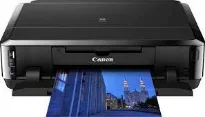
Canon PIXMA iP7270 has many fascinating features for photo printers for the best quality output and at high speed. The printing resolution from this machine is about 9600 (horizontal) x 2400 (vertical) dots per inch (dpi). It uses individual ink cartridges that comprise up to 5120 nozzles for optimum print performance. The minimum volume of each ink droplet is about one picolitre.
Canon PIXMA iP7270 Drivers for Windows
9e6299f7d8974fb68780cc5ffd665b366f20f899ad297bd06b63ea6d8ce04ff73ba58059ca15160e2aa6c945e0b312694c9c6480521c641db876b7148e2ac22c8dd427942e8e31c574841b714286f9171dafe7b49dd781ec9b62ff0cc61cf1a415e26104a051d3f79061242bb8114e3d81f35bbe709d14bb07a6284eb01471d099b24ecf5316405389c4ed89fe40cb4525c4404436f13a9b4cdbc334aacb6086Canon PIXMA iP7270 Drivers for macOS
02d0aa59f99bef7babb3cab5e8fa66fd997f6fcd966d21b4792921cd620d6cce7e3e0e53101a39da20c430a62307ff1a2457206fa50988a4f303df0d829ac8bb33d949689439d3fa1e9bf1de4e1c40d9c3c55e5028b09d6b9b76c7235c264d2400f3256823acc194f88a14227354ccb26695ef3d3741b69133621a576e32e352Canon PIXMA iP7270 Drivers for Linux
c20fe715cf7bac066837dcf7b9b36fe123ca82c40056bc7b09b2e223ffca600d0d6a47fd288cd437284e391e2cf6d2dd7d2b6fcaa7937692553b8850135ad2548b6d408f18191f19465ee8fc31aa08455e8bec186fdd3f02ee822f53a9b086a9Canon PIXMA iP7270 Supported Ink Catridges
Black Ink Cartridge CLI-751, Colors Cyan, Magenta, Yellow Cartridges CLI-751, Ink Cartridge Pigment Black PGI-750
However, the ink tanks vary by color and models. For instance, the compatible standard ink tanks include PGI-750 for pigment black and CLI-751 for cyan, magenta, yellow and black. Other options of ink tanks include PGI-750XL for Pigment Black and CLI-751XL for cyan, magenta, yellow and black. At the same time, the machine manufacturer recommends using only compatible ink tanks.
The rate of printing with this Canon PIXMA iP7270 device depends on the complexity of the document in print and the printer model. For example, printing in color in the simplex mode runs at 10.0 pages per minute (ppm). But when printing in the same manner in black and white, the rate is about 15 pages per minute (ppm). In the case of printing on photo paper, the rate is approximately 21 seconds.
In bordered printing, the top margin is 3 mm, the bottom margin is 5 mm, while the other sides are 3.4 mm. Similarly, bordered auto duplex printing allows a top and bottom margin of 5 mm, while left/right margins are 3.4 mm. However, if the printing is borderless, all the sides have no extra margin. Therefore, the recommended printing area has a top margin of 40.7 mm and a bottom margin of 37.4 mm.
The compatible paper types with this machine include photo paper pro platinum, photo paper plus glossy II, and glossy photo paper. Other options include photo stickers, high-resolution paper, plain paper, envelope, and T-shirt transfer.
Technical Details
| Title | Canon PIXMA iP7270 Drivers |
|---|---|
| Device Type | Printer |
| Driver Version | Varies by driver and operating system |
| Available Downloads | Drivers |
| License | Free |
| Manufacturer | Canon Inc. |