
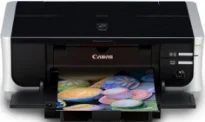
Canon PIXMA iP4500 weighs about 15.2 lbs, moderate for a machine of its print capacity and 5-ink system. The device’s width is approximately 17.5 inches, the depth is 11.9 inches, while the height is about 6.3 inches. The rate at which it consumes power is a factor of the printer mode of operation. But the maximum usage occurs while printing, and it is about 13 watts. However, when the machine is in standby mode, it uses only about 1.2 watts of energy.
Canon PIXMA iP4500 driver Downloads for Microsoft Windows 32-bit – 64-bit and Macintosh Operating System.
Canon PIXMA iP4500 Drivers for Windows
72d1e690ee21990cc4bd0c621ea49d8a52ac36b93d34d68ebbf3f4f06d1614292140cf31b7ecce095292d992b535e99370f90ea7bd66438df6f07b3d2a235f63c61bf6037a1e50254b2d5439c040cf438bc498f1b90589b48c9be081cb51ff79Canon PIXMA iP4500 Drivers for macOS
5bbd8aa4d1aac3d44f534087e783c648eecc41d14aa77d048f8bbc1997abc488d169d3121519f7896f397619f237876599c8235a01bf14c811814d815b11b556Canon PIXMA iP4500 Supported Ink Catridges
Black Ink Cartridge CLI-8, Cyan, Yellow, Magenta Ink Cartridges CLI-8, PGI-5 Pigment Black Ink Cartridge
The device has toll-free technical phone assistance from the manufacturer. This feature also includes a one-year limited warranty with an Instant Exchange Program. Besides, the buildup already contains software for the printer driver, setup software, easy-photoprint EX, and the user’s guide. Users should also expect a noise level of up to 34.5 dB (A) in the best quality mode. Standard paper sizes include the credit card size, photo sizes, letter, legal, US envelopes, and photo stickers.
The buffer RAM is 42 KB while ink droplet sizes are 1, 2, and 5 picoliters (pl). Connectivity to the device is either through the standard USB 2.0 hi-speed port or the PictBridge port. The latter is essential for connecting photo cameras for direct printing. In terms of the operating system compatibility, Canon PIXMA iP4500 can work with Windows Vista, 7, XP, and 2000. Apart from MS Windows OS versions, it is also compatible with the system that has Mac OS X v10.2.8 to 10.5.x.
The print rate for color printing is up to 24 pages per minute (ppm), which is about 2.5 seconds per page. Besides, black printing has a speed of 31 ppm, which is about 1.9 seconds per page. When carrying out borderless printing on postcard size, the rate is 21 seconds per page.
Technical Details
| Title | Canon PIXMA iP4500 Drivers |
|---|---|
| Device Type | Printer |
| Driver Version | Varies by driver and operating system |
| Available Downloads | Drivers |
| License | Free |
| Manufacturer | Canon Inc. |