
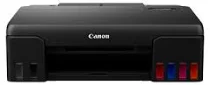
The Canon PIXMA G570 printer model is compatible with up to 2304 nozzles for both color and monochrome printing. Its compatibility includes the GI-73 for grey, black, magenta, yellow, cyan, and red, while the MC-G02 works for maintenance cartridges. In addition, the maximum printing resolution is up to 4800 x 1200 for the horizontal and vertical sides, respectively. Meanwhile, the Canon PIXMA G570 also has an internal driver compatible with automatic duplexing, macOS, and Windows OS.
Canon PIXMA G570 Drivers for Windows
e7203fac800cd3db75815c32dd05618b510e73a67569e00db7c2199fb7e4681c67626182674929e4ef2dc6866df6ce3c14ea9d881cad5274b5d2b62b3513890c8dd427942e8e31c574841b714286f9171dafe7b49dd781ec9b62ff0cc61cf1a415e26104a051d3f79061242bb8114e3d81f35bbe709d14bb07a6284eb01471d0Canon PIXMA G570 Drivers for Linux
7b3e7e3924f305a63727a7b0fe1e4d4bc5fae6804cb9a57ceeb563e1036d4958c4fe9c04943c284a3b82d82ecbdc9c9ae9c8232585ef301dcec8b3ce7fd2ab3f685709bc9b1e183470985a58b976a0873992fef0171c5cc4381bae20746ab2c2When the machine is in the simplex mode, the regular printing is 3.9 images per minute (ipm) for black and color documents. The first printout time in the ready and simplex modes is about 20 seconds for both black and color documents. But photo printing has an average rate of 47 seconds when using 4 x 6 photo printing paper. Also, the printable width with this machine, Canon PIXMA G570, is up to 203.2 mm, while the borderless printing is up to 216 mm.
The compatible paper types of the Canon PIXMA G570 printer include plain paper, photo paper, matte photo paper, photo paper plus glossy II, and photo paper pro luster. Others have premium fine art rough, magnetic photo paper; the premium fine is photo stickers and photo paper plus semi-gloss. On the other hand, the rear tray also supports standard paper types such as A4, A5, legal, letter, executive, foolscap, B-oficio, M-oficio, photo paper sizes, and custom sizes.
The main input tray can take up to 100 plain paper sheets in terms of paper handling. But when the high-resolution paper is in place, it can also take 80 sheets. It will take 30 sheets of photo paper plus glossy, glossy photo paper, matte photo paper, or photo paper plus semi-gloss. Similarly, the acceptable weight range is between 64 and 105 gsm, while the maximum level is approximately 275gsm.
Technical Details
| Title | Canon PIXMA G570 Drivers |
|---|---|
| Device Type | Printer |
| Driver Version | Varies by driver and operating system |
| Available Downloads | Drivers |
| License | Free |
| Manufacturer | Canon Inc. |