
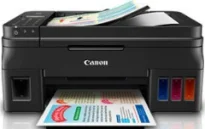
The Canon PIXMA G4000 model represents the G4000 series of multifunction printers that can print, copy, scan, and fax documents. Some of the most outstanding features of the machine include the mobile printing features. These features include the Apple AirPrint, Google Cloud Print, and PIXMA Cloud Print. Others are Easy WebPrint EX, which requires an internet connection as well as an online manual to use.
Canon PIXMA G4000 driver Downloads for Microsoft Windows 32-bit – 64-bit and Macintosh Operating System.
Canon PIXMA G4000 Drivers for Windows
eb443a728c2b5e44258a0b8977e7c73df79d169bf7a89ca1e27112bc3a8f9d36ef658beb0a4220b61aac6c1bb3f2c1f535de9ea30bb8e929d73515fbe0e1f2daa4839ad6afb68f518cf9a924d2651362196a90dc6a31d12cf0db33636e87f2e18dd427942e8e31c574841b714286f9171dafe7b49dd781ec9b62ff0cc61cf1a415e26104a051d3f79061242bb8114e3d81f35bbe709d14bb07a6284eb01471d0Canon PIXMA G4000 Drivers for macOS
a86b7e06c6c25f3b0b40a686262da269c32001193476a163c7c3f28e0433cfb975968c9d3d89d434d33981fd3d3f5dfd278a75a78cf92fafa94db143446d19598314a132fff98b68ad12c639c4b39fd045af374096bd8e039991a6153bd199785f364309390bda740c4b7be8a1a87f77a8a1041593e3f9eff3660824ae48c242b0025d455bdc0e8c24d2aee1a01c1efd4521d1bc5fd81685becf05472f7a0c6005fd9c59ffd568e0c41d201e512443bdc7912d4404afb84f877bd377e5fa8c61Canon PIXMA G4000 Drivers for Linux
3b298716ad8b806fad72ed52714838921dea6f84253446a02d0e669afbc13804559acc98851ecf86000724ee268b473818b395c6b87524dc0d82ead6263a6ab598ba823924fb7835d6f2697a2561e0e92c44b64fc10b6f8086a7bbbe5ee998eabb8d108b2c3557f3dc258d47b560ce96608a006ec7b052a630e0a5f911da2413da7fddf03d95b487b55795812c9a27a00aa027a8f3bbcc76ead54ce07108976bcfb2af683f1d1ed0431948967bae872798d8b75da9eac1bfbf30aa8394220ab0Canon PIXMA G4000 Ink Catridge Details
Ink Cartridge Black GI-790, Yellow Ink Cartridge GI-790, Ink Cartridge GI-790 Cyan, Magenta Ink Cartridge GI-790
There is a need for a CD-ROM drive or an internet connection during the installation of this machine. Also, the supported operating system versions of this Canon PIXMA G4000 machine include Windows 10, 8, 8.1, 7 SP1, and Windows Vista SP2. Apart from the Windows OS, it also supports Mac OS X v10.8.5 to v10.11. And some of the mobile device OS versions include iOS, Android, Windows RT, and Windows 10 Mobile.
Communication protocols include TCP/IP with supported standards such as IEEE802.11b/g/n components. Besides, the machine Canon PIXMA G4000 also requires a frequency bandwidth of 2.4 GHz and 1-11 or 1-13 channels. The maximum printing resolution is up to 4800 (horizontal) x 1200 (vertical) dots per inch (dpi). In the ink droplets, which are within the pitch, the minimum ink volume is about 1/4800 inch. Whereas, the essential connection should be through the standard USB 2.0 hi-speed port.
An alternative to connection is the LAN port that comprises the wireless components. Setting up the machine can work through the standard setup, Wi-Fi Protected Setup (WPS), and Windows Connect Now (WCN). The last option is through the Easy wireless connect, which supports a frequency band of up to 2.4 GHz. Users should note that both the USB connectivity and the LAN port are both usable at the same time.
In terms of the borderless printing, procedures do not allow any margin at any of the four sides. But standard printing mode allows a top margin of 0.12 inch and a bottom margin of 0.2 inches.
Technical Details
| Title | Canon PIXMA G4000 Drivers |
|---|---|
| Device Type | All-in-one printer |
| Driver Version | Varies by driver and operating system |
| Available Downloads | Drivers |
| License | Free |
| Manufacturer | Canon Inc. |