
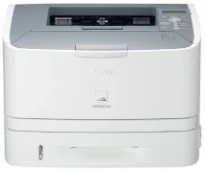
The printer engine can run at a speed of 33 pages per minute (ppm) with a paper size of A4. The printing method of the machine is the monochrome laser beam print technology. In contrast, it has a print resolution of up to 2400 x 600 dots per inch (dpi) with automatic image refinement. However, the minimum resolution is about 600 x 600 dpi, while warm-up time is 10 seconds or even lower. The maximum capacity of the printer’s performance is up to 50,000 pages in a month.
Canon LASER SHOT LBP6650dn Drivers for Windows
d8e463505298f05934015f45615c10b5a46fd76a8891d9656d2715be490786a96e0231df2bc994176723bf67b28263786b2b3e6ac5df81286842a78a1c27114d0a54440677db13a6306081b5281edd2265717657d96e00e05d61cab0fd6ab0b7ab06b4ca4e6b96740e86bc83f313b9da6af77fed24ede730682fd05be1c26baf0d4f501e637282f476f558da6d428a536f40bdaf69f972730f29ca6ed53bfe02a2bc8d3788b40a988e601879c7178b38569e43ea26256cddb57d63fac655fdec64e44aa350b529a66bd231af6902423a022db12268f6c535a88e9095473bd9fb23d81f5345fe18341a46cda9685998ac34bb4e9d83646bb5db3f3031bed8d40003d06cd9ccd69ae52631051dd223d09446d268467e073d875d526e6836c6aabfd4aebae44aea8fe3fbb0eb30289f321d3b2c78e4f1b21ef6b61fa9fb38eb0e073f4fd16fa6cdc14b041014fb334ae000c9dd07b5fb4f1cff611920fe8a1fd1941f50404ce941c1de922df5a0ec3bd64a12d29816a5f744031ebcda6e0ac5aeef4a98330af919b0fac3a1a441d032f5850a117403e84f288e284d681df52a13be2fc5d695d5a90c870505748cf09fa944f64d9d731257651dae8d32af4134a9d10dcd01f780afdd8ea6159f16beace40bd5a7f313268f194ec60fb5f4b8a813bbfaf3b14fd344e4824698372d4669b7a90aba0822f5c3b317a3608b90842f857484c3f334b0f856222b8eed352c7ba34b7b81539648effe54499b3e74fab8d5590cbcdc48fadbe7ec928ffd8b05bb6813ea056ad9d4b3e7473fa76dd1f5d1de72f68c3dfadf181b5613fa1622383ccf14566b02d160aa7f01941d10aee6bc386ebbbc3d5cce35c4598a3f2b7f62c1d191c66a78f5bacdd7ee915f7c61e2771dbf5ce34dce406f36dd4468fa4e86676ad211a0ebe5026fd2007168c92b420d76518489588dc560880fa58e7af3f4a0b67d115b55dfbf3ee02e20ba4e64f1a399d32d97ead841d426ddb38a488cfe967b2b49aa89286fcf271af0ce96685b45ad2c041d82c9bcc80559e68ff68c6ba4ad4b306aa68506bf8ce00e71b99fdb985558cfe557946e69a58fbd83d2cf6ff6641be9e10624362f28ec6d414790303e17c6ec252ebd13b65d30d03910b256ba25720b7f8f84ab958a3e343a9ff44c0198f93ae3a9bec19da4981fa9ffa55ea4f53d8846c5a1f2e740bf9ee2b1e5f1a7507a427b89bc8d04fad2cd44ff669aa188f9c594e14fa7a4377a6036d303db7140f3813d953b761ca70a8d70c2bdd2180478b09313620848f4b541c40880091153936a86d8853cc41e26974731a64e63139f24ef01c6bf602ec1a19c74bce55cae182de53dbdd53cae4b58941fad955d291f8b2889cdd6f8d5550b67fdf46185ce3a4fa53803288d165780e30642620fc733296058518e7ae460c263a77588ae1f8bCanon LASER SHOT LBP6650dn Drivers for macOS
883486e9090fa71b21286a676ceb6794224b0e5126260c6bcab8be3f3bab9b03f836e8cce717a80e3cca62ac92d824cd138923ef4a4f05c80dc7f449bafc98e69cb40f3853c3fade0a2f8063dfad5ffb6919e879b5b19968938321bd5c139db5804989950b94f64b85160213d11a5259c082d1312c1f627a0812ee349ad6245f8c3891f63d4e6b9d23a613adb34a803bd4b45593d9fc0ca658465a0aba1a7ff3646aaa66b64a8416492c4abf846958b255a596204cbd7db738b975103f543f503cac8d47a0bb1580e74b492bc876858781092e8fae8a009946dc72a2194c0ca96b581313eec6df01b8ad51715b70513f5b2a2cb26467a41d34966d7b57f74f963accb0f153300092a2ee312825c851035f1c66d65dafd67c77e2d4fbcd27c13a312dad7b42625ee423180149805c7ec4e10d238d7ee98b777e766374df0576c8ab8f0f303177d8c2129a2a2db2b478c6b63e40154d669f8d01041b4f7afcfbb1b3a91af1f32651926bea385706e66a9224b8471985df9e1f9d051d98d6da7b6301a221888cc3651a64f633e461870d1e2d0cce0ef54abb9c8317ca085ad2196494292469e0acf79d6f42d1ee69f08969d05241d73a3b0845a32aaa2fe1c08f5d22777e10690dcebdae80b6ec50e7bed2b28b71ca4cf9315646912ab2ad21c066702b8d833f5f41ec87cd5b357b1b9ddd3bb3d1b09a3768321db602239d77749239d1dfee3689a7f3cbe7d777c61b1ed00ffd86dc8a01d1e3652cafab5bb14b9dc0f30b290384f17a632ab8d1bb4aaeb3589d0088456996795300daf6874e757f48161d9708c89c3e6582c1998ff8f43602df6e3a91aa8f4f1b5bfa1a7cd1078a7bba6d6ba05b0df3771569f21db0b854939d2854ce29f2f882cc1878c0b0de10Canon LASER SHOT LBP6650dn Drivers for Linux
dfd33db96aacd96ba06c0f5bfa11fa9f5d368ef520100c6e5abf900539592e7eCanon LASER SHOT LBP6650dn Specifications
The paper input capacity of the standard tray can reach up to 250 sheets. But there is an optional tray that can hold up to 500 sheets. On the other hand, the output tray will take up to 150 sheets of printed paper in a face-down pattern. The supported paper types include plain paper, heavy paper, transparency, index card, and envelope types. However, in terms of the paper size, the compatible formats include A4, A5, A6, legal, letter, executive, and custom sizes.
Similarly, the power requirements of the machine stand between 220 and 240 volts at 50/60 Hz. In terms of power consumption, the maximum capacity is about 1170 watts or even less. However, during powerful performance, the machine Canon LASER SHOT LBP6650dn uses about 580 watts while the standby mode uses 11 watts. In the sleep mode, the approximate usage at the panel sleep mode is 10 watts, but deep sleep is 6 watts.
The physical dimensions of the machine include a width of 400 mm, and the height is about 267 mm. On the other hand, the depth is up to 376 mm while the weight is up to 12.4 kg. On the control panel of the machine is also a liquid crystal display (LCD) of 16 characters and one line. It also has 8 LED indicators and eight operational keys for the user’s control.
Technical Details
| Title | Canon LASER SHOT LBP6650dn Drivers |
|---|---|
| Device Type | Printer |
| Driver Version | Varies by driver and operating system |
| Available Downloads | Drivers |
| License | Free |
| Manufacturer | Canon Inc. |