
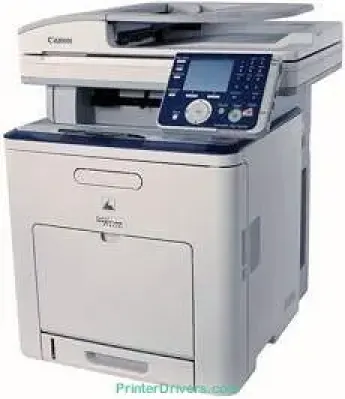
Printing with the Canon imageCLASS MF8450c model produces top-quality color and monochrome printing. Also, the machine uses color laser print technology. In terms of the machine’s speed, the rate for both color and monochrome documents is up to 17 pages per minute (ppm). This rate, however, applies to the use of letter paper size. Simultaneously, the print resolution is up to 600 x 600 dots per inch (dpi).
Canon imageCLASS MF8450c driver Downloads for Microsoft Windows 32-bit – 64-bit and Macintosh Operating System.
Toner Cartridge Details
Toner Cartridge 117 Black : Yield Upto 6,000 pages
117 Cyan Toner Cartridge : Upto 4,000 pages
Magenta 117 Toner Cartridge : Approx 4,000 pages
117 Yellow Toner Cartridge : Upto 4,000 Yield pages
Canon imageCLASS MF8450c Drivers for Windows
8efb6161178da01d79d6c01a0d7580f023b8f48eaef578f105c978726b6b00746b60707db5c4a5d6af427c68f221758bf0b24d9c1dd03e07237edf442972c83190717826c5ec8bb3524546746b4ba39c6ae35e6f25737c5e294f356dd7875ccffed6a6d44f04227dda23cdfae320070aeabe23a20a3b308f5bcd953f237b2486083c19754284db2ff3f9d1ccd9a9f544276e8cdf6dbf499bbd1b38a9b43ada81d713d828cdebc7804384d9ae9e4272ca5bdc382062df9b7f362f61801111980ec2eaa283de1e130d72a4e6ac45bf80cc7be72fe4a2e2c826c4ef667dcec53563649bf8e02d19224f1c9760e1023a124b469a28dfbdcda08131b07139dd8367ddCanon imageCLASS MF8450c Drivers for macOS
0f53fae19e0d86f5dad9e95bef02c8f9406769c635e54ac210c6d8ab9f8e11d3503619d05f501b7a04c15b3f849f415878d501725df252139d81841280c628e88c3891f63d4e6b9d23a613adb34a803bd4b45593d9fc0ca658465a0aba1a7ff3a2f4cd0e35483928ff487a3267ea5c930711de5d487220a3d3402f65c263e8e6120127e629c21787113c325d0a39041678f71d4a9f42e666ef90388f0c0584b569ef5f30da4c92762d2a5b614957892f1b542e16a07d53fec92f92bc3051fe32edd8dcff2593c749a946c421f8d3b7484ca2059b0e42799acf81f74ccc168efec5875b37125b8c8a32cad84148bab04417f7abf39551d213d21db0084be432cc5c70ce408e9af249acb1d961605a3c4e4741913910cc53c3a562af0ca8c76e6e0297641744ea447acd804af112d0693e6588ba52e03feaf0d3150446eb3e84f53d1cdceea84a542a2f3a87260766b5c9361b29b64316e7ff24d6a98a6826c68dcd403b42f9117b3534b580cc059e657ae4f18497b4b9c846bd39602446daae2822777e10690dcebdae80b6ec50e7bed2b28b71ca4cf9315646912ab2ad21c0669dd3f1b1c7dc175ab7cd4bb929f902c55966150a6a0273dbb36ccad0f146006ac0f30b290384f17a632ab8d1bb4aaeb3589d0088456996795300daf6874e757fce4e588538376ea06d8cebe6fcce2f0feef6a769b6be9f24e7f1db99f24bb06495a8a167b29fa549e7cef6686d42491921d3db11307ee86a2b894730cbc5e9a7245023025e79196fe45e820e0d6ae054991fda6551b4a53e028cd1844354065fCanon imageCLASS MF8450c Drivers for Linux
c0c2d391a4fd6e2f014a1e7e30a8cb20c7464112e1430532d3a5116f0cf648cbCanon imageCLASS MF8450c Specifications
Nevertheless, the maximum print quality resolution is up to 2400 x 600 dpi for the highest possible quality. The machine can work with the Canon cartridge 117 models for cyan, magenta, yellow, and black, concerning the toner compatibility. On the one hand, the maximum yield for cyan, magenta, and yellow colors is about 4000 pages. Simultaneously, the maximum output for the machine itself is up to 50,000 pages in a single month.
Besides, the print yield is dependent on the 5% coverage document status. It also has an output tray capacity of up to 250 sheets of printed paper. In terms of its copying function, the machine can produce a resolution of 600 x 600 dpi. When copying documents, the process can run at 17 copies per minute with letter paper size under ideal conditions. At the same time, it can zoom in and out within the range of 50 and 200% in 1% gradual increments.
This machine’s scanning component is also the color CCD element, producing a 600 x 600 dpi resolution for black documents. On the other hand, the color document can only reach an output resolution of 300 x 300 dpi. Some of the other scanner features may include the scan to USB feature, two USB host devices with a 2.0 hi-speed port, and USB flash support.
Technical Details
| Title | Canon imageCLASS MF8450c Drivers |
|---|---|
| Device Type | All-in-one printer |
| Driver Version | Varies by driver and operating system |
| Available Downloads | Drivers |
| License | Free |
| Manufacturer | Canon Inc. |