
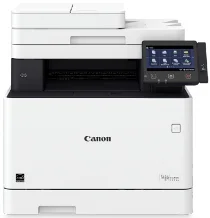
The Canon imageCLASS MF743Cdw driver has many core functions, including printing, copying, scanning, faxing, and sending documents. Moreover, it also contains a Canon custom processor with a 5-inches color touch panel and an internal memory of 1 GB. The options include a standard USB 2.0 x2 host and device for the standard interface connection. It is also compatible with a 10/100/1000Base-T Ethernet network.
Canon imageCLASS MF743Cdw Drivers for Windows
b053666c6a3bda82c6c887546099f06470e94b6b93f4d801296a1565657602fe2b2e0987eefee71945b234777d35ba1cde4132e809b5346e233c8e9325616df5d8e463505298f05934015f45615c10b5a46fd76a8891d9656d2715be490786a96e0231df2bc994176723bf67b28263786b2b3e6ac5df81286842a78a1c27114d0a54440677db13a6306081b5281edd2265717657d96e00e05d61cab0fd6ab0b7ab06b4ca4e6b96740e86bc83f313b9da6af77fed24ede730682fd05be1c26bafc60ae7abde74362ee1fc65c30bd9d6dbd210613ae7713e332cb28ca73d2602ce04d2e8b6f97ecdbf6149ef728dccd1e27a7ad604327a8fa2972b7d5b6323ac32bfe0eb5da0704a1ead08d62abcaad77b93dbe9887cbbef1220fe9ac8b47ffa0993fe1355abd4a92e1f64fd2c59ed2fadbd86a63ad22776f06d63b753f56541fc0793ccc7bbcb9b575bde84842a172c08ca890a97938e35b82d0ff7c8cb0379b5de56033f3245fcb34e2e7b291a7aaa4c5c3810bb3294ae9cbdf27e8908830120Canon imageCLASS MF743Cdw Drivers for macOS
883486e9090fa71b21286a676ceb6794224b0e5126260c6bcab8be3f3bab9b03cb41803f7db3dba7467715a8b0eb892c101e0c4c2dd082f285dfd820d8f432a36ad260f511b97e8c3121c13e74d8266d5288007f6a56b64927f5f675629ac29d5b8f8de010495b58464dd89bf0ec72e21a931f7476ebec8cf8c194361052d65735223b2977d71ab373eafd6f14f28daa933cd2dcdc4b0d818da4a4432b14366879b3e920a4196ee4aaf6d17c5a095266ecf44e51626bd2902b01fa785dcd407504379ee4276dcb51d3d98f083a64cb6f006f980ebc7cfff7f3b862d6b83fb0adff5d80d992a0f8b003104ffdc1bdf36bfe8bce0aa49cce77b27cdc9a95a5776c86d5330d84af4dcc7458630c4999aae2495eebf5e1e3c6688e6e7c0453cb25a1120127e629c21787113c325d0a39041678f71d4a9f42e666ef90388f0c0584b55efcaeccd8b1f1103d2bb966199a47fc50f0116996d987bd51178d61474c215169ef5f30da4c92762d2a5b614957892f1b542e16a07d53fec92f92bc3051fe32edd8dcff2593c749a946c421f8d3b7484ca2059b0e42799acf81f74ccc168efe917e7c7089148ed46d637656f66159b2042287e9084b2b921ae5b5f5c0eb0e48c5875b37125b8c8a32cad84148bab04417f7abf39551d213d21db0084be432ccCanon imageCLASS MF743Cdw Drivers for Linux
d58796ee5518feee485119683cf7caa705668652803b8f0fb60177472ebe6d3bThe paper capacity is up to 300 sheets for letter-sized paper with an average weight of 20 lbs. In terms of the paper capacity of the trays, the standard tray can hold up to 250 sheets. In contrast, the stack bypass tray can hold an extra 50. Similarly, the Canon imageCLASS MF743Cdw supports an optional tray that can hold 550 sheets, producing 850 sheets of plain paper. Other features include Wi-Fi 802.11b/g/n, a Wi-Fi connection, and a near-field communication component.
The output tray of the Canon imageCLASS MF743Cdw can hold 75 printed sheets. Meanwhile, the supported media types include thin, plain, recycled, color, thick, label, letter, envelopes, and coated papers. On the flip side, the compatible media sizes include A4, A5, A6, B5, Letter, legal, statement, executive, envelope, monarch, C5, DL, and custom sizes. It also has a supported media weight range between 16 lbs and 53 lbs for bond paper.
The warm-up time from the power-on mode is about 13 seconds or less. The warm-up time from the sleep mode is about 6.1 seconds or less. By physical measurements, the dimensions include a width of 18.8 inches, a depth of 18.8 inches, and a height of 18.4 inches. Meanwhile, the average weight is about 64 lbs, equivalent to 29.0 kg. But the boxed weight is approximately 76.1 lbs, equal to 35 kg.
Technical Details
| Title | Canon imageCLASS MF743Cdw Drivers |
|---|---|
| Device Type | All-in-one printer |
| Driver Version | Varies by driver and operating system |
| Available Downloads | Drivers |
| License | Free |
| Manufacturer | Canon Inc. |