
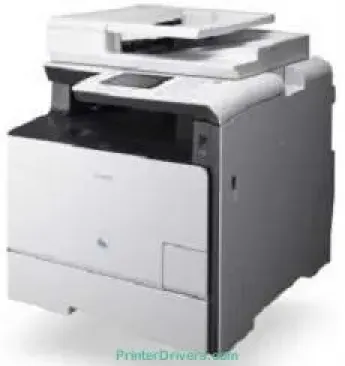
Canon imageCLASS MF729Cx model is a personal desktop printer that ideally fits into an intimate work environment. The power requirement is within a voltage range between 220 and 240 volts at 50/60 Hz, depending on the country of use. Similarly, the maximum power consumption is 1200 watts or less in the maximum operation mode. But when the printer is in the standby mode, the approximate power usage is 25 watts.
Canon imageCLASS MF729Cx Drivers for Windows
30e60eee8ff436e54c2a94c4ed6a58217ca7f317495016ad17b0d46ed02d1eca30e60eee8ff436e54c2a94c4ed6a58217ca7f317495016ad17b0d46ed02d1eca04d2e8b6f97ecdbf6149ef728dccd1e27a7ad604327a8fa2972b7d5b6323ac32484d887fc334579b3dc3a8bc75da393a9e3965472a7d23778e61bd2de5b0bee20f9c6406c46b234f582a575d1581efe532fa405c5390a18408e0a3cd074c96112351d02b585f408482068bf227d77bc186c7f29b3ce31f22340dfa26bf62a80978dba4149b6223898c28c095d1c88859ed1ae9aeab6f3521c2d54ebfd0c972b60cbcdc48fadbe7ec928ffd8b05bb6813ea056ad9d4b3e7473fa76dd1f5d1de7284c3f334b0f856222b8eed352c7ba34b7b81539648effe54499b3e74fab8d559ba516521903a6d3f420ee99db46038790be4c52c00f08e5f40dadb4103727ee3b61dc3d97292c5b398738861d93bde601e4bef0b6df07b51f038ac409ed9a979427b89bc8d04fad2cd44ff669aa188f9c594e14fa7a4377a6036d303db7140f33ae3a9bec19da4981fa9ffa55ea4f53d8846c5a1f2e740bf9ee2b1e5f1a7507a8489588dc560880fa58e7af3f4a0b67d115b55dfbf3ee02e20ba4e64f1a399d35ce34dce406f36dd4468fa4e86676ad211a0ebe5026fd2007168c92b420d7651de56033f3245fcb34e2e7b291a7aaa4c5c3810bb3294ae9cbdf27e89088301200793ccc7bbcb9b575bde84842a172c08ca890a97938e35b82d0ff7c8cb0379b5fc45986a67f67e83483094d9f729c15e1a50757e24b8901a050df1ab047a4b3b69a2c1f9ac7592d57562c1d504d3280f36d756f7c03b07ed8b1b77d75b4054904d55a4a3e3f5a130bc7a9ccfc5f72f91edf71646e99efe25e959fc74157e973fCanon imageCLASS MF729Cx Drivers for macOS
d5f10278e0dd91a898757299adb4a566e5f14e6ad073c885da268768b7b8172edc0b747649fd9f72c6908765afdccac3720f84838bd6491360b431c69ee2fd6aff5d80d992a0f8b003104ffdc1bdf36bfe8bce0aa49cce77b27cdc9a95a5776cacba8d1ff32f0bddfb05dd5f9adbd105580d1505801cc771b89f19bcbf5eac1e6708a180dad9484c82047dc4624ec4b3dd3438231e6ac5cbcdba793755e1ddb46790fad87cfd6df48f74ed732c2c222f5baa62e7a17958b029f2efd102ce36315efcaeccd8b1f1103d2bb966199a47fc50f0116996d987bd51178d61474c2151c98999b876d4bc8928e9adbfd33748039773dbb01850e711679363ae3e93785b8a9fe8a3ad9ee02fb65e10e05eda1e6d8e6ba268fa987a6e164d5ba661bb1240e7931af2339fea2198ae845c6357e921538761f3610de796cbbf426d81eebfd3917e7c7089148ed46d637656f66159b2042287e9084b2b921ae5b5f5c0eb0e4837c7892368c2313a0619c97b4f71f32be34757bfcc84538a957d6f23e43e81f0da6c9cbd85a75754061053b0cd0086f0297ea2f9d52a2bb0056fff1438bcff1282479e45d013253d1629fa59133d3c05fa5002f39303f4f772912d334dc6f395e9d00025aec26385cf22fcbd22ef4f1a7720267f938902aafc11822545bb49240297641744ea447acd804af112d0693e6588ba52e03feaf0d3150446eb3e84f535dc19aa61aba625226444a79ce3488bb61f99b0c653d1abf054c9b471d5a1b3e36a86682555814ab749d6fcc4df5ae336b34c5effd7760bbbc8330cb7e07d40e65a67c44f07e8c6ecf20e167ae2d83d355023809358287d3a2badbce6507585319819327b889a34a931905184cbeb1e9c986e5d635fa77c88f5de1e424c30886321f7ffd7900bcf8e4b8ce99f0d3d7af91556b836e302306ae8a25a2e16df9d272765a3f84315bd212c67b3fff1852f23a365abc5b0e061b1b5e25ed0dd811ae6a48ab862ab2fa01c7793bae9776d4de130b89fe50e189ff8c78d1e5fa6183d9dd3f1b1c7dc175ab7cd4bb929f902c55966150a6a0273dbb36ccad0f146006a360e961225a3a218f8f019abb06cafb6699a0ae2279c20467a32e972a2b98b6dcc86acf4b98a7844af468939d214f414650d54ea8d07c87841d2eafa2b285525ce4e588538376ea06d8cebe6fcce2f0feef6a769b6be9f24e7f1db99f24bb06402735f008f6d8f5882c2824e3f2b83f7ccf7de77a1e3cca3f3007e0d40da0aefCanon imageCLASS MF729Cx Drivers for Linux
63d6d12d89e21430d0a906fcbedc849ca66c96352b13ebccdb8228a1d8810a3bCanon imageCLASS MF729Cx Supported Toner Catridges
Black Toner Catridge CART418BK : Upto yield 3500 Pages
Color Cyan Catridge CART418C : Upto Pages 2900
Yellow Color Toner CART418Y : Approx. 2900 Pages
Color Magenta Catridge CART418M : Yield Upto 2900 Pages
Specifications
This printer takes about 23 seconds or less to warm up and be ready for printing. Then, the approximate weight of the machine is about 31 kg. In the normal state, the machine has a width of 430 mm and a depth of 484 mm. Also, the height is up to 479 mm without the paper cassette. An ideal print environment should also have a temperature range between 10 and 30°C. Besides, the relative humidity range is between 20 and 80%, with no condensation.
The user interface options include an Ethernet 100BaseTX, 10Base-T, and a hi-speed USB 2.0 port. Apart from the cable connections, it can also support IEEE 802.11b/g/n in the infrastructure mode. It is also a full-color printer with 256 gradations. Furthermore, the machine is a multipurpose printer that can print, copy, scan, and fax documents at optimum quality. The compatible paper types for the device include plain paper, recycled paper, and heavy paper.
Other compatible types include coated paper, label, index card, envelopes, and transparent films. In terms of sizes, the consistent standard examples include A4, A5, B5, legal, letter, executive, statement, postcard, and foolscap. Apart from the standard sizes, the machine is also compatible with custom sizes. Inside the paper trays, the consistent media weight range is between 60 and 163 gsm. But for the multipurpose tray, the weight range is between 60 and 220 gsm.
Technical Details
| Title | Canon imageCLASS MF729Cx Drivers |
|---|---|
| Device Type | All-in-one printer |
| Driver Version | Varies by driver and operating system |
| Available Downloads | Drivers |
| License | Free |
| Manufacturer | Canon Inc. |