
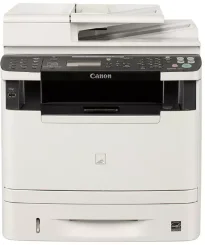
Canon imageCLASS MF5960dn printer model is an exceptional printer model useful for black and white documents. It also uses laser print technology for producing high-quality output. For instance, the default print mode, which is the duplex mode, can print at a rate of 17 pages per minute (ppm). On the other hand, the same black printing for simplex or one-sided printing is up to 35 ppm for the letter-sized paper.
Canon imageCLASS MF5960dn Drivers for Windows
ed349f7a55ee5260a66cb33a78742b489f90257f131dad4e4ea77201dd2d55f1ce56495a06d538d860635fc9261badad508a8c777a4cb99cbb8774ede0b8ed904d55a4a3e3f5a130bc7a9ccfc5f72f91edf71646e99efe25e959fc74157e973fCanon imageCLASS MF5960dn Drivers for macOS
b6ddb33c456e76b77c69654f2216908bce41d1c2f4c7b496f268dd5603748e09fff1780999685317a1609338aaf40ef1e54a4f5b750c252bf25d8acf357387b6db4bd12b92b8a2e9c7a25ac0d3bae568b640c30b1739dbb30a4fa5b89a977d2caf80abbfffc6c226407dfc5c2ea7fe751fb9c52c56dd4bf9a5cb587899b1368ff950b97366af1fb4a29ca5e58214d601da12098c39fbd8ff8c42f692cf8da1bb35223b2977d71ab373eafd6f14f28daa933cd2dcdc4b0d818da4a4432b14366879b3e920a4196ee4aaf6d17c5a095266ecf44e51626bd2902b01fa785dcd4075d5f10278e0dd91a898757299adb4a566e5f14e6ad073c885da268768b7b8172e0eb111d5cf4d5c62d6b9284027ec6281e368fed92dad0a18812530e0bc4faebeff5d80d992a0f8b003104ffdc1bdf36bfe8bce0aa49cce77b27cdc9a95a5776c02735f008f6d8f5882c2824e3f2b83f7ccf7de77a1e3cca3f3007e0d40da0aef86d5330d84af4dcc7458630c4999aae2495eebf5e1e3c6688e6e7c0453cb25a16708a180dad9484c82047dc4624ec4b3dd3438231e6ac5cbcdba793755e1ddb48a61b1860bb1be1d4e708f1419f7202262e29fb743bd1a4b7674daa6b74fce965efcaeccd8b1f1103d2bb966199a47fc50f0116996d987bd51178d61474c215169ef5f30da4c92762d2a5b614957892f1b542e16a07d53fec92f92bc3051fe328a9fe8a3ad9ee02fb65e10e05eda1e6d8e6ba268fa987a6e164d5ba661bb124090e2e6baaecf684360cf1130ec83b9d1c94718c339626db52f7b4688f9ce8f31917e7c7089148ed46d637656f66159b2042287e9084b2b921ae5b5f5c0eb0e48c5875b37125b8c8a32cad84148bab04417f7abf39551d213d21db0084be432ccddd1a155fe623f7f913e5bf860233ad73ccaaa5a5814b9b1e9353dd6501d88f7b3a91af1f32651926bea385706e66a9224b8471985df9e1f9d051d98d6da7b63c5310bca335d137d5d319b3536e7bd3bca38355c1bd03236c03a8c33fc0acd3e0297641744ea447acd804af112d0693e6588ba52e03feaf0d3150446eb3e84f535dc19aa61aba625226444a79ce3488bb61f99b0c653d1abf054c9b471d5a1b3f575641e457c67d6ab0291408154e09d5b5c40fee0413f8b74ebb8554db24d6fc18cb1be042fdd2ba53d1436d1118f2692f02d2b30388b52164994d355ae6aeae65a67c44f07e8c6ecf20e167ae2d83d355023809358287d3a2badbce6507585cd403b42f9117b3534b580cc059e657ae4f18497b4b9c846bd39602446daae286321f7ffd7900bcf8e4b8ce99f0d3d7af91556b836e302306ae8a25a2e16df9d702b8d833f5f41ec87cd5b357b1b9ddd3bb3d1b09a3768321db602239d777492e6a48ab862ab2fa01c7793bae9776d4de130b89fe50e189ff8c78d1e5fa6183d9dd3f1b1c7dc175ab7cd4bb929f902c55966150a6a0273dbb36ccad0f146006a95a8a167b29fa549e7cef6686d42491921d3db11307ee86a2b894730cbc5e9a7360e961225a3a218f8f019abb06cafb6699a0ae2279c20467a32e972a2b98b6d48161d9708c89c3e6582c1998ff8f43602df6e3a91aa8f4f1b5bfa1a7cd1078af3eb2eb16ece98af122e46ab88961d4c057c658e70b3441b239e996a75f0f9dece4e588538376ea06d8cebe6fcce2f0feef6a769b6be9f24e7f1db99f24bb064245023025e79196fe45e820e0d6ae054991fda6551b4a53e028cd1844354065fCanon imageCLASS MF5960dn Drivers for Linux
d58796ee5518feee485119683cf7caa705668652803b8f0fb60177472ebe6d3bCanon imageCLASS MF5960dn driver Downloads for Microsoft Windows 32-bit – 64-bit and Macintosh Operating System.
Toner Cartridge Details: 119 Black Toner Cartridge – Yield approx. 2,100 pages
The first print out time is about 6 seconds or less when printing on letter-sized paper. The average quality output is about 600 x 600 dots per inch (dpi). At the optimum level, the best output quality resolution is up to 1200 x 600 dpi. Besides, the toner compatibility for the laser multifunction printer is the Canon Cartridge 119 model. This print cartridge can also produce up to 2100 pages at the best performance level.
On the other hand, the machine is also compatible with a hi-capacity version of this Canon imageCLASS MF5960dn model that can print up to 6400 pages. These specifications and ratings are according to the ISO/IEC standards. Moreover, compatible paper sizes include letter, legal, A4, B5, A5, statement, and executive paper sizes. Conversely, this device is compatible with plain, heavy bond paper and an index card and envelopes.
The machine’s compatible languages include the host-based UFR II LT, PCL 5/XL, and the PS 3 emulation. Simultaneously, the print modes include the poster, booklet, toner save, page composer, and watermark. It also has an internal print memory of up to 256 MB of RAM for the shared component. In terms of the paperweights, the supported range is between 16 and 32 lbs. However, the multipurpose tray allows between 16 and 51 lbs when using the main cassette.
Technical Details
| Title | Canon imageCLASS MF5960dn Drivers |
|---|---|
| Device Type | All-in-one printer |
| Driver Version | Varies by driver and operating system |
| Available Downloads | Drivers |
| License | Free |
| Manufacturer | Canon Inc. |