
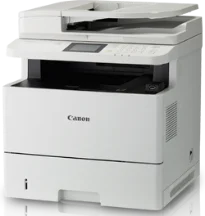
The printing method in the Canon imageCLASS MF515x model is the monochrome laser beam print technology. This technology runs at a speed of 40 pages per minute (ppm) when printing on A4 paper. Also, it has a basic resolution of 600 x 600 dots per inch (dpi). But with an image refinement technology, the resolution can reach 1200 x 1200 dpi or even 2400 x 600 dpi. Furthermore, the warm-up time from the power on mode is about 16 seconds or even less.
Canon imageCLASS MF515x Drivers for Windows
ce97779ce7654495ec64b58c36fb4eab1c670fc237f944c955ac0575cff70c29ce97779ce7654495ec64b58c36fb4eab1c670fc237f944c955ac0575cff70c29d8e463505298f05934015f45615c10b5a46fd76a8891d9656d2715be490786a96e0231df2bc994176723bf67b28263786b2b3e6ac5df81286842a78a1c27114d0a54440677db13a6306081b5281edd2265717657d96e00e05d61cab0fd6ab0b7ab06b4ca4e6b96740e86bc83f313b9da6af77fed24ede730682fd05be1c26baf0d4f501e637282f476f558da6d428a536f40bdaf69f972730f29ca6ed53bfe02a2bc8d3788b40a988e601879c7178b38569e43ea26256cddb57d63fac655fdecc60ae7abde74362ee1fc65c30bd9d6dbd210613ae7713e332cb28ca73d2602ce04d2e8b6f97ecdbf6149ef728dccd1e27a7ad604327a8fa2972b7d5b6323ac324a98330af919b0fac3a1a441d032f5850a117403e84f288e284d681df52a13be2fc5d695d5a90c870505748cf09fa944f64d9d731257651dae8d32af4134a9d10dcd01f780afdd8ea6159f16beace40bd5a7f313268f194ec60fb5f4b8a813bbfaf3b14fd344e4824698372d4669b7a90aba0822f5c3b317a3608b90842f857484c3f334b0f856222b8eed352c7ba34b7b81539648effe54499b3e74fab8d5590cbcdc48fadbe7ec928ffd8b05bb6813ea056ad9d4b3e7473fa76dd1f5d1de725ce34dce406f36dd4468fa4e86676ad211a0ebe5026fd2007168c92b420d76518489588dc560880fa58e7af3f4a0b67d115b55dfbf3ee02e20ba4e64f1a399d30f9c6406c46b234f582a575d1581efe532fa405c5390a18408e0a3cd074c96112d97ead841d426ddb38a488cfe967b2b49aa89286fcf271af0ce96685b45ad2c041d82c9bcc80559e68ff68c6ba4ad4b306aa68506bf8ce00e71b99fdb985558cfe557946e69a58fbd83d2cf6ff6641be9e10624362f28ec6d414790303e17c6ec252ebd13b65d30d03910b256ba25720b7f8f84ab958a3e343a9ff44c0198f93ae3a9bec19da4981fa9ffa55ea4f53d8846c5a1f2e740bf9ee2b1e5f1a7507a427b89bc8d04fad2cd44ff669aa188f9c594e14fa7a4377a6036d303db7140f3484d887fc334579b3dc3a8bc75da393a9e3965472a7d23778e61bd2de5b0bee2bfe0eb5da0704a1ead08d62abcaad77b93dbe9887cbbef1220fe9ac8b47ffa0993fe1355abd4a92e1f64fd2c59ed2fadbd86a63ad22776f06d63b753f56541fc0793ccc7bbcb9b575bde84842a172c08ca890a97938e35b82d0ff7c8cb0379b5de56033f3245fcb34e2e7b291a7aaa4c5c3810bb3294ae9cbdf27e890883012069a2c1f9ac7592d57562c1d504d3280f36d756f7c03b07ed8b1b77d75b405490fc45986a67f67e83483094d9f729c15e1a50757e24b8901a050df1ab047a4b3b4d55a4a3e3f5a130bc7a9ccfc5f72f91edf71646e99efe25e959fc74157e973fCanon imageCLASS MF515x Drivers for macOS
96a508b8817dcf2f4b7b59ad21e195a640c540ff08a6411639aa7834d23e0743f1060d911d60e9eec0d8bbce4eea0ce63bad2dc9ce7f31cf9f8dd79e64d2b9c5cb41803f7db3dba7467715a8b0eb892c101e0c4c2dd082f285dfd820d8f432a36ad260f511b97e8c3121c13e74d8266d5288007f6a56b64927f5f675629ac29db6ddb33c456e76b77c69654f2216908bce41d1c2f4c7b496f268dd5603748e09120d84051404d68ff23facc20ca6068b52d890770b6a9f100e82adfa5277a5aa35223b2977d71ab373eafd6f14f28daa933cd2dcdc4b0d818da4a4432b143668bab040d0f51bbba8d87eabd09cef54161c5bb88806ea1c2715cf85dfa833b99bd5f10278e0dd91a898757299adb4a566e5f14e6ad073c885da268768b7b8172edc0b747649fd9f72c6908765afdccac3720f84838bd6491360b431c69ee2fd6aff5d80d992a0f8b003104ffdc1bdf36bfe8bce0aa49cce77b27cdc9a95a5776ca2f4cd0e35483928ff487a3267ea5c930711de5d487220a3d3402f65c263e8e66708a180dad9484c82047dc4624ec4b3dd3438231e6ac5cbcdba793755e1ddb46790fad87cfd6df48f74ed732c2c222f5baa62e7a17958b029f2efd102ce36315efcaeccd8b1f1103d2bb966199a47fc50f0116996d987bd51178d61474c2151c98999b876d4bc8928e9adbfd33748039773dbb01850e711679363ae3e93785b8a9fe8a3ad9ee02fb65e10e05eda1e6d8e6ba268fa987a6e164d5ba661bb1240e7931af2339fea2198ae845c6357e921538761f3610de796cbbf426d81eebfd3917e7c7089148ed46d637656f66159b2042287e9084b2b921ae5b5f5c0eb0e4837c7892368c2313a0619c97b4f71f32be34757bfcc84538a957d6f23e43e81f0da6c9cbd85a75754061053b0cd0086f0297ea2f9d52a2bb0056fff1438bcff1282479e45d013253d1629fa59133d3c05fa5002f39303f4f772912d334dc6f395e9d00025aec26385cf22fcbd22ef4f1a7720267f938902aafc11822545bb49240297641744ea447acd804af112d0693e6588ba52e03feaf0d3150446eb3e84f535dc19aa61aba625226444a79ce3488bb61f99b0c653d1abf054c9b471d5a1b3e36a86682555814ab749d6fcc4df5ae336b34c5effd7760bbbc8330cb7e07d40e65a67c44f07e8c6ecf20e167ae2d83d355023809358287d3a2badbce6507585319819327b889a34a931905184cbeb1e9c986e5d635fa77c88f5de1e424c30886321f7ffd7900bcf8e4b8ce99f0d3d7af91556b836e302306ae8a25a2e16df9d272765a3f84315bd212c67b3fff1852f23a365abc5b0e061b1b5e25ed0dd811ae6a48ab862ab2fa01c7793bae9776d4de130b89fe50e189ff8c78d1e5fa6183d9dd3f1b1c7dc175ab7cd4bb929f902c55966150a6a0273dbb36ccad0f146006aCanon imageCLASS MF515x Drivers for Linux
dfd33db96aacd96ba06c0f5bfa11fa9f5d368ef520100c6e5abf900539592e7eCanon imageCLASS MF515x Supported Toner Catridges
Catridge Toner Black 324 and Black Catridge 324 II
It takes approximately 7.6 seconds to produce the first printout page, while recovery time is about 8.0 seconds. Supported print languages are UFR II, PCL 6, and the Postscript 3. It also supports auto duplex printing for standard printing on both sides of the paper. In terms of the compatible paper sizes, the options include A4, legal, letter, foolscap, and Indian legal. The printer also allows a 5 mm print margin on top, bottom, right, and left sides.
Canon imageCLASS MF515x printer model features include the poster, booklet, watermark, page composer, and toner saver, whereas the supported file formats for USB direct print include JPEG, TIFF, and PDF. The rate of copying is the same as printing, 40 ppm, while the maximum copy resolution is 600 x 600 dpi. This machine can also produce up to 999 copies from a single original document. The very first copy comes out after 9.7 seconds.
Under the scan specifications, the optical resolution through the platen glass is up to 600 x 600 dpi. However, the resolution through the feeder is up to 300 x 300 dpi. On the other hand, with a driver enhancer, the resolution reaches 9600 x 9600 dpi. The scanning method also uses the color contact image sensor.
Technical Details
| Title | Canon imageCLASS MF515x Drivers |
|---|---|
| Device Type | All-in-one printer |
| Driver Version | Varies by driver and operating system |
| Available Downloads | Drivers |
| License | Free |
| Manufacturer | Canon Inc. |