
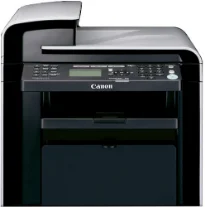
The Canon imageCLASS MF4580dw printer model is a multifunction machine with a digital display component to update users about the status. This model can print, copy, scan, and send or receive fax messages as a multifunction device. It has five lines on the display while it uses the wireless component as an alternative means of connectivity. However, the primary connectivity option includes the standard USB 2.0 hi-speed port.
Canon imageCLASS MF4580dw Drivers for Windows
f9f942d7b43b3abed4d758528b36120f7ac56731c0dbb393114970f4de37f8c16b1e78909edfa8dead5b2ed13902235fc84273ec7e799790efa7b99a7ee419254d55a4a3e3f5a130bc7a9ccfc5f72f91edf71646e99efe25e959fc74157e973fCanon imageCLASS MF4580dw Drivers for macOS
b6ddb33c456e76b77c69654f2216908bce41d1c2f4c7b496f268dd5603748e09aaada4153be3b6cfa1ce7ebcf30b0758b1929a6ef8aea97857a0955911ce9e12fe736014202dd4dc2cc4b5618076a08306ebd2cadd738ee8c501bc1619fc19e735223b2977d71ab373eafd6f14f28daa933cd2dcdc4b0d818da4a4432b14366879b3e920a4196ee4aaf6d17c5a095266ecf44e51626bd2902b01fa785dcd4075d5f10278e0dd91a898757299adb4a566e5f14e6ad073c885da268768b7b8172eff5d80d992a0f8b003104ffdc1bdf36bfe8bce0aa49cce77b27cdc9a95a5776c02735f008f6d8f5882c2824e3f2b83f7ccf7de77a1e3cca3f3007e0d40da0aefa2f4cd0e35483928ff487a3267ea5c930711de5d487220a3d3402f65c263e8e66708a180dad9484c82047dc4624ec4b3dd3438231e6ac5cbcdba793755e1ddb45efcaeccd8b1f1103d2bb966199a47fc50f0116996d987bd51178d61474c2151c98999b876d4bc8928e9adbfd33748039773dbb01850e711679363ae3e93785b8a9fe8a3ad9ee02fb65e10e05eda1e6d8e6ba268fa987a6e164d5ba661bb1240917e7c7089148ed46d637656f66159b2042287e9084b2b921ae5b5f5c0eb0e4837c7892368c2313a0619c97b4f71f32be34757bfcc84538a957d6f23e43e81f0da6c9cbd85a75754061053b0cd0086f0297ea2f9d52a2bb0056fff1438bcff12e9d00025aec26385cf22fcbd22ef4f1a7720267f938902aafc11822545bb49240297641744ea447acd804af112d0693e6588ba52e03feaf0d3150446eb3e84f535dc19aa61aba625226444a79ce3488bb61f99b0c653d1abf054c9b471d5a1b3e65a67c44f07e8c6ecf20e167ae2d83d355023809358287d3a2badbce6507585319819327b889a34a931905184cbeb1e9c986e5d635fa77c88f5de1e424c30886321f7ffd7900bcf8e4b8ce99f0d3d7af91556b836e302306ae8a25a2e16df9de6a48ab862ab2fa01c7793bae9776d4de130b89fe50e189ff8c78d1e5fa6183d9dd3f1b1c7dc175ab7cd4bb929f902c55966150a6a0273dbb36ccad0f146006a39d1dfee3689a7f3cbe7d777c61b1ed00ffd86dc8a01d1e3652cafab5bb14b9d360e961225a3a218f8f019abb06cafb6699a0ae2279c20467a32e972a2b98b6d4fe09622cf352cfb39785875efcfde33a7f47cbaa88c59f92f1899529dd25869ce4e588538376ea06d8cebe6fcce2f0feef6a769b6be9f24e7f1db99f24bb0642cb3630a8731182d0397d801cf7a93db0379115824defa2ab3781374fd4fa4cfCanon imageCLASS MF4580dw Drivers for Linux
dfd33db96aacd96ba06c0f5bfa11fa9f5d368ef520100c6e5abf900539592e7eCanon imageCLASS MF4580dw driver Downloads for Microsoft Windows 32-bit – 64-bit and Macintosh Operating System.
Toner Cartridge Details: Toner Cartridge 728 Black: Page Yield approx. 2100 pages
The standard internal memory of the Canon imageCLASS MF4580dw model is 64 MB of RAM. The first print out time for black and white is about 6 seconds from issuing the command. In terms of the printer power consumption, optimum use occurs at the printer operation performance. For instance, when in full operation, the machine consumes up to 490 watts. At the same time, the standby mode uses 10 watts while the sleep mode uses 2.9 watts.
Under the copying specifications, the work rate is up to 25 pages per minute (ppm). Besides, the copy resolution from this multifunction printer is up to 600 x 600 dots per inch (dpi). In comparison, the copying speed of the black and white documents is about 25 ppm. It also has grayscale halftones of 256 levels. At the same time, the first copy out time in black and white is about 9 seconds. This feature can zoom in or out of the output image up to 400% or 25% as appropriate.
The Canon imageCLASS MF4580dw machine’s maximum print resolution is up to 1200 x 600 dpi, while the speed is 25 ppm while printing. On the other hand, the first print out time for the black and white document is about 6 seconds. It supports the UFR II LT printer language as well as an automatic image refinement component. The MF4580dw model supports an automated duplexing element for printing on both sides of the page.
Technical Details
| Title | Canon imageCLASS MF4580dw Drivers |
|---|---|
| Device Type | All-in-one printer |
| Driver Version | Varies by driver and operating system |
| Available Downloads | Drivers |
| License | Free |
| Manufacturer | Canon Inc. |