
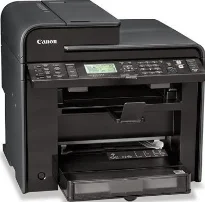
As a monochrome printer, this machine uses laser print technology to print black and white documents. In terms of the print speed, it depends on the print mode, which can be duplex or simplex. For instance, the simplex or single-sided mode allows a print rate of up to 26 pages per minute (ppm). On the other hand, the duplex or double-sided printing has a speed of 16 ppm when using letter-sized plain paper.
Canon imageCLASS MF4570dw driver Downloads for Microsoft Windows 32-bit – 64-bit and Macintosh Operating System.
Canon imageCLASS MF4570dw Drivers for Windows
45ccf38d2196d3c6c7aa60f2ccad6dd97b5d86fe46e9dd3df52e1f7a40e740d8f0de6f11b3b4ae8de259054cb746acddacfc18d87003a5e32f8ae424944823104091a30888165437f1d2a4ad6bed11698fe95235d8c3232060da1c3074c851e2a4007bc9db764e25dce68943c01963c875e39c3ee21273315438d5993e99f101Canon imageCLASS MF4570dw Drivers for macOS
b6ddb33c456e76b77c69654f2216908bce41d1c2f4c7b496f268dd5603748e09db4bd12b92b8a2e9c7a25ac0d3bae568b640c30b1739dbb30a4fa5b89a977d2caf80abbfffc6c226407dfc5c2ea7fe751fb9c52c56dd4bf9a5cb587899b1368f35223b2977d71ab373eafd6f14f28daa933cd2dcdc4b0d818da4a4432b14366879b3e920a4196ee4aaf6d17c5a095266ecf44e51626bd2902b01fa785dcd4075d5f10278e0dd91a898757299adb4a566e5f14e6ad073c885da268768b7b8172eff5d80d992a0f8b003104ffdc1bdf36bfe8bce0aa49cce77b27cdc9a95a5776c02735f008f6d8f5882c2824e3f2b83f7ccf7de77a1e3cca3f3007e0d40da0aef86d5330d84af4dcc7458630c4999aae2495eebf5e1e3c6688e6e7c0453cb25a16708a180dad9484c82047dc4624ec4b3dd3438231e6ac5cbcdba793755e1ddb45efcaeccd8b1f1103d2bb966199a47fc50f0116996d987bd51178d61474c215169ef5f30da4c92762d2a5b614957892f1b542e16a07d53fec92f92bc3051fe328a9fe8a3ad9ee02fb65e10e05eda1e6d8e6ba268fa987a6e164d5ba661bb1240917e7c7089148ed46d637656f66159b2042287e9084b2b921ae5b5f5c0eb0e48c5875b37125b8c8a32cad84148bab04417f7abf39551d213d21db0084be432ccddd1a155fe623f7f913e5bf860233ad73ccaaa5a5814b9b1e9353dd6501d88f7c5310bca335d137d5d319b3536e7bd3bca38355c1bd03236c03a8c33fc0acd3e0297641744ea447acd804af112d0693e6588ba52e03feaf0d3150446eb3e84f535dc19aa61aba625226444a79ce3488bb61f99b0c653d1abf054c9b471d5a1b3e65a67c44f07e8c6ecf20e167ae2d83d355023809358287d3a2badbce6507585cd403b42f9117b3534b580cc059e657ae4f18497b4b9c846bd39602446daae286321f7ffd7900bcf8e4b8ce99f0d3d7af91556b836e302306ae8a25a2e16df9de6a48ab862ab2fa01c7793bae9776d4de130b89fe50e189ff8c78d1e5fa6183d9dd3f1b1c7dc175ab7cd4bb929f902c55966150a6a0273dbb36ccad0f146006a95a8a167b29fa549e7cef6686d42491921d3db11307ee86a2b894730cbc5e9a7360e961225a3a218f8f019abb06cafb6699a0ae2279c20467a32e972a2b98b6df3eb2eb16ece98af122e46ab88961d4c057c658e70b3441b239e996a75f0f9dece4e588538376ea06d8cebe6fcce2f0feef6a769b6be9f24e7f1db99f24bb064245023025e79196fe45e820e0d6ae054991fda6551b4a53e028cd1844354065fCanon imageCLASS MF4570dw Drivers for Linux
d58796ee5518feee485119683cf7caa705668652803b8f0fb60177472ebe6d3bCanon imageCLASS MF4570dw Specifications
Supported Toner Cartridges
Toner Cartridge 128 Black : Yield approx 2,100 Pages
The Canon imageCLASS MF4570dw printer takes less than 6 seconds to print the first page after the power is turned ON. In terms of the average print resolution, the black printing produces a quality of 600 x 600 dots per inch (dpi). Conversely, the maximum print resolution reaches a level of up to 1200 x 600 dpi at the highest level. Canon imageCLASS MF4570dw model is compatible with the cartridge 128 models, yielding up to 2100 pages.
The print yield is according to the ISO/IEC general print standard. The machine supports paper sizes, including legal, letter, statement, executive, A4, A5, and B5 sizes. It also has an automatic sheet feeder that can accommodate up to 35 sheets of plain paper to augment the main paper tray supply. The main cassette and the multipurpose tray allow a range between 16 and 43 lbs for bond paperweight under normal conditions.
Some of the general features of the Canon imageCLASS MF4570dw model include an infrastructure mode for Wi-Fi access. This Wi-Fi also has an encryption mode through the WEP (64/128 bit), TKIP, and the AES. In terms of connectivity, it allows the USB 2.0 hi-speed device, 10/100 Base-T Ethernet network, and the IEEE802.11b/g/n wireless component. The maximum power consumption from this device is up to 1090 watts at the best performance. However, the machine uses much less power when it is in standby or energy saver mode.
Technical Details
| Title | Canon imageCLASS MF4570dw Drivers |
|---|---|
| Device Type | All-in-one printer |
| Driver Version | Varies by driver and operating system |
| Available Downloads | Drivers |
| License | Free |
| Manufacturer | Canon Inc. |