
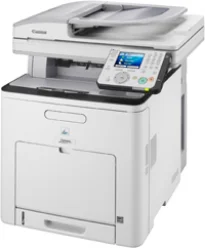
Canon i-SENSYS MF9280Cdn printer model can produce a maximum production of up to 65,000 pages in a single month. This device’s warm-up time is up to 60 seconds when the machine is waking from the power-on mode. It also has an internal shared memory of up to 768 MB of RAM. The control panel has a diagonal size of 3.5 inches, which is about 8.8 cm for the color TFT display. This component also has an easy scroll-wheel.
Canon i-SENSYS MF9280Cdn Drivers for Windows
ddc9e974d8d5e15a1ae4cb3117af56461467302ce79f7ffef638642848d0c3f4430a9479763a92c393c58516fbb6c784bd10d3fffea68e29aa3037967b6291a29a1afa2c3e1e35b01b97ed884bddd23829d707c44539bca6ece74547b87abae38d2fea082d8742dc83b719e15fe2f40b7b1f6b4989427ed5e97430f47623d7f3b1a5520fb7f652b0e9ee4b4a83e072327625e52ff281fbe0a70989f7ea07e5b04a9a1df9c5994c09b491bea55250c3a9803402f7cff710cb623807b64594e728c1bfad159d62fab63862a6fdf792c13be08ec542d9147d3c5d189b92cf117f05443586ca6d538a0ef5ddea5cb22db9c19a6e312885460e262c69793b2ffdd0e8e10fae91cdf20194edba025fa9bc08f0cee2ad0faaf22d9a8d30edde8f002cff9392ac4854b6611280a41af3b0273a86f621eaf21a1b98f60bb72df9a27a75089ff9d626f727260aac636225ad851eaf6cf3b03f80e18decd2f38217d4eae456d978ee6c4172ea568d6aae8fd3e874fa2096bf93ff90717e4fe34550fd75e3858ca59880d1cb5901be647cdf1caea23c100983180f08882aa439e2bb80f0478b9e0a235803be9f47a5d243d9335d0f9156f4db43c0d73229137365945e3a335e0deff56a0148d7027b8877556b7745d42c5813c7817e149c0897f3f537e54418cb339db25c05a3beb421ad1e31ab9601f64af4d7f5ac81885c067d86673faafb18012b4e3d9f4e36620ad4a72652f692fb8084fdd104e565bfabf3a44a89702bc8bb7c4afd1d14907fb5b41fe64d1bd2f0f0d5f570be7556c09a020a9ab7d698ecc2e2d13acf13111493bfce4e219b94e788771ce499f714ad883960c756c14c3dbaff462f856b55b98bc62ad910edf1d37eeaa36e99315d823fb455f11c7009bd8828daab14ec56a9e38bdea36fa9bf64ef4b79026cfa955cc0c1e777b97ad1Canon i-SENSYS MF9280Cdn Drivers for macOS
042821d27cddff8d35489be405be6fb6758a74e2357dcf8b86a6decc26d7aaefb9037c1d57b4057417612c80a9f29487bb47edfb0266ba96c153717b6717b88cfe736014202dd4dc2cc4b5618076a08306ebd2cadd738ee8c501bc1619fc19e75b8f8de010495b58464dd89bf0ec72e21a931f7476ebec8cf8c194361052d657804989950b94f64b85160213d11a5259c082d1312c1f627a0812ee349ad6245f79b3e920a4196ee4aaf6d17c5a095266ecf44e51626bd2902b01fa785dcd4075602bdd48468bf971d46227aeb5a5e80268b4d63683acc1033092bf82e239f06404379ee4276dcb51d3d98f083a64cb6f006f980ebc7cfff7f3b862d6b83fb0ad0eb111d5cf4d5c62d6b9284027ec6281e368fed92dad0a18812530e0bc4faebe61f0115a742ccd592c97a829fdce66fb3936ba20e2c75c3a64b8fbf107dc5ff086d5330d84af4dcc7458630c4999aae2495eebf5e1e3c6688e6e7c0453cb25a1317cf79acc2b5c650f2d0487297a075500cf16bac82b4995036f450d7eb267a83cac8d47a0bb1580e74b492bc876858781092e8fae8a009946dc72a2194c0ca96b581313eec6df01b8ad51715b70513f5b2a2cb26467a41d34966d7b57f74f96c98999b876d4bc8928e9adbfd33748039773dbb01850e711679363ae3e93785b3accb0f153300092a2ee312825c851035f1c66d65dafd67c77e2d4fbcd27c13a312dad7b42625ee423180149805c7ec4e10d238d7ee98b777e766374df0576c837c7892368c2313a0619c97b4f71f32be34757bfcc84538a957d6f23e43e81f04c12283382997a0a253b5b7bedae90cf797892d245c51f896cbbc7eaf39f0d5bab8f0f303177d8c2129a2a2db2b478c6b63e40154d669f8d01041b4f7afcfbb1afa07a120e13f388f25264155b97228b6378ddc7bc4138e34904c730a8b43dcb0297641744ea447acd804af112d0693e6588ba52e03feaf0d3150446eb3e84f5400f046433591f4a0ff3c99e03208e8383398907c9703634230bd5670b241b6601a221888cc3651a64f633e461870d1e2d0cce0ef54abb9c8317ca085ad2196494292469e0acf79d6f42d1ee69f08969d05241d73a3b0845a32aaa2fe1c08f5d319819327b889a34a931905184cbeb1e9c986e5d635fa77c88f5de1e424c308822777e10690dcebdae80b6ec50e7bed2b28b71ca4cf9315646912ab2ad21c066702b8d833f5f41ec87cd5b357b1b9ddd3bb3d1b09a3768321db602239d7774929dd3f1b1c7dc175ab7cd4bb929f902c55966150a6a0273dbb36ccad0f146006aCanon i-SENSYS MF9280Cdn Drivers for Linux
29e2380e21bda8c31f8c08435a2ba49cba61c13abfa47ba78081a9b0e55df333Canon i-SENSYS MF 9280Cdn driver Downloads for Microsoft Windows 32-bit – 64-bit and Macintosh Operating System.
Supported Toner Cartridges
Cyan 711 Toner Cartridge : Yields upto 6000 Pages
The print width is up to 546 mm in terms of the physical dimensions, while the depth is 527 mm. This Canon i-SENSYS MF9280Cdn machine has a height of 632 mm, while the device’s weight is up to 43.3 kg. In a typical print environment, the operating temperature is within ten and 320C. Besides, the supported relative humidity is between 20 and 80%, with no condensation. It also has an internal power source of voltage between 220 and 240 volts at 50/60 Hz.
The scanner type is a flatbed component with a duplex automatic document feeder (DADF) component. The printer Canon i-SENSYS MF9280Cdn also has a standard paper input capacity of up to 250 sheets of plain paper. On the other hand, it is also a multipurpose tray that can hold up to 100 sheets. Besides, there is a DADF with up to 50 sheets of extra paper supply. The supported media types include plain paper, recycled paper, heavy paper, transparent films, envelopes, and labels.
On the other hand, the compatible media sizes include A4, A5, B5, legal, letter, executive, statement, envelope, and monarch. In terms of the supported paper weight, the range is between 60 and 120 gsm for the main paper tray. However, in the multipurpose tray, the recommended paper weight is between 60 and 176 gsm.
Technical Details
| Title | Canon i-SENSYS MF9280Cdn Drivers |
|---|---|
| Device Type | All-in-one printer |
| Driver Version | Varies by driver and operating system |
| Available Downloads | Drivers |
| License | Free |
| Manufacturer | Canon Inc. |