
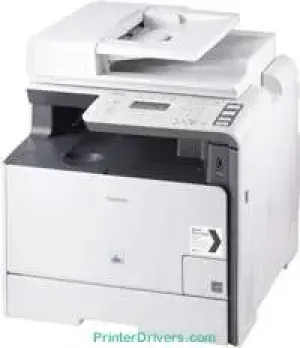
When users put the Canon i-SENSYS MF8380Cdw machine side by side with other similar printers, this particular model always comes out on top. One of the reasons for this excellence is its outstanding features not too standard with other printers of that category. Some of the basic machine features include printing, copying, scanning, and faxing documents. Each of these features performs the best operation to satisfy the users.
Canon i-SENSYS MF8380Cdw driver Downloads for Microsoft Windows 32-bit – 64-bit and Macintosh Operating System.
Supported Toner Cartridges
718 Black Toner Cartridge : Yields approx 3400 Pages
Cyan 718 Toner Cartridge : Upto 2900 Pages
718 Toner Cartridge Yellow : Yields Upto 2900 Pages
Toner Cartridge 718 Magenta : Page Yield 2900 Pages
Canon i-SENSYS MF8380Cdw Drivers for Windows
87739dc31fb60e8d490ccc04fc533c3d297a0849e37d0d93caa408665752b627607576cd426a295a5823514480e00dddf4ffada8fc420d77ca5611ddc849f2d04d55a4a3e3f5a130bc7a9ccfc5f72f91edf71646e99efe25e959fc74157e973fCanon i-SENSYS MF8380Cdw Drivers for macOS
d5f10278e0dd91a898757299adb4a566e5f14e6ad073c885da268768b7b8172eff5d80d992a0f8b003104ffdc1bdf36bfe8bce0aa49cce77b27cdc9a95a5776c81682e33345b34a81c06f13d6dd4d7d9a98164afe7d89843d94d1dac52bdbe386708a180dad9484c82047dc4624ec4b3dd3438231e6ac5cbcdba793755e1ddb45efcaeccd8b1f1103d2bb966199a47fc50f0116996d987bd51178d61474c2151c98999b876d4bc8928e9adbfd33748039773dbb01850e711679363ae3e93785b8a9fe8a3ad9ee02fb65e10e05eda1e6d8e6ba268fa987a6e164d5ba661bb1240917e7c7089148ed46d637656f66159b2042287e9084b2b921ae5b5f5c0eb0e4837c7892368c2313a0619c97b4f71f32be34757bfcc84538a957d6f23e43e81f0da6c9cbd85a75754061053b0cd0086f0297ea2f9d52a2bb0056fff1438bcff1209431107d2b98a5c1a3d4ae6141590e902abf12a5f16be1d69712e8cfe9845590297641744ea447acd804af112d0693e6588ba52e03feaf0d3150446eb3e84f535dc19aa61aba625226444a79ce3488bb61f99b0c653d1abf054c9b471d5a1b3e65a67c44f07e8c6ecf20e167ae2d83d355023809358287d3a2badbce6507585319819327b889a34a931905184cbeb1e9c986e5d635fa77c88f5de1e424c30886321f7ffd7900bcf8e4b8ce99f0d3d7af91556b836e302306ae8a25a2e16df9de6a48ab862ab2fa01c7793bae9776d4de130b89fe50e189ff8c78d1e5fa6183d9dd3f1b1c7dc175ab7cd4bb929f902c55966150a6a0273dbb36ccad0f146006a360e961225a3a218f8f019abb06cafb6699a0ae2279c20467a32e972a2b98b6d4c12283382997a0a253b5b7bedae90cf797892d245c51f896cbbc7eaf39f0d5b400f046433591f4a0ff3c99e03208e8383398907c9703634230bd5670b241b665afe5cf7fb0b2760c08f60dbce40f1d5569a42ee8c5601b28c28fdbf74dd03b44fe09622cf352cfb39785875efcfde33a7f47cbaa88c59f92f1899529dd25869317cf79acc2b5c650f2d0487297a075500cf16bac82b4995036f450d7eb267a802735f008f6d8f5882c2824e3f2b83f7ccf7de77a1e3cca3f3007e0d40da0aefCanon i-SENSYS MF8380Cdw Drivers for Linux
51cab752fad9bcd5379320c7d0d092b90e67c30b336c1776bfe4ea74b03c2634Canon i-SENSYS MF8380Cdw Specifications
Furthermore, the machine’s print speed is 20 pages per minute (ppm) for both color and monochrome documents. Simultaneously, it demands the use of A4 paper size through the color laser beam printing. The highest print quality is up to 2400 x 600 dots per inch (dpi) with an automatic image refinement. The machine has a print resolution of 600 x 600 dpi. Besides, the first print out time is about 14.5 seconds or less for color and monochrome documents.
In terms of this machine’s media handling, it supports up to 250 sheets in its main paper input tray. Besides, it has a multipurpose tray that can accommodate 50 sheets of plain paper. It also has an automatic document feeder (DADF) that can hold 50 sheets of plain paper as well. The output tray can accommodate up to 125 sheets of the printed documents.
Some of the compatible media types include plain paper, recycled paper, heavy paper, transparency, coated paper, label, and envelope. On the flip side, the consistent media sizes include A4, B5, A5, letter, legal, executive, statement, postcard, foolscap, envelopes, and Monarch. The supported media weight largely depends on the tray that is in use. For instance, the leading paper cassette and multipurpose tray support between 60 and 220 gsm.
Technical Details
| Title | Canon i-SENSYS MF8380Cdw Drivers |
|---|---|
| Device Type | All-in-one printer |
| Driver Version | Varies by driver and operating system |
| Available Downloads | Drivers |
| License | Free |
| Manufacturer | Canon Inc. |