
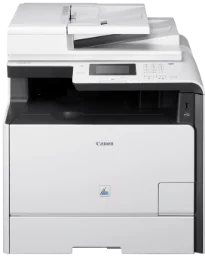
Printing with the Canon i-SENSYS MF728Cdw model comes with impressive qualities for its multifunction printing abilities. The print speed is 20 pages per minute (ppm) on A4 paper for simplex or single-sided printing. On the other hand, double-sided printing or duplex printing has a rate of 10 ipm for A4 plain paper. However, the print rates apply to both color and monochrome documents. The basic features include printing, copying, scanning, and faxing documents at great speed and with great quality.
Canon i-SENSYS MF728Cdw Drivers for Windows
30e60eee8ff436e54c2a94c4ed6a58217ca7f317495016ad17b0d46ed02d1eca30e60eee8ff436e54c2a94c4ed6a58217ca7f317495016ad17b0d46ed02d1eca04d2e8b6f97ecdbf6149ef728dccd1e27a7ad604327a8fa2972b7d5b6323ac32979feeac98383f6de997313a1d3a6fd34cf1d9b95b65894a99852f93693b8dfa4a9a1df9c5994c09b491bea55250c3a9803402f7cff710cb623807b64594e7289392ac4854b6611280a41af3b0273a86f621eaf21a1b98f60bb72df9a27a75080f9c6406c46b234f582a575d1581efe532fa405c5390a18408e0a3cd074c9611ca24566a8863d09cb0a71bc936a2b859655bc9f17e472761da0d0a8459ab785bd978ee6c4172ea568d6aae8fd3e874fa2096bf93ff90717e4fe34550fd75e385484d887fc334579b3dc3a8bc75da393a9e3965472a7d23778e61bd2de5b0bee29e0a235803be9f47a5d243d9335d0f9156f4db43c0d73229137365945e3a335e2c2da2bf7efb99ef1e5e32ae980eca5982980a80ba6d9621af0b8c314cd0f3824d55a4a3e3f5a130bc7a9ccfc5f72f91edf71646e99efe25e959fc74157e973fCanon i-SENSYS MF728Cdw Drivers for macOS
b6ddb33c456e76b77c69654f2216908bce41d1c2f4c7b496f268dd5603748e09120d84051404d68ff23facc20ca6068b52d890770b6a9f100e82adfa5277a5aadb4bd12b92b8a2e9c7a25ac0d3bae568b640c30b1739dbb30a4fa5b89a977d2caf80abbfffc6c226407dfc5c2ea7fe751fb9c52c56dd4bf9a5cb587899b1368fd5f10278e0dd91a898757299adb4a566e5f14e6ad073c885da268768b7b8172edc0b747649fd9f72c6908765afdccac3720f84838bd6491360b431c69ee2fd6a35223b2977d71ab373eafd6f14f28daa933cd2dcdc4b0d818da4a4432b14366879b3e920a4196ee4aaf6d17c5a095266ecf44e51626bd2902b01fa785dcd4075ff5d80d992a0f8b003104ffdc1bdf36bfe8bce0aa49cce77b27cdc9a95a5776c02735f008f6d8f5882c2824e3f2b83f7ccf7de77a1e3cca3f3007e0d40da0aef86d5330d84af4dcc7458630c4999aae2495eebf5e1e3c6688e6e7c0453cb25a1317cf79acc2b5c650f2d0487297a075500cf16bac82b4995036f450d7eb267a86708a180dad9484c82047dc4624ec4b3dd3438231e6ac5cbcdba793755e1ddb46790fad87cfd6df48f74ed732c2c222f5baa62e7a17958b029f2efd102ce36315efcaeccd8b1f1103d2bb966199a47fc50f0116996d987bd51178d61474c2151c98999b876d4bc8928e9adbfd33748039773dbb01850e711679363ae3e93785b8a9fe8a3ad9ee02fb65e10e05eda1e6d8e6ba268fa987a6e164d5ba661bb1240e7931af2339fea2198ae845c6357e921538761f3610de796cbbf426d81eebfd3917e7c7089148ed46d637656f66159b2042287e9084b2b921ae5b5f5c0eb0e4837c7892368c2313a0619c97b4f71f32be34757bfcc84538a957d6f23e43e81f0da6c9cbd85a75754061053b0cd0086f0297ea2f9d52a2bb0056fff1438bcff1282479e45d013253d1629fa59133d3c05fa5002f39303f4f772912d334dc6f39509431107d2b98a5c1a3d4ae6141590e902abf12a5f16be1d69712e8cfe9845590297641744ea447acd804af112d0693e6588ba52e03feaf0d3150446eb3e84f535dc19aa61aba625226444a79ce3488bb61f99b0c653d1abf054c9b471d5a1b3e36a86682555814ab749d6fcc4df5ae336b34c5effd7760bbbc8330cb7e07d40e65a67c44f07e8c6ecf20e167ae2d83d355023809358287d3a2badbce6507585319819327b889a34a931905184cbeb1e9c986e5d635fa77c88f5de1e424c30886321f7ffd7900bcf8e4b8ce99f0d3d7af91556b836e302306ae8a25a2e16df9d272765a3f84315bd212c67b3fff1852f23a365abc5b0e061b1b5e25ed0dd811ae6a48ab862ab2fa01c7793bae9776d4de130b89fe50e189ff8c78d1e5fa6183d9dd3f1b1c7dc175ab7cd4bb929f902c55966150a6a0273dbb36ccad0f146006a360e961225a3a218f8f019abb06cafb6699a0ae2279c20467a32e972a2b98b6dcc86acf4b98a7844af468939d214f414650d54ea8d07c87841d2eafa2b285525Canon i-SENSYS MF728Cdw Drivers for Linux
29e2380e21bda8c31f8c08435a2ba49cba61c13abfa47ba78081a9b0e55df333Canon i-SENSYS MF728Cdw driver Downloads for Microsoft Windows 32-bit – 64-bit and Macintosh Operating System.
Supported Toner Cartridges
Toner Cartridge 718 Black – Upto (3,400 pages)
718 Cyan Toner Cartridge – (2,900 pages)
Magenta 718 Toner Cartridge – (2,900 pages)
Toner Cartridge 718 Yellow – (2,900 pages)
The Canon i-SENSYS MF728Cdw printer uses the color laser-beam print technology, which produces an average resolution of 600 x 600 dots per inch (dpi). However, the optimum print resolution is up to 1200 x 1200 dpi with the automatic image refinement (AIR) component. The first printout time for color and monochrome printing is about 14.5 seconds or less. Besides, its double-sided printing is automatic to print on both sides of the page.
Furthermore, the printer languages include UFRII-LT, PCL 5c, Adobe PostScript, and PCL 6 emulation. It also supports up to 93 PCL fonts and 136 PostScript fonts. In terms of the print margin for the pages, the machine allows a 5 mm margin for the four sides. However, when an envelope paper is in use, the acceptable print margin is about 10 mm on all four sides of the paper. It also contains a toner saver mode to maintain print quality.
Under scanning, the Canon i-SENSYS MF728Cdw machine can produce an optical resolution of up to 600 x 600 dpi. On the other hand, the enhanced resolution is up to 9600 x 9600 dpi. Its color scanning depth is about 24 bit/24 bit for both input and output. Besides, it supports TWAIN and WIA components as well as TIFF, JPEG, PDF, Compact PDF, and searchable PDF. The maximum scan width is 216 mm.
Technical Details
| Title | Canon i-SENSYS MF728Cdw Drivers |
|---|---|
| Device Type | All-in-one printer |
| Driver Version | Varies by driver and operating system |
| Available Downloads | Drivers |
| License | Free |
| Manufacturer | Canon Inc. |