
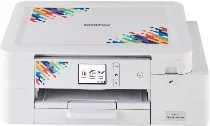
Brother SP-1 Driver is for the SP-1 sublimation printer, which prints custom transfer designs from a connected computer. The driver sends image data in the format the printer can process. After installation, print control can run through USB, Ethernet, or wireless connection, depending on the setup. The SP-1 only prints, with no scanner, copier, or fax hardware.
Brother SP-1 Drivers for Windows
ee36c21313d3e8d3c428eef544d9d069abe74a7557b9b41ba01a7a0109c6b5e59a517e16d64152c2befc55062563558b332e991169d141fa03dd09358f81fd3bBrother SP-1 Drivers for macOS
40708817f4cefabd224435d66c8bc90a8c432411b58b50a6f0c3f9abdba5509fBrother SP-1 Specifications
Brother SP-1 is a sublimation inkjet printer for print-only work, not scanning, copying, or faxing. It uses a four-colour CMYK sublimation ink set with Brother SP01BKS, SP01CS, SP01MS, and SP01YS cartridges. Memory is 128 MB, and the 2.7-inch touch panel sits on a body sized at 435 x 343 x 159 mm. Physical weight is about 7.9 kg. In-box consumables use 47 ml sublimation ink cartridges.
Print resolution reaches up to 1200 x 2400 dpi for sublimation transfer output. Paper sizes include A4, Letter, Legal, and user-defined settings for the loaded transfer sheets. The ink system works with Brother sublimation paper rather than ordinary photo cartridges. Designs can be sent from phones or tablets through Artspira. Since the unit has no scanner hardware, copy and scan specifications do not apply.
Paper input comes through a standard tray and a manual feed slot. With 64 to 120 g/m² transfer paper, the main tray holds up to 100 sheets, but 120 to 220 g/m² stock reduces tray capacity to 20 sheets. The manual feed slot accepts heavier media from 64 to 300 g/m², while finished output capacity is listed at 20 sheets and Brother supplies ten sheets of sublimation paper in the starter package.
Connections include Hi-Speed USB 2.0, wired Ethernet, and wireless LAN on the 2.4 GHz band. Infrastructure Wi-Fi works with IEEE 802.11b/g/n, while Wi-Fi Direct uses IEEE 802.11g/n. Power requirements vary by region, with Japanese specifications listing AC 100 to 120 V at 50/60 Hz. Operation runs from 10°C to 35°C with 20 to 80 percent relative humidity without condensation during normal use of the sublimation printer.
Technical Details
| Title | Brother SP-1 Drivers |
|---|---|
| Device Type | Printer |
| Driver Version | Varies by driver and operating system |
| Available Downloads | Drivers |
| License | Free |
| Manufacturer | Brother Industries, Ltd. |