
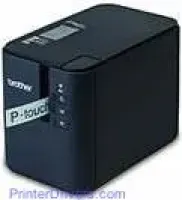
Brother PT-P950NW printer uses the thermal transfer print method which assures users of effectiveness and high productivity. This printer has fascinating physical dimensions such as a height of 5.75 inches, a depth of 7.56 inches and a width of 4.65 inches. The weight of the printer is approximately 3.33 lbs, and this is without including either the tape cassette or the battery base and the batteries themselves.
Brother PT-P950NW Drivers for Windows
0be5a8f4ed1bcc8af9d9a189e3c145e384857d42151224c476676ace5cff1575Brother PT-P950NW Drivers for macOS
1fe6bb6fc9f14b4a49601921ecc0dae2fb536a7e62991d58da7621e8936a0581000b26cb26e17762bfda6db611feccff2c6cc03c24d3f75f98789f672139e4f80cb5ec047441c0d8401a829300fb33673538c79a687e5ac7d8afe5cb57e4f996Brother PT-P950NW Specifications
Furthermore, this printer has LED indicators that show the present condition of the device such as a battery, status, power, and wi-fi indicator. Also, on the printer body are buttons that enhance the ease of use for the user such as power, Wi-Fi, and the feed and cut buttons. The print head uses 454 dots and prints at a resolution of 360 dots per inch (dpi).
The actual resolution of the device is of standard quality of 360 dpi x 360 dpi in both dimensions while the high-resolution mode produces up to 360 x 720 dpi. If a user prefers a higher speed than resolution then, the high-speed mode produces a resolution of 360 x 180 dpi. On the other hand, a user prefers a top quality, and the print resolution is 360 x 360 dpi.
The print speed mostly depends on the means of connectivity and the present mode of printing of the device. With a direct connection to the AC adapter, the maximum speed is 2.36 inches per second while the high-resolution mode has a maximum speed of 1.18 inches per second. Other modes include the high-speed mode which is at 0.78 inches per second and a high-quality mode with a speed of 0.78 inches per second.
Apart from the printer running on AC power, the alternative is through an inbuilt battery which produces an average speed range of 0.78 inches to 2.36 inches per second.
Technical Details
| Title | Brother PT-P950NW Drivers |
|---|---|
| Device Type | Label Printer |
| Driver Version | Varies by driver and operating system |
| Available Downloads | Drivers |
| License | Free |
| Manufacturer | Brother Industries, Ltd. |