
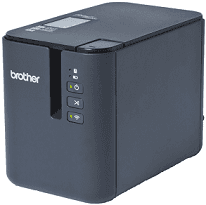
The Brother PT-P900W printer belongs to the Brother PT series with a moderate size for both private and commercial uses. The dimensions include a printer height of 5.75 inches, depth is 7.56 inches, and width is 4.65 inches. Also, the weight of the printer is about 3.33 lbs with the tape cassette, battery base and the batteries themselves.
Brother PT-P900W Drivers for Windows
7eab289cbee33537f50332f58e1084752d9c17aef3b7b9b5d30ce1fdded0dc926227d92099afe4ed65daa57f8558646999e5a204a69b435f8314359c120945130aa79465945a8117e3c75a7b22a236ecb8bc2574794a495c139e206995cd28edBrother PT-P900W Drivers for macOS
3f38595dfb333093587a67846e813ddc3c481701517a5c3af1747f506a17fa268fc857c4ab093dbe88c89a67827a482acfe59582dc64830d9ff6f57deb685663d910f4dc2bd13d9f36b7050707c853f97ff8d5f5d82ec87df960cecb88cfd5fca462a146a4c8deb9952e2483dea414c4225c1b9c74b4e8df699185f292a379145e2cbedf240d9b312aa3b43a706f81d30cc82ccd0c164d7c47297a9f210871088c969bff77c445e81f9e59be75d2599447e579cf4fc2e6bb423fb14bb75374cd39bf8d5871680aeb01684e45c4e5d8d6f82094a07ebf21ed1738bdeca8ea9834ceacfa89cba9e4b068f1885baaa5cb0c8166bd392e0d461090a0d546349b3901Brother PT-P900W Specifications
The printer also has LED indicators that can show the status and condition of the printer. These indicators are for battery, status, power, and Wi-Fi. The print resolution includes a standard 360 dpi x 360 dpi, but the high-resolution mode offers a resolution of 360 x 720 dpi. The high-speed mode provides 360 x 180 dpi while the high-quality mode is 360 x 360 dpi.
There are also essential buttons that can help the smooth operation of the printer and create user-friendliness. Such useful buttons include the power, Wi-Fi, as well as the feed and cut buttons. The print method for this Brother PT-P900W device is through the thermal transfer while there is a color depth 454 dot and 360 dots per inch (dpi).
The speed of the printer work depends on both the power source of operation as well as the mode of printing. The case of power input includes that of AC power adapter which works at a speed of 2.36 inches per second. On the other hand, if the Brother PT-P900W printer is running on the inbuilt battery power, the print speed is 0.78 inches per second to 2.36 per second.
The print mode that affects the print speed includes the high-resolution mode that has a maximum speed of 1.18 inches per second. Others include the high-speed mode with a maximum speed of 3.14 inches per second, and the high-quality mode has a speed of 0.78 inches per second.
Technical Details
| Title | Brother PT-P900W Drivers |
|---|---|
| Device Type | Label Printer |
| Driver Version | Varies by driver and operating system |
| Available Downloads | Drivers |
| License | Free |
| Manufacturer | Brother Industries, Ltd. |