
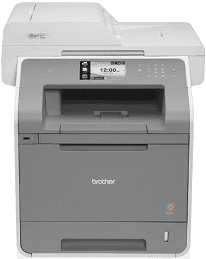
The Brother MFC-L9550CDW model printer is similar to the MFC-L8650CDW and MFC-L8850CDW but only differs in a few characteristics. In one way, they are all using the latest laser print technology of the electrophotographic type with a single pass. The standard internal memory of the printer is about 256 MB of RAM with an optional slot for DDR2 SO-DIMM for up to 256 MB. The display feature of the device includes a 4.85-inch TFT color touchscreen and touchpanel.
Brother MFC-L9550CDW Drivers for Windows
7e0b6ea7e4fcfd637372e30ecb79e84bdbaf5f5cb5e8c082b496e5da664823520c01149d314807508af96952fc14c63dc8926eef8eb890f0f08e94d62bb17a57ca092e4dbda6fac646833eb1e80c66d77a203b6636cb5b06112a9c0bad23d083d4318059a8988fbdcb4393c5d67ba44669669a7ab061d199dba84943fda8ec0fBrother MFC-L9550CDW Drivers for macOS
e62e2a4b31b185644323392133cad6a0ee79f3896d4ce5b4343c540d804419576a9ef2865964ff4918dd1441876a80485fb8c329df36aa8d6680deff2eecd53e31c5e7315789c2217516cf95e948fb0d4e3a9650070e664993296f216b3c7c1a573de07ec53a141e949ac7d1563c5d8f44bb7e63fc70edb8f3f79143889c2bd9949467d5fd874da4f4bcf9028483495f8319aad70483dbb26c2c4db964fbc8a7c47e5032f8c7f1c3aa7dae26cdd88c8241e1f161fa83541fecea3c9c8ff129b6d010dc401a00f982e9c3be3d8552eb5b4be39e006055c5189a3ffcb13f0688d57a561501401629bf6fa158d46c5a190eefe95941b2d995e77190840bfb4a58de59553d65e3e1fd0efacf7816fbbefce981bc6f2b27ffc20c6b452dba4c4a8d7cd213bb86ec24d8b58439c3573e98418ca30ee1ce236f33652a6db248b5807136dbea605f83827e65127c898bb19443c9a575297ede103ec298b99b1cde6d3b3aa47f2e6b9b5d9f4dc7bf154292f2e691176be4724779a06d00497673134f1a50baf42ba0f1fb26065d69e9af68eb6c4f6dff6431e5d00c6dd5c06d546a68c64b47e26a481968bd3ae74b6d77b69c018982a7e0451375ed6990cb18cfd6c92b597770aeb08d96878a2bc433c1468057f97bb9777da1b1c4e194c3d5307b176243Brother MFC-L9550CDW Drivers for Linux
edf6a0a10bb5588543e58da6f72a4b679a96aa7d865980b2e89fdb3bf61b7788c9cfd5092948a8541ad36b6dbc0d34ca2e92b8c12d1cd92076c90444a27a6f89a0c1d127d106009368a4e62d83fc6b2d2c8e573e10d0a2399b15587a6238e472648635ad4698bf1f57ca6009bc894ab7a49c2e595acbafc26018c0955d97495e027b73648722ac8c8eb1a9c419d284a6562cc763feac9740a2b75a683b0929727d7dcbe8349ae4d4ab816e4551017f2f1fd9fd6bf3f4f3c570fbd9576248dd9f4225e91dd7f7d0ba2a202f616b15b669be7800c271a7d25efed94191f71fc4508bd395b8a25a385eb4a5e2770d4b10b17735203006b7a90a6879a0ef69e5fe4df71dadda535bb90dbfaf88fd603897f96e8b09a2f3ae9bd4e2daafb925e896e24082d824222ec7a7646309260fd661387ca1aa5dc1ffe851db7bbefe5271b755Brother MFC-L9550CDW Specifications
Furthermore, the Brother MFC-L9550CDW printer uses a power source that supplies a range between 220 and 240 volts of AC at 50/60 Hz. In other words, any power supply outside of this range is not safe for the device. Similarly, the power consumption by the printer is a function of the present condition of the printer. For example, at peak performance, this printer consumes approximately 1200 watts of power.
While printing, the average power consumption is about 565 watts at a standard temperature of 25°C. However, printing in quiet mode implies the power consumption is only about 355 watts at the same temperature. When the printer is active, the power consumption is only about 65 watts. Also, the deep sleep mode requires about 10.5 watts on average while it is 10.5 watts at sleep mode.
The copying process uses about 565 watts as well, including the quiet mode with 365 watts of power usage. In terms of the printer’s physical dimensions, the width of the printer is about 490 mm, and the height is about 530 mm. Also, the depth of the device is about 526 mm, and the weight is about 31.0 kg — the amount of noise from the device also concerns the ongoing printing process. The operating temperature range is also between 10 and 32°C.
Technical Details
| Title | Brother MFC-L9550CDW Drivers |
|---|---|
| Device Type | All-in-one printer |
| Driver Version | Varies by driver and operating system |
| Available Downloads | Drivers |
| License | Free |
| Manufacturer | Brother Industries, Ltd. |