
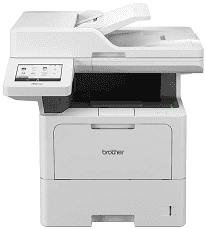
Brother MFC-L6710DW Driver gives the computer the software it needs to communicate with this monochrome laser multifunction machine. A nearby computer can connect by USB, or the printer can join a wired Ethernet or wireless network for shared use. Once the connection is established, the same system link carries print data and gives the computer access to scanning. Copying can be started directly at the machine, while fax operation uses the MFC-L6710DW’s built-in fax hardware. Correct driver installation also helps the computer identify the printer properly instead of treating it as an unknown or partially supported device.
Brother MFC-L6710DW Drivers for Windows
bf184aedaf4eeccd48c577399149f3162253652cd17f6e76f96dc052926d0afcd4cffb668f8eb5ce44306cf4a23d82b75209f5a18f9e29bef540a5d95e376831d4cffb668f8eb5ce44306cf4a23d82b75209f5a18f9e29bef540a5d95e376831e03602d33d26952daa81cc8da4d5739ba571c6102073fc023b49aed3ad41cc446eddedfff4131bc903d581f6dc86a8518e1c82980a4cd38b4396c4c1bb1338d35f3ad9dd0475f7524f0e489aa7076da168c228bcd22031394a53fad4b9a2573fee2cabe92d46f7f6804a469fbdf46bfefbc58df649a126f936d83c3cc990a4efba40f5efe1d1d3896139bc31bc28b4a3f2e75c76684987239019db6a68d6977d0917273bb5bc10ee4775f36bd98bd05152835bf5370614cf5a803ffa9260b0adBrother MFC-L6710DW Drivers for macOS
ced39a97373636f55d0967e8b23ca5af4897884cf0b123af1f30b6b7a99ff6e9Brother MFC-L6710DW Drivers for Linux
abb2ad015609baa02d18e8af79ed19b9932ce1f1ead5535b92d5201086efbb771d6f3495a69033cd82dcf9418cba1aa39d243bbcd0334dfeb79a96d9294e6f9a9c3a200db3dc7b2b3332dff8c5226b4f3ee560d20b2e1f4918b1faf7124517b2197f63a52e89b8744f5a3c2d843abb3b76d003d5d4830bdfe675c44841a6c72bcda25534ea8e3018e7d46b970cb08b36084355adedc933aba0c8c7d03e903db901dc859f1978e645147ced5ec4b5448cc3e26b1c6d2f1104834f5891c0e17469d724746540a51f8286f2a318b47657227f7131d384a1a4f0475dacb7e3580f3ee74ef3a5529ebf3b26d6139ce15d75374a4538ba2efd48c28b209b0d705e5ec72ba3bffcf199fee6387cb79d6923214648db0f2df1c5a13f8f8f0a6fe0995c401404f2622e60470b4de25d0cdb4adc0f130ace6b380cc0d4b3d7714ad761c1aee28a8765f6637456d81ad1a56226e6857be2f1581fdcd9e4a5a4fbc4c42dd3450a4412b306b9ce2eb7e3ef4734a7b648f9561f525922b02541e98b545929dc2b82aa17ba2e331de1fcb34f0a839d27b9b193ac680d9742250a89e588a6bd56206c4e17c6dbcf263d9d08fb460ccd5b9f1a23fce79b30d0a41d96a224839322b2Brother MFC-L6710DW Specifications
The Brother MFC-L6710DW is a monochrome laser multifunction printer with print, scan, copy, and fax hardware. Its laser engine has 2 GB of memory, and the front panel carries a 5.0-inch TFT colour touchscreen. A 70-sheet automatic document feeder sits above the flatbed. It can process both sides of multipage originals during scanning, copying, or fax sending.
At full quality, print resolution reaches 1200 x 1200 dpi. A4 documents can run at up to 50 pages per minute, and automatic duplex output reaches 24 sides per minute. The first printed page takes less than 6.7 seconds from ready mode. Scanning from the flatbed reaches 1200 x 1200 dpi. Through the document feeder, optical resolution is 600 x 600 dpi.
The main paper cassette holds 520 sheets and takes common office sizes such as A4, Letter, Legal, and Folio. Smaller A6 sheets fit there as well. A separate 100-sheet multipurpose tray is intended for stock that does not suit the main cassette, including bond paper and envelopes. Normal output lands face down in the 150-sheet tray.
A nearby computer can connect through Hi-Speed USB 2.0. Gigabit Ethernet serves a wired network, and wireless jobs can use the regular Wi-Fi network or Wi-Fi Direct. The front USB host port can print stored PDF, JPEG, TIFF, PRN, and XPS files without sending them from a computer. With the machine assembled, the body measures 495 x 518 x 473 mm and weighs 19.4 kg with supplies installed.
Technical Details
| Title | Brother MFC-L6710DW Drivers |
|---|---|
| Device Type | All-in-one printer |
| Driver Version | Varies by driver and operating system |
| Available Downloads | Drivers |
| License | Free |
| Manufacturer | Brother Industries, Ltd. |