
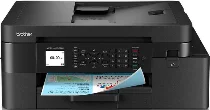
Brother MFC-J4350DW Driver lets the computer communicate with this colour inkjet all-in-one printer. After installation, the computer can recognise the machine for printing, scanning, copying, and faxing. A direct setup can use USB, while a wireless connection carries commands to the selected function. Those commands keep document and scan settings matched to the job.
Brother MFC-J4350DW Drivers for Windows
70c9909f85ac4813ad77db168c3f71571df6fb7f1c6def624ab5535ad5a73aab88c2859bb73443ee7219e69b64aa9fc96a0851565f03766eb7084941c8994120940f5e4e81dbb3e9162f90a6236fb3b440916812a6205bef0d41fea604df23c1940f5e4e81dbb3e9162f90a6236fb3b440916812a6205bef0d41fea604df23c10edce9170c3f46f065e52aa6335c093befa453212698a94c7d59fcfc5197fa7e0917273bb5bc10ee4775f36bd98bd05152835bf5370614cf5a803ffa9260b0adBrother MFC-J4350DW Drivers for macOS
f707c2d445abb161ea328c5367b962b7e611c10a55e1dd807848fbce01166bfbBrother MFC-J4350DW Drivers for Linux
8472c643400abab2445da632bde05c2cb5a436fbaafc2137a20a93102013d324f67774d8d09cc633ff716dcd86449d731a10d9ffb11cf2acd0b2d258a0f5e8cd9c3a200db3dc7b2b3332dff8c5226b4f3ee560d20b2e1f4918b1faf7124517b2197f63a52e89b8744f5a3c2d843abb3b76d003d5d4830bdfe675c44841a6c72bcda25534ea8e3018e7d46b970cb08b36084355adedc933aba0c8c7d03e903db901dc859f1978e645147ced5ec4b5448cc3e26b1c6d2f1104834f5891c0e17469d724746540a51f8286f2a318b47657227f7131d384a1a4f0475dacb7e3580f3ee74ef3a5529ebf3b26d6139ce15d75374a4538ba2efd48c28b209b0d705e5ec72ba3bffcf199fee6387cb79d6923214648db0f2df1c5a13f8f8f0a6fe0995c401404f2622e60470b4de25d0cdb4adc0f130ace6b380cc0d4b3d7714ad761c1aee28a8765f6637456d81ad1a56226e6857be2f1581fdcd9e4a5a4fbc4c42dd3450a4412b306b9ce2eb7e3ef4734a7b648f9561f525922b02541e98b545929dc2b82aa17ba2e331de1fcb34f0a839d27b9b193ac680d9742250a89e588a6bd56206c4e17c6dbcf263d9d08fb460ccd5b9f1a23fce79b30d0a41d96a224839322b2Brother MFC-J4350DW Specifications
The Brother MFC-J4350DW is a colour inkjet all-in-one with print, scan, copy, and fax functions. Its piezo printhead carries 210 black nozzles and 210 nozzles for each colour channel inside. Built-in memory is 256 MB, while the control panel uses keys with a 1.8-inch, 4.5 cm TFT colour LCD rather than a touchscreen. Scanning comes through a flatbed and a 20-page automatic document feeder.
Printing reaches up to 1200 x 4800 dpi, while A4 simplex speed runs up to 20 ipm in black and 19 ipm in colour. Automatic duplex printing reaches up to 11 ipm in black and 10 ipm in colour, and first-page timing is about 5.8 seconds for black and 5.9 seconds for colour. Borderless printing covers A4, Letter, A6, photo sizes, Photo L, Photo 2L, and 13 x 20 cm index cards.
Scanning reaches up to 1200 x 2400 dpi from the glass, while the ADF reads up to 1200 x 600 dpi. Interpolated scan resolution can reach 19200 x 19200 dpi, and the scanner glass covers originals up to 213.9 x 295 mm. Through the ADF, document length extends to 353.6 mm, while copying includes 25 to 400 percent scaling, N-in-1 layouts, sorting, and up to 99 copies.
Paper input comes through a 150-sheet tray and a one-sheet manual feed slot for plain, inkjet, glossy, and recycled media. Output capacity is up to 100 sheets of 80 gsm paper, while the ADF takes plain or recycled originals from 64 to 90 gsm. Hi-Speed USB 2.0, 2.4 GHz and 5 GHz wireless networking, Wi-Fi Direct, AirPrint, Mopria, Brother Mobile Connect, and Chromebook printing cover connections, while Ethernet is not listed.
Technical Details
| Title | Brother MFC-J4350DW Drivers |
|---|---|
| Device Type | All-in-one printer |
| Driver Version | Varies by driver and operating system |
| Available Downloads | Drivers |
| License | Free |
| Manufacturer | Brother Industries, Ltd. |