
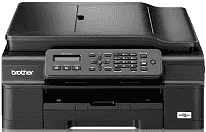
Printing with this device is through the inkjet printing with piezo that has 210 nozzles for both monochrome and color. This print method requires a piezo component that has 210 vents for ink management. The memory capacity for the internal part of the printer has up to 64 MB with compatibility with the processor. The liquid crystal display (LCD) that stands out in the control panel supports 16-character types and one line.
Brother MFC-J245 Drivers for Windows
81a91e7dfd632bcc2c8eb9d8258de637c3a50a65654beb7721fc48d6cc36eb440d141cae44419b4b6ed0793e207e991c5af04cdd700521c361f346bea1c7da69Brother MFC-J245 Drivers for macOS
dc886520244b33cfeb818312f6ee9b2f31d40a7639309d8a58f522372ac5f9786a9ef2865964ff4918dd1441876a80485fb8c329df36aa8d6680deff2eecd53ebe276896da6d01ab40093bee2ee908216d56ce78a84a40bc32be653c76bc819d949467d5fd874da4f4bcf9028483495f8319aad70483dbb26c2c4db964fbc8a71abf02206636ba656cf2ac87055b7abf22fa7f28e6658ca47be927e79dfbe7a05a7267150b83ee885c1eaea15b7033b2cce24fd9c0ff9335ad5e5e43d2a9371259553d65e3e1fd0efacf7816fbbefce981bc6f2b27ffc20c6b452dba4c4a8d7cf76b3ab85aaf47427b46287fda88801eb90d14cd63b23612824ff1513e658f92a47f2e6b9b5d9f4dc7bf154292f2e691176be4724779a06d00497673134f1a501abf02206636ba656cf2ac87055b7abf22fa7f28e6658ca47be927e79dfbe7a0a47f2e6b9b5d9f4dc7bf154292f2e691176be4724779a06d00497673134f1a5029e7bb503430a2390e602adb8c8d477932b998ce42e7a1e2acc9500ebc4e0124dba1cca38f237e7877e7aef019fc05e5de804b7d40925339b606befebdbc70f8868ee1de715a54d657a791d0077a3621bbc02efe2d1d5e69a9b3472a42f1aad0Brother MFC-J245 Drivers for Linux
2d2b7bf4dbc3cc0978de1fc1a1e21ecea34823ae6745534b0deaaf30a72ad0b286e4c89d63ccbb1a951ee4674d658a5f524c864f41c33acb9c30deda0ec184a7f6f0b9564ae53ad97d2abb2345280ed4851e513f7e1459bc901b9a500622558412843fc5dcd49bd54f06f03c639dc325016b4b197097133c7a93f9a325a852b5027b73648722ac8c8eb1a9c419d284a6562cc763feac9740a2b75a683b0929727d7dcbe8349ae4d4ab816e4551017f2f1fd9fd6bf3f4f3c570fbd9576248dd9f4225e91dd7f7d0ba2a202f616b15b669be7800c271a7d25efed94191f71fc4508bd395b8a25a385eb4a5e2770d4b10b17735203006b7a90a6879a0ef69e5fe4df71dadda535bb90dbfaf88fd603897f96e8b09a2f3ae9bd4e2daafb925e896e24082d824222ec7a7646309260fd661387ca1aa5dc1ffe851db7bbefe5271b755Brother MFC-J245 Specifications
The power source must supply a voltage between 220 and 240 volts at 50/60Hz, and power consumption depends on the mode. The copy mode, for instance, consumes approximately 16 watts and the immediate mode uses 3 watts. The sleep mode requires 1.1 watts, and the ‘off’ mode uses 0.2 watts. In concrete terms, the height of the Brother MFC-J245 printer is about 180 mm while the depth is about 374 mm. The weight of the printer, on the other hand, is about 8.1 kg.
The acceptable temperature range is between 10 and 35°C for operations and 20 to 33°C for best print quality. In terms of humidity, however, the acceptable range is between 20 and 80% without condensation in all situations. There is also provision for an automatic document feeder (ADF) that supports up to 20 pages at a standard weight of 80 gsm. The document size of the ADF involves a width of 148 mm to 215 mm and a scanner glass width of 215.9 mm.
The print media includes a type like plain, inkjet, glossy and transparent paper with support for standard and custom sizes. The maximum capacity of the printer input tray is about 100 sheets of paper with a weight of 80 gsm. However, the output tray of the printer can hold up to 50 sheets of everyday printed paper. In sending and receiving fax messages, the acceptable compatibility is with ITU-T group 3 with 14400 bps speed.
Technical Details
| Title | Brother MFC-J245 Drivers |
|---|---|
| Device Type | All-in-one printer |
| Driver Version | Varies by driver and operating system |
| Available Downloads | Drivers |
| License | Free |
| Manufacturer | Brother Industries, Ltd. |