
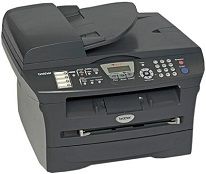
This product is a multifunction device that prints, scans, copies, sends and receives fax messages with excellent quality and speed. The physical parameters of this printer include a height of 11.57 inches, the width is about 17.01 inches, and the depth is approximately 15.5 inches. The weight of the device, however, is about 20.93 lbs as a whole. The printer supports an automatic document feeder (ADF) which has a maximum document input width of 5.8 to 8.5 inches. The document input length for the ADF component is between 5.8 and 14 inches.
Brother MFC-7820N Drivers for Windows
cd79ddbbeadc2fec2a3784d2ab5e5325f57e0cb783d94a1a411e08811401fc261d06ff46471602a6ce2830dec7caa6ef98202e585d8a9ba78ee5325d143a3d8f3f2655c5cdf63427d8037015bb43a50a66c7f789e2b093ae85feade1f20d3a4b2cc6f69ac2855eacd56df37477477501c798125d69307ff3ec9c043cb107adead4ba3716c26265ce8439a720c491e585aee78705052e7a05b87250f805a0556dcc11706511482efffd7cc837c1edb869026194327c5e5116affd9fe33b59d931ec2116bb560f20b11274499a961e5eb06f7075f9ac19cec3e4f6d63fdf060f68c24a5336d1abe68833ddc4e7df2fd1fc4096204d85855d33b6b8b54b30a07a52Brother MFC-7820N Drivers for macOS
1c314e965ea405afba0a391130d9e5dfcadfc1f48d1bc507e1e02e63f0e2be62eb44291166c3a5324c114ac781ae3c04b7df9c985d17b8a70e813b4ad05d732347e26a481968bd3ae74b6d77b69c018982a7e0451375ed6990cb18cfd6c92b59623af72665493bb62cd501e079c0f011be6d0066b02d05bcaa36415bd4d5aa7ff3c30ec8f49d874311cee80e5d5f211322e06a36622d74e058fab18aebd711f555b3ac74c954b4139a9ba0aef4f10291a4841599bb650201f554f0fade6c94fe868ee1de715a54d657a791d0077a3621bbc02efe2d1d5e69a9b3472a42f1aad0f3b2750562104b18e96024f36004fa8b3c78faf1ff37efd680531bf63aa37d5df8b36b787a34698bbe669254a86c305f6b4a595b292f97c41e6e82816be371ddBrother MFC-7820N Drivers for Linux
909c591b28594ef7d785106c61e0b0200fcaf88ecc3c36bb0bf7d2149a4c8879557cba911466d3a50c7a7efb032d40440e0c4c5690a3861a81e470ea5c0a610a25ee1e302c32acf66a69c6a546f26df2624446e48f157cfe0656e2e3b4deea3532aa208838c01e90ac2645634735968738626ad5a0e04da4b1fbb926e66f3a05c63670f6126161d188b0efbbed99d1c584bfb0f77ab718c7a99e88a8c925a77eab02c4e2292e9847a0338a225973735ccaec49c3d443f584004c8f91f5d6a8c92c62a817626e1caa728b1279e4768d66546850f57d4bb5a73c825cb897bd114af9c12f8467288c48cd00b532b2c64f53764a001f4b193f1c5f1ac746a1bd7c9cf71dadda535bb90dbfaf88fd603897f96e8b09a2f3ae9bd4e2daafb925e896e24082d824222ec7a7646309260fd661387ca1aa5dc1ffe851db7bbefe5271b755Brother MFC-7820N Specifications
The paper holding capacity for the input tray is about 250 pages of plain sheets of standard maximum weight of 20 lbs, which is equivalent to 80 gsm. Whereas, the output tray of this printer can only hold about 100 printed pages of 20 pounds standard weight, and the ADF component holds up to 35 sheets of the same weight. Similarly, the internal memory capacity of the printer is about 32 MB of Ram which supports the processor for quality delivery. This backup memory can store with the battery a charge that can work for up to 4 days.
Its control panel has a liquid crystal display (LCD) screen with a backlight and many control buttons for easy access and usability. The connectivity options of this Brother MFC-7820N printer include a parallel wireless IEEE-1284 component, a full-speed USB 2.0 port, and an Ethernet 10/100 BaseTX. An optional part is an NC-2200w, which is a wireless USB server.
For optimum performance, the temperature range is between 10 and 32.5°C while the humidity range is between 20 and 80% without condensation. The faxing component works at the speed of 22600 bps while the rate of transmission is approximately 2 seconds per page. The feature also comprises one-touch dialing, speed dialing of a maximum of 200 locations and a dual access feature.
Technical Details
| Title | Brother MFC-7820N Drivers |
|---|---|
| Device Type | All-in-one printer |
| Driver Version | Varies by driver and operating system |
| Available Downloads | Drivers |
| License | Free |
| Manufacturer | Brother Industries, Ltd. |