
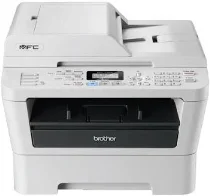
Brother MFC-7360 Driver helps a computer communicate with this monochrome laser all-in-one printer. After setup, the system can send print jobs and use the machine for scanning, copying, and faxing. A nearby computer connects through USB, which carries commands between the operating system and the printer. The driver passes each document to the selected function in a form the machine can process.
Brother MFC-7360 Drivers for Windows
2103e49c9ff0d95c4e298735136054c155402129b02273971892f226e383ae9c395e932b2a4d8ba8493039dff9b91d2a52e4938eda6788033ab856a757ee336c395e932b2a4d8ba8493039dff9b91d2a52e4938eda6788033ab856a757ee336c961f5e0214251652a9fac6b27b56d2fd874043a6bfbe99ebe56cf1817699af72961f5e0214251652a9fac6b27b56d2fd874043a6bfbe99ebe56cf1817699af7225bdab69783b5335570d3fad201a3d553bcbdaccac1d1e7c595f3e78829a354fBrother MFC-7360 Drivers for Linux
87866b380a672f2f1ebbe6f8d461e895adeb11d34b6a715c6e123b5401fe0ccc05438cf7af4babbd40e2beed42d8d1b16a1328ee8a6e23df813febb617f91dbcf951e08cb11e5c54e36999f30cd34c47b01c5fbe0ca9f8bd8f6d5964c877c42712676fb0a475c9776ff00cac76da86cd982f6df005d88e5b3fde40508e5a75311a9af9e39e8c08da726a6de0daa3e8ed2dda11914c694191f1bbbb626458f31989d82315fd9d629f8af7b5bc489f392da218acfe2436e42eec147246101636d5cda25534ea8e3018e7d46b970cb08b36084355adedc933aba0c8c7d03e903db901dc859f1978e645147ced5ec4b5448cc3e26b1c6d2f1104834f5891c0e17469ca620083eadf4983f9bb3b0033585461969c2743d798a12896336d6f4a6018cc0fec3bcffeb597b2d23ef7ff31f34dc7bd8d4736a35c2d1ff5e56784d709ce532ba3bffcf199fee6387cb79d6923214648db0f2df1c5a13f8f8f0a6fe0995c401404f2622e60470b4de25d0cdb4adc0f130ace6b380cc0d4b3d7714ad761c1aed9e8a164b36bd1bc74cb7a90111ae1f0d2569a1d3a221db69b2064acb850a24d2e01bfadc82b0416f05c18ba1d3d23999672bb8db48832815a3afd2cb395bb7d397cb2d91e0748f4c0498d831647efbc62af9e02f576ad52dc520bcac876f79518823eb345e4e4391d7a6a3a1d442a96b2224e12a0600542f0d3d700cf158706e28a8765f6637456d81ad1a56226e6857be2f1581fdcd9e4a5a4fbc4c42dd3450a4412b306b9ce2eb7e3ef4734a7b648f9561f525922b02541e98b545929dc2b82aa17ba2e331de1fcb34f0a839d27b9b193ac680d9742250a89e588a6bd56206c4e17c6dbcf263d9d08fb460ccd5b9f1a23fce79b30d0a41d96a224839322b2Brother MFC-7360 Specifications
Brother MFC-7360 is a mono laser multifunction printer for printing, copying, scanning, and faxing. Print output comes from electrophotographic laser technology. Processing runs through a 200 MHz ARM9 controller with 16 MB of memory. The front panel uses a two-line LCD, with 16 characters on each line. Under the scanner lid, the flatbed handles single originals, while a 35-sheet automatic document feeder sits above it.
Print resolution is 600 x 600 dpi, with HQ1200 processing for 2400 x 600 dpi class output. Warm-up takes less than 27 seconds from power on. From sleep mode, recovery takes less than 7 seconds at 23 degrees Celsius. Copying starts in less than 11 seconds from ready mode. A copy run can produce up to 99 pages, with sorting, N-in-1 copying, and 25 to 400 percent resizing.
Paper feeds from a 250-sheet front tray, with a one-sheet manual slot for single sheets. The main tray takes plain, thin, and recycled sheets. Supported sizes for that tray include A4, Letter, B5, A5, A6, Executive, Legal, and Folio. Thicker paper, bond paper, labels, and envelopes feed through the manual slot. Printed pages collect in a 100-sheet face-down tray, or one sheet exits face up through the straight paper path.
Colour scanning works from the flatbed, even though the print engine remains monochrome. The scanner glass records up to 600 x 2400 dpi optical resolution, while the automatic document feeder reaches up to 600 x 600 dpi. Faxing runs as Group 3 through a 14,400 bps modem, with 8 one-touch locations and 200 speed-dial locations. The machine weighs 11.3 kg with toner and drum.
Technical Details
| Title | Brother MFC-7360 Drivers |
|---|---|
| Device Type | All-in-one printer |
| Driver Version | Varies by driver and operating system |
| Available Downloads | Drivers |
| License | Free |
| Manufacturer | Brother Industries, Ltd. |