
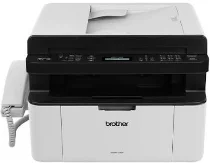
Brother MFC-1815 Driver helps a computer communicate with this monochrome laser all-in-one printer. After setup, the system can send print jobs and use the machine for scanning, copying, and faxing. A nearby computer connects through USB, which carries commands between the operating system and the printer. The driver passes each document to the selected function in a form the machine can process.
Brother MFC-1815 Drivers for Windows
95de6c9b8bfaded8b8898654b9d8d55fc5809b6fb8715f03630f5807ee99e511Brother MFC-1815 Drivers for macOS
ccd05a0ff77b516148780b0faac3e495cc38a6893f850a417f0d8275770fb253ac24dc9ef5043009b2f2646e04861883d81baeb6d1d13139b1686028b80f59c0Brother MFC-1815 Drivers for Linux
4df641998cfbddce4d33642ee594049d1240212ada4b19812386f9031711d4fc3b8042c1c4a2d61f5bf13e3678265d1357a206beba9f11f8c84156a769a05bf6af1e4c1f60f550abe73b169c23eeca5bfd98286b15ccdc807bf8dc04952cf754ce786a7b127aa0266d0e05f8e00a1d8adadd6127bc422d6bf8021e101dc6a75e027b73648722ac8c8eb1a9c419d284a6562cc763feac9740a2b75a683b09297289d82315fd9d629f8af7b5bc489f392da218acfe2436e42eec147246101636d5cda25534ea8e3018e7d46b970cb08b36084355adedc933aba0c8c7d03e903db901dc859f1978e645147ced5ec4b5448cc3e26b1c6d2f1104834f5891c0e174694225e91dd7f7d0ba2a202f616b15b669be7800c271a7d25efed94191f71fc4500fec3bcffeb597b2d23ef7ff31f34dc7bd8d4736a35c2d1ff5e56784d709ce532ba3bffcf199fee6387cb79d6923214648db0f2df1c5a13f8f8f0a6fe0995c401404f2622e60470b4de25d0cdb4adc0f130ace6b380cc0d4b3d7714ad761c1aee28a8765f6637456d81ad1a56226e6857be2f1581fdcd9e4a5a4fbc4c42dd3450a4412b306b9ce2eb7e3ef4734a7b648f9561f525922b02541e98b545929dc2b82aa17ba2e331de1fcb34f0a839d27b9b193ac680d9742250a89e588a6bd56206c4e17c6dbcf263d9d08fb460ccd5b9f1a23fce79b30d0a41d96a224839322b2Brother MFC-1815 Specifications
Brother MFC-1815 is a mono laser multifunction printer for printing, copying, scanning, and faxing. Its print engine uses electrophotographic laser technology with HQ1200 processing. Brother separates the toner cartridge from the drum unit in this hardware layout. A flatbed sits below the scanner lid, and the 10-page automatic document feeder handles supported multipage originals. Fax calls can use the telephone handset on the body, while a local computer connects through Hi-Speed USB 2.0 only.
Print resolution reaches up to 2400 x 600 dpi. On A4 paper, speed runs at up to 20 pages per minute. Letter output reaches up to 21 pages per minute, and the first printed page takes less than 10 seconds. Copies are made at up to 600 x 600 dpi. Reduction and enlargement run from 25 to 400 percent. Copy output can be stacked or sorted for jobs of up to 99 pages.
The flatbed records up to 600 x 1200 dpi optical resolution. Through the automatic document feeder, scanning reaches up to 600 x 600 dpi. Interpolated scan output can rise to 19200 x 19200 dpi. The scanner glass takes one sheet at a time, up to 215.9 mm wide and 300 mm long. Fax hardware runs through a 14,400 bps modem with automatic fallback.
A front tray holds up to 150 sheets of 80 gsm plain paper. Printed pages leave the machine face down in a 50-sheet output area. Plain and recycled paper are the supported media types. The paper path takes A4, Letter, Legal, and Folio sheets. Paper weight ranges from 65 to 105 gsm. With consumables installed, the machine measures 456 x 340 x 283 mm and weighs 8.3 kg.
Technical Details
| Title | Brother MFC-1815 Drivers |
|---|---|
| Device Type | All-in-one printer |
| Driver Version | Varies by driver and operating system |
| Available Downloads | Drivers |
| License | Free |
| Manufacturer | Brother Industries, Ltd. |