
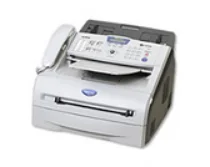
This Brother MFC-7225N printer has several exciting features such as good quality of print as well as an impressive speed. The physical dimensions include a width of 14.7 inches, a height of 10.3 inches, a depth of 14.7 inches and a weight of 16.2 lb. The control panel of the device comprises a liquid crystal display (LCD) with a backlight. The internal printer memory is an inbuilt 32 MB of memory for top quality.
Brother MFC-7225N Drivers for Windows
bc6ee1f594165f8bc49c86139355832d0aac0c99879bd847bc2f11dad2f17e2d0308b3fa31382fddae92d938fa5685aa68c1c7571c8ccf71959faff327236ec916dece3e66b433e5d023b63b79ad3326570ddd5d05fc313254e7cdb5fefe703f84cfc85d35629ca699304b4b674d2064e9df645a7595b622228b6ea9debb20c7cc11706511482efffd7cc837c1edb869026194327c5e5116affd9fe33b59d931d4ba3716c26265ce8439a720c491e585aee78705052e7a05b87250f805a0556dc24a5336d1abe68833ddc4e7df2fd1fc4096204d85855d33b6b8b54b30a07a52ec2116bb560f20b11274499a961e5eb06f7075f9ac19cec3e4f6d63fdf060f68998b2815632b81e0812a7b4b13cd5725eda23ca0a544fa48831024d2d611fb4333593b8000f8e94050453e2f407b6a63fbbce07cfa6e2b0957de435478802203Brother MFC-7225N Drivers for macOS
623af72665493bb62cd501e079c0f011be6d0066b02d05bcaa36415bd4d5aa7f1c314e965ea405afba0a391130d9e5dfcadfc1f48d1bc507e1e02e63f0e2be62f3c30ec8f49d874311cee80e5d5f211322e06a36622d74e058fab18aebd711f5f3b2750562104b18e96024f36004fa8b3c78faf1ff37efd680531bf63aa37d5d55b3ac74c954b4139a9ba0aef4f10291a4841599bb650201f554f0fade6c94fe47e26a481968bd3ae74b6d77b69c018982a7e0451375ed6990cb18cfd6c92b59868ee1de715a54d657a791d0077a3621bbc02efe2d1d5e69a9b3472a42f1aad0f8b36b787a34698bbe669254a86c305f6b4a595b292f97c41e6e82816be371ddBrother MFC-7225N Specifications
The memory backup of the system with its battery is also present for up to 4 whole days. The PC interface, otherwise known as the connectivity options include a full speed USB 2.0 port. This feature is compatible with the IEEE-1284 standard. It also has Ethernet 10/100 BaseTX and an optional NC-2200w (Wireless USB server).
This printer operates optimally under certain environmental conditions such as a temperature range between 10 and 32.5°C. On the other hand, the relative humidity range is between 20 and 80% without condensation. The Ethernet option is also usable as a means of a network connection through auto-negotiation. Users can also share the printer, share the scanner and share the PC fax to send documents.
The supported protocols include TCP/IP, SNMP, BOOTP, DHCP, APIPA, TELNET, HTTP, TFTP, WINS/NetBIOS, and many more. The network management tools include BRAdmin Professional, web-based management and MIB-II with Brother private MIB.
In copying, this Brother MFC-7225N printer has a resolution of 200 x 300 dots per inch (dpi) with a reduction or enlargement range of 50% to 200% in gradual increments. The multicopy feature is also possible with this device, producing up to 99 copies, and the device can produce multiple pages on a sheet.
The printer has a work rate of up to 20 pages per minute (ppm) on letter size and at a resolution of HQ1200 (2400 x 600 dpi). The understandable print language emulations are the Windows GDI, PCL 6 and BR-script 3.
Technical Details
| Title | Brother MFC-7225N Drivers |
|---|---|
| Device Type | All-in-one printer |
| Driver Version | Varies by driver and operating system |
| Available Downloads | Drivers |
| License | Free |
| Manufacturer | Brother Industries, Ltd. |