
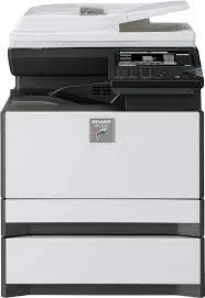
Sharp MX-C301W model is similar to the Sharp MX-C300 model, but with unique differences for optimum performance of duty. It also posses the color multifunction digital document system capacity as a desktop printer. The control panel on the printer has a color matrix touch panel that is about 7 inches in diagonal measurement. The essential features of the machine include the ability to copy, print, network print, network scan, document filing, and fax.
Sharp MX-C301W Driver for Windows
Driver and Software for Mac OS
Driver for Linux
Specifications
Within the copy system, there are the dry electrostatic transfer, dual-component developer, and the magnetic brush development. Other features are the OPC drums, and white LED exposure for printer status and the heat roller fusing. In the copying mode, the machine can produce up to 999 copies from a single original document. Also, while copying, the magnification feature can enlarge the output to reach 400% of the original size. Whereas, the reduction size can reach 25% of the document size.
Scanning runs at a speed of 37 pages per minute (ppm) for both color and black/white scanning. Furthermore, the paper tray capacity for input can take up to 300 sheets, but the maximum is 800 sheets. In the same way, when we can, the best quality resolution reaches 600 x 600 dots per inch (dpi). The warm-up time for the machine is about 18 seconds or less for it to be ready to print. The Sharp MX-C301W printer’s original feed can also hold about 50 sheets.
The supported image formats include TIFF, PDF, Encrypted PDF, and XPS for the black and white functions. While scanning, it can also compress images in formats such as MH, MMR, and JPEG. Furthermore, the scan destinations include e-mail, desktop, FTP, folder (SMB), USB, Internet fax, and Super G3 fax. It also has network protocols like TCP/IP, SSL, SMB, ESMTP, and the 802.1x.