
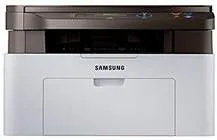
The Samsung Xpress SL-M2071 model of Samsung printer is a classic member of the M2070 printer series with excellent properties. One of the uniqueness of this machine is its multifunction ability to print, copy, and scan documents with excellence. The rate of the printing process is up to 20 pages per minute (ppm) at the normal mode on A4 paper. It takes as fast as 8.5 seconds for the printer to produce its first page in black and white on A4.
Samsung Xpress SL-M2071 Driver for Windows
Driver and Software for Mac OS
Driver for Linux
Specifications
On the other hand, when the printer is just waking from the sleep mode, the first page may take 14 seconds. In a month, this device can produce up to 10,000 pages of print on an A4 paper. However, the manufacturer recommends a range between 100 and 1500 pages to keep the printer in the best condition. Also, the machine uses the laser print technology that ensures the print resources are intact.
Print resolution is up to 1200 x 1200 dots per inch (dpi) at the best print quality. It also supports the Samsung Printer Language (SPL) as the primary printer language for decoding prints. The control panel of the machine contains a liquid crystal display (LCD) that displays two lines with 16 characters each. The inbuilt processor can run at the speed of 600 MHz, combining effect with the internal memory. Also, the internal memory size is about 128 MB, which is its maximum size.
This machine has a cartridge that is replaceable with a standard toner cartridge with a 1000-page capacity. It has a standard connectivity option of a USB 2.0 hi-speed port that has no wireless or network connection. In terms of the paper handling property, the input paper tray can take up to 150 sheets of plain paper. On the other hand, the output tray can hold up to 100 sheets. Download Samsung Xpress SL-M2071 driver from HP website