
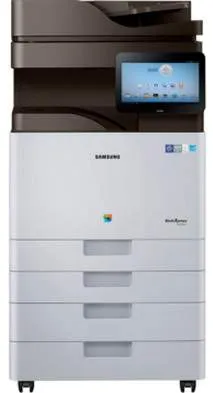
Printing with the Samsung MultiXpress SL-X4250LX assures users of an outstanding performance from the machine. For one, it uses a laser print technology that can still produce both color and monochrome products. In a month, this machine can create up to 110,000 pages of printed work as an Energy Star-rated device. Furthermore, it is very suitable to be a commercial printer that is fit for the business market for high yield.
Samsung MultiXpress SL-X4250LX Drivers for Windows
e4256eca5151a5c923b75e781c763b961f6230ab465a23999eeb417bd58ee27f2f1495ceaeb182f8b27bf7937f44e900750807129cfefeaea506f49eb6fc5f8612daa1b4a0b84c420fe70f71865d85aa48b5bb686384114d46733a2a550bfb2c304491200b9da426543172d594d07214e33369ef8aae843236891f5b725258fbb070e320cb18bc9efe3dbdb1daa1214887d255e5b44005721f2e05710a5cbe6b3b06413ec387904d5a08dc038390f120ff1160eb9295a6b3b0f02c66b76acc2a7e9244b9d42a27e6f2c712bfb8addd0bc3e9124da262072b9e9fa5ab73746534Samsung MultiXpress SL-X4250LX Drivers for macOS
c04ecbd7bfff799cf61aaf205c358df7cf0e3ba9aff05e8f0efd977be8ef46127fe0c9ec10014408d97e68b84f01223da130aef43f2d1451a0fc9a2a29e51b7c83f1138c6d4dd70ad1b7c416e6bc3838064b8e911e3dbb6c0aa77de39b9c90bdc15b7526b70a49b07618961b45a7b4d85799e74677afc0c24829425f12b0e6b22454566e40386fc4f4b5a0bc29659429e8da349d6c34ee0bf493e7c6e3efc2faSamsung MultiXpress SL-X4250LX Drivers for Linux
0c38213b846644500526bf281caaa6e36c40b8f2241cac2f0398c97c3814540eSamsung MultiXpress SL-X4250LX Specifications
It has a digital sender with four cartridges as well as duplex print functions for both sides of the page. The print colors include cyan, magenta, yellow, and of course, black. In terms of the printer management features, we have the fleet admin pro and the secure deployment manager. As a multipurpose printer, it can print, copy, and scan while the faxing feature is an option. While printing, the rate of production is up to 25 pages per minute (ppm) for black printing in normal mode.
At the same time, the print resolution is up to 1200 x 1200 dots per inch (dpi) at maximum production. The supported print languages include PCL 5, PCL 6, and PDF 1.7, apart from the Samsung Print Language. When the printer is in the normal mode, it takes less than 9.5 seconds to produce its first page. However, the print time for the first page in color at the same normal mode is about 11.5 seconds.
In copying, this machine can produce a resolution of up to 600 x 600 dpi with a speed of 25 CPM. The copy feature can also produce up to 9999 copies at once, from a single original document. It can also zoom in up to 400% of the document size and reduce up to 25% of the original size. Similarly, the scanning resolution is about 600 x 600 dpi.
Technical Details
| Title | Samsung MultiXpress SL-X4250LX Drivers |
|---|---|
| Device Type | All-in-one printer |
| Driver Version | Varies by driver and operating system |
| Available Downloads | Drivers |
| License | Free |
| Manufacturer | Samsung Electronics Co., Ltd. |