
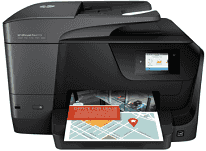
A perfect partner for the offices, the HP Officejet Pro 8715 is a large printer. It can perform all the tasks of printing, copying, faxing, and scanning the documents efficiently. The most important aspect of the printer is its low-cost printing capability. It can print pages at half the cost of its competitors. Added to it, the wireless printing technology further augments its credibility.
HP OfficeJet Pro 8715 Drivers for Windows
0dc7c47c5e049e804ed72bee0126f5079649ed6dfe333f4e6eca92c85248d68c00c2deba4c5f4e195013db4832efcdcf3660ee36b2a62f0fbb77d725d01af9b3a5ced39e41c5dcafc2845c4f00a0780d6d44734bc2a75df5db03077fd2201e9dd2f18088da8df16f0017983756626431eeeeddb0e386dd19a223c89e5a6a9c4fce728403422ec1c590fb971561abec94e476484815326373058a39afd61bccc2cc5c7d9a9f83c8f0133c25117e3ec2eddb63bb42f93ef455246cb578202c6e93a4d5272029ec44a3a3eb879d14232d2852c06fe1ee19e3b9486c3d491245fc57a4d5272029ec44a3a3eb879d14232d2852c06fe1ee19e3b9486c3d491245fc57a4d5272029ec44a3a3eb879d14232d2852c06fe1ee19e3b9486c3d491245fc57HP OfficeJet Pro 8715 Drivers for macOS
99e1d18847c64a405486ae34424f0a1c8d89920d17df86c45b6b0007f101d70ae42fb243082e789de3cd721316447df2622404b1fca087f9856fc28174596313HP Officejet Pro 8715 ink cartridges.
HP952 Black Ink Cartridge (~1000 pages), HP 952 Cyan Ink Cartridge (~700 pages), HP 952 Magenta Ink Cartridge (~700 pages), HP 952 Yellow Ink Cartridge (~700 pages)
Specifications
The HP Officejet Pro 8715 driver has full compatibility with all the Windows operating systems including the latest Windows 10. For Windows XP, it requires an Intel Pentium II processor, 512 MB RAM and 750 MB of free storage. Windows Vista and 7 need some upgrades of RAM and disk space. They need 1 GB of RAM and 2 GB of storage to install its drivers and other firmware. In the Macintosh operating system, the printer has full compatibility with the latest version, Mac OS X 10.14. For lower versions OS X 10.9 to 10.11, it requires 1 GB of free disk space on the system.
The print resolution of HP OfficeJet Pro 8715 Printer when printing color documents is 4800 by 1200 dots per inch. The monochrome documents’ print resolution maximizes at 1200 dots per inch. The print speed is typical for color and mono sheets which is 35 pages per minute. It also has the functionality to print on both the sides simultaneously called duplex printing.
The automatic document feeder increases the copy speed up to 20 cpm and 14 CPM for black and colored documents, respectively. The users can now directly edit the scanned images with the inbuilt image editor of the printer.
There are in total three paper trays built into the printer. The first tray is multipurpose and can hold various types of media; the second tray can only hold plain paper. The third tray is the output tray, and its capacity is 150 plain sheets.
Technical Details
| Title | HP OfficeJet Pro 8715 Drivers |
|---|---|
| Device Type | All-in-one printer |
| Driver Version | Varies by driver and operating system |
| Available Downloads | Drivers |
| License | Free |
| Manufacturer | HP Inc. |