
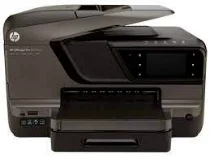
HP is one of the most notable names in the print industry that sells both inkjets and laser printers. All-in-one printers from HP are an excellent choice for small business and home printing needs. HP Officejet Pro 8600 Plus has replaced the HP Officejet Pro 8500A Plus and has improved a ton over its predecessor, both on the inside and outside. It is faster, sleeker and better finished than its predecessor. Moreover, it also supports ePrint and an iOS application that makes printing very easy. It is the most viable option for your office needs.
HP Officejet Pro 8600 Plus Drivers for Windows
88afd43d12db946fbcb5b7461c5e811648be9438bd4f708dde1046e918a1f615d612939cc0339135bf58fda3676ffd4e19d18a2fb9675aed8b0d77a6c8e2855e4335e4b750553ad1b869e1ec289cf216f43c13e93f8e7179ce9c94394657e2a5d2f18088da8df16f0017983756626431eeeeddb0e386dd19a223c89e5a6a9c4fce728403422ec1c590fb971561abec94e476484815326373058a39afd61bccc265600b3146322a625534e02a701fc04e05403b71f61f358d6358f868ffc1c676HP Officejet Pro 8600 Plus Drivers for macOS
99e1d18847c64a405486ae34424f0a1c8d89920d17df86c45b6b0007f101d70acba1598dc5d03fbf28fa649dafca5cd251f273066cc3a050966834a73ba66c3ef827c2e3b35f8dbde7322bb869df7370f5acf2cd62103daf08d1d6155553d0285dcaf1a21cbb5963338e3bc7fe57f89878721b72869afaa1b4fb155f46e6de6aHP Officejet Pro 8600 Plus e-All-in-One printer cartridges
HP950 Black Ink Cartridge (~1000 pages), HP 951 cyan Ink Cartridge (~700 pages), HP 951 yellow Ink Cartridge (~700 pages), HP 951 magenta Ink Cartridge (~700 pages)
Specifications
Setting up this printer is also very easy with the wireless connectivity support. However, the traditional USB connectivity is also supported as a plus. Other features include Ethernet support as well as mobile printing through HP print apps. You can easily connect it wirelessly using the touchscreen without needing to install any additional software. Moreover, with a duty cycle of 15,000 per month, it is on par with some of the laser printers in the market, yet still cheaper than them. HP Officejet Pro 8600 Plus supports a variety of media like plain paper, thick paper, brochures, photo paper, greeting cards, card stock and many others.
1 Printer technology: Inkjet
2 Functions: Print, scan, copy, and fax
3 Print speed (ISO): 20 ppm black/16 ppm color
4 Print speed (Draft): 35 ppm black/34 ppm color
5 Supported Print resolution: 1200 x 1200 dpi black and 4800 x 1200 dpi color
6 No. of cartridges: 4 (each for black, cyan, magenta, and yellow)
7 Wireless and mobile printing support: Yes, with Wi-Fi, HP ePrint, Apple AirPrint, Wireless Direct Printing
8 Processor speed: 360 Mhz
9 Automatic Duplexing printing: Yes
Being great in printing doesn’t mean it will be average in scanning, copying or faxing functions. With an automatic document feeder, you can scan or copy up to 50 sheets. The standard copy speed is 35 cpm for both color and black, and a maximum of 99 copies can be made at one time. It also supports color faxing, with a fax transmission speed of 4 sec per page at a 300 x 300 resolution. Though it doesn’t have a multipurpose tray or PictBridge support for printing photos directly from a camera, HP Officejet Pro 8600 Plus justifies its worth.
Technical Details
| Title | HP Officejet Pro 8600 Plus Drivers |
|---|---|
| Device Type | All-in-one printer |
| Driver Version | Varies by driver and operating system |
| Available Downloads | Drivers |
| License | Free |
| Manufacturer | HP Inc. |