
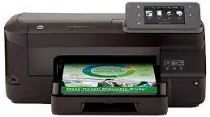
The printers have become an essential part of the office and business. The home-based business can’t depend on others for every paperwork need. So, to ease the paperwork, it is essential to have a device with advanced features which enables fast processing and efficiency at work. The HP Officejet Pro 251dw manages the printing environment efficiently and lowers the budget by up to 50%. The printer has powerful manageability tools to simplify home and office tasks with secure networking and time-saving. The printer offers lower printing costs than other laser printers without compromising quality.
HP Officejet Pro 251dw Drivers for Windows
f38380d3a0ebbc7d5a16c04c3f8e9c06ce280a4f4ffe5ef56bf29b43dd737712feb04c54ff1ed8cb41cb3ecd9494481db933e97d93d482b22a2aba2cd00a46091b530e5d56255716650b543b0844977e3c740c397ee915e122611325e7dd216cd2f18088da8df16f0017983756626431eeeeddb0e386dd19a223c89e5a6a9c4fce728403422ec1c590fb971561abec94e476484815326373058a39afd61bccc2eb727293767ac87183406c24c35cea7756c5b4acbcd130e968e6f166c6c95c08bea1ab4fb7079681cb60e7dcc19ffdcaa8f955a7b4c018f4b44c5ff05cf20973b5e03eff7772b8ff14e6bc09e7d3ece79fdc058ac93e597d4de58ea65cd131a1680967e8c32026bc2071ce27a65e55a2e26501f405a8a09c0324f59a974f1cc2252e3bb84737038c907650b13a150fe34cfaddc5810fa8a17e29b0e1e3e49fed9086a918c0d2b80dc034ad79fe64f90fc0fb244fb9ed7af2c3c9e71cf03979831088425bc237bfabaf7ff8fedb6675d2bc6a55836caa899688eda82c404247313e1529cc2cf7f249d20d574f41e6d32f7e9ce1341e11553bec91c6fa19a34663HP Officejet Pro 251dw Drivers for macOS
99e1d18847c64a405486ae34424f0a1c8d89920d17df86c45b6b0007f101d70aaec957311bb5148ff3a5c1631b19bcd13ac440029937dc8e82aa2e5379db3062HP Officejet Pro 251dw Officejet Pro 251dw Printer Cartridges
HP 950 intro Black Ink Cartridge (~1000 pages), HP 951 intro cyan Ink Cartridge (~700 pages), HP 951 intro yellow Ink Cartridge (~700 pages), HP 951 intro magenta Ink Cartridge (~700 pages)
The printer comes with two modes, i.e., draft mode and ISO mode with both black and color printing modules. The printing speed of black is up to 20 ppm for ISO and 25ppm for Draft. The print speed for color is up to 15 ppm for ISO and 25 ppm for the draft. The first page out time is fast which is 13 sec for black and 14 sec for color.
The duty cycle for a month is up to 30000 pages, and the recommended page volume is 250 to 1500 pages per month. The recommendation is provided for the optimum device performance based on a variety of factors.
The print technology used in HP Officejet Pro 251dw is HP Thermal Inkjet technology. The print drivers include Windows PCL6, Mac PS, Windows HP Universal Print Driver, SAP, Linux, Unix. The best print quality is up to 1200×1200 optimized dpi for black and color both.
The printer doesn’t have any internal memory storage but you can use external storage up to 256 MB. The paper handling of the printer is up to 250 sheets input tray and 150 sheet output tray. It also supports automatic duplex printing.
The power consumption of HP Officejet Pro 251dw is 38.58 watts maximum and 1.27 watts minimum. The input voltage for the printer must be 100 to 240 VAC, 50/60 Hz. The operating temperature is 5 to 40 ᵒC, and the humidity range is 20 to 80%. The printer is certified as Energy Star Device thus saves energy and doesn’t have any environmental impact.
Technical Details
| Title | HP Officejet Pro 251dw Drivers |
|---|---|
| Device Type | Printer |
| Driver Version | Varies by driver and operating system |
| Available Downloads | Drivers |
| License | Free |
| Manufacturer | HP Inc. |