
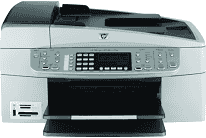
The product is a beautiful device of immense significance for the Middle East and Africa with a model number, Q8061C. The printer specifications include a resolution of 1200 x 1200 dots per inch (dpi) for black and 4800 optimized dpi color. The print method is a drop on demand thermal inkjet print technology, and the print language is PCL3 GUI.
HP Officejet 6313 Drivers for Windows
9de4bc6aa17163d278e5d9ee04c26b4ecaff5775d9b5918d0e7797989309b9db4dbb26746b9351e47fb394cdc45f56833caf12cbdda676bc3ea6bab3cdd72b25def7892aec84b4cd3ecff5a90bb603ad18ea18cfc6ebab825e3872415f06ab5ea60a2bb24dbd63900111c2a8e7aa8f4364bf2306bc07e41e103e78fe51e44235a9a1dd8f36048071c6033e7d1cc98730005a945c391fa7bf771a815860cadd11c28d191ce53ac148a4f15dcac8da14a36704f581507e90ba4bd8e9978ce0592f4ca4bdab78cd183e03ddf4667476938bc38daeb0ce18c8e2088f69adc8fdbe86b35429e08ed1c32c7ddee9cd37b1626a79f6124fc97557bd854a6e88cf682f215ca1b0628d787298f2d3cf1cabf6a0b2571a567348071c1d7aa6f1a1ffeacb51HP Officejet 6313 Drivers for macOS
9350574ed403706ea9bfba5a41e933acdfb8ccb63d3064af6df56d880f491b45019b5652c7dfbe5bc3fa82da4926f456c6b42a5a501c410b776d48cc38404321HP Officejet 6313 printer is a multifunction printer with the ability to print, copy, scan, send and receive fax messages. Amazingly, the print speed of the device is up to 30 pages per minute (ppm) for printing in black and 24 ppm for color. The rate also depends on the complexity of the document as well as the present printing mode of the device. The device can produce up to 3000 printed pages in one month.
Regarding copying specifications, the process also uses digital image processing with the fit-to-page and pre-scan options. The copying feature can produce up to 100 copies from the original document, which vary by the model. It also has a zoom range of 25 to 400% and works at a speed that also changes according to the complexity of the document.
The scanning component includes an image editor with integrated optical character recognition (OCR) software. This component converts a scanned image into editable text while the scan speed varies with the complexity of the document. The scanning feature works with a TWAIN-compliant interface and a resolution of 2400 x 4800 optical dpi. However, the maximum resolution is up to 19200 enhanced dpi.
In the faxing processes, it supports walk-up faxing in both black and white as well as color. There are up to 110 speed dials with this feature, although this varies by the model of the printer. Also depending on the model and the principle, there is a memory that can take up to 120 pages.
Technical Details
| Title | HP Officejet 6313 Drivers |
|---|---|
| Device Type | All-in-one printer |
| Driver Version | Varies by driver and operating system |
| Available Downloads | Drivers |
| License | Free |
| Manufacturer | HP Inc. |