
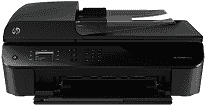
If you are looking for a printer which connects with your smartphone or tablets, then HP Officejet 4630 is the best choice. With this printer, you don’t need to use your PC; you can easily print the documents from your phone. This printer uses the method of drop-on-demand thermal inkjet for printing the documents. It supports the various types of paper such as Plain Paper, Envelopes, Cards, and Custom, etc.
HP Officejet 4630 driver is compatible with the latest versions of both Windows and Macintosh operating systems including Windows 10, 8, 8.1 and Mac OS X v10.13 High Sierra.
HP Officejet 4630 Drivers for Windows
fc6f0d4699f0b316e8c85b198eee0b78509caceffc37905978f93a0aadd4bfc178bc2792e25f489cb6f2789a62892d73d34544c2654a6b5ee4e9ae5e4f201c951c5abfeee8d6c73e4bbc90d4b8bb9bae53a942fd8f74b2f01da43b771566579fd2f18088da8df16f0017983756626431eeeeddb0e386dd19a223c89e5a6a9c4fce728403422ec1c590fb971561abec94e476484815326373058a39afd61bccc2HP Officejet 4630 Drivers for macOS
99e1d18847c64a405486ae34424f0a1c8d89920d17df86c45b6b0007f101d70af3c4bdc990133e3c728ca7b8a2dfc5c4e1c1b4a8ba7d8e6dcfbbbbf9295fc0aeHP Officejet 4630 HP Printer Officejet 4630 cartridges
HP 61 Black Ink Cartridge (~190 pages), HP 61 Tri-color Ink Cartridge (~165 pages)
Supported operating system for HP Officejet 4630 driver:
1. Operating system: Windows XP 32-bit, Vista, 10, 8, 7, and Mac OS X v10.8, 10.7, 10.6, 10.9, 10.10, 10.11
2. Processor: Intel Pentium 2, 800 MHz, 1GHz
3. RAM: 128 Mb, 512 MB, 1GB
Specifications of HP Officejet Printer 4630:
Tray capacity:
In this HP printer, the tray capacity is up to 50 sheets of plain paper in the input tray and up to 20 sheets of plain paper in the output tray. The card capacity in the input tray is up to 20 and the card capacity in the output tray is ten.
Scan:
This printer also includes the image editor in it. The resolution of this printer in scanning is up to 1200×2400 pixels per inch (optical) or up to 19200 pixels per inch enhanced (software).
Fax:
The transmission speed of this printer is 4 seconds per page at a speed of 33.6 kbps.
Copy:
The speed of copying documents with this printer varies according to the document complexity. It also includes digital image processing.
Print:
In this printer, the resolution is up to 600×600 dots per inch for black in Photo-best mode and 1200×1200 dots per inch in Max dpi mode.
Features of HP Office jet 4630:
1. Twain-compliant interface.
2. Wireless printing.
3. Performs multiple functions.
Technical Details
| Title | HP Officejet 4630 Drivers |
|---|---|
| Device Type | All-in-one printer |
| Driver Version | Varies by driver and operating system |
| Available Downloads | Drivers |
| License | Free |
| Manufacturer | HP Inc. |