
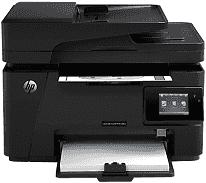
HP LaserJet Pro MFP M128fw is a different printer that involves features of printing, scanning, copying, sending and receiving fax messages. The input tray of this printer can hold up to 150 sheets of plain paper while the output tray holds about 100 sheets of printed pages. It also has a short paper extender and an automatic document feeder.
HP LaserJet Pro MFP M128fw Drivers for Windows
e00a7538cc284304e4f7938b4199331f94f2148053a1b807ba51b0321dbfd2c2130ae6d271760a6b2e10a18ce27a836513b7711d26cf51b0f7dfd496886475e3a1fbd7ecb5096539e06291311f11c130810f1eedc75c4b2cc23ccb90873b0668d2f18088da8df16f0017983756626431eeeeddb0e386dd19a223c89e5a6a9c4fce728403422ec1c590fb971561abec94e476484815326373058a39afd61bccc265600b3146322a625534e02a701fc04e05403b71f61f358d6358f868ffc1c676HP LaserJet Pro MFP M128fw Drivers for macOS
99e1d18847c64a405486ae34424f0a1c8d89920d17df86c45b6b0007f101d70a4ae9937731e211cd555246523701de7e33b70a0a3bb4323d6d2875df49f4906207652454eeb139f01d69a132166d112fdbce4a331fa95ca32cb802b577507934HP LaserJet Pro MFP M128fw Specifications
The printer supports the use of HP PCLm5 HP LaserJet Pro MFP M128fw driver and has some connectivity options. The options include the hi-speed USB 2.0 port, 10/100/1000T Ethernet LAN connection, and the wireless network connection. The inbuilt memory is up to 128 MB of RAM with a color graphical touchscreen display as the control panel.
The print rate of the HP LaserJet Pro MFP M128fw device comes at an average of 20 pages per minute (ppm) when printing on A4 paper. However, when printing on letter-size paper, the speed is 21 ppm. The copy function uses the flatbed scanning feature of the printer that can take up to A4 and letter-size documents. It also has an attached document feeder for essential service.
The scanning resolution is up to 1200 dpi with the support for both color and monochrome scanning. Also sending and receiving fax messages is possible through the V34 with two RJ-11 fax ports on the device. The physical components of this printer that suit its compact body include a direct power on/off button and a flexible control panel that varies by the model.
For the Pro MFP M128fw model, the display is in color and gives direct access to the essential features of the printer such as copy, fax, and supported apps. The recommended paper sizes include standard and custom-sized papers such as letter, legal, executive, envelopes, and postcard.
This printer supports mobile printing features with compatibility for software such as the Mopria compatibility, HP ePrint, and the Apple AirPrint.
Technical Details
| Title | HP LaserJet Pro MFP M128fw Drivers |
|---|---|
| Device Type | All-in-one printer |
| Driver Version | Varies by driver and operating system |
| Available Downloads | Drivers |
| License | Free |
| Manufacturer | HP Inc. |