
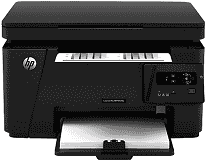
The multifunctional printer M125a with model number CZ172A functions correctly with Microsoft Windows XP (32-bit) Service Pack 3. Other compatible versions include Windows Vista, Windows 7, Windows 8 and Windows 10.
HP LaserJet Pro MFP M125a driver is compatible with Macintosh Operating System OS X v10.11 El Capitan, OS X v10.10 Yosemite. Other versions include OS X v10.9 Mavericks, OS X v10.8 Mountain and OS X v10.7 Lion with 1GB of disk space. The supporting connections comprise a USB Port and internet access.
The physical dimensions of the printer include height; 254 mm (10 inches), and width; 420 mm (16.5 inches). Others include a depth of 379 mm (17.2 inches) and weight 8.3 kg (18.3Ibs).
HP LaserJet Pro MFP M125a Drivers for Windows
ff9e27daa698e998d31ba30737428d9b2d09e9568c853d36631c27feea6ded4e1f1a51334c242c0694348ac12b8a5bbb47b5dd64e4264aa6261b247a65897dae22731ac21346246b6e3f708e5b157a1b8267c03e53105233405716cbde2574edHP LaserJet Pro MFP M125a Drivers for macOS
99e1d18847c64a405486ae34424f0a1c8d89920d17df86c45b6b0007f101d70a4ae9937731e211cd555246523701de7e33b70a0a3bb4323d6d2875df49f4906207652454eeb139f01d69a132166d112fdbce4a331fa95ca32cb802b577507934HP LaserJet Pro MFP M125a HP printer LaserJet Pro MFP M125a toner cartridge.
HP83A Black Original LaserJet Toner Cartridge (~1500 pages)
It also works perfectly with Linux Operating system such as Linux Kernel 2.4.19 and above with GNU software tools. The latter is also required to build from source code. Libusb 0.1 8, GPL Ghostscript 7.05 or higher, Foomatic 3.0.2 or higher, Qt 3.x or higher for UI toolkit. Others are PyQt 3.14 or higher for Qt wrapper for Python, python 2.2 or higher and Python-level and reportlab.
The paper handling specifications of the printer include an input tray capacity of up to 150 sheets of plain paper. In addition to this property, it takes up to 10 Envelopes and up to 75 Transparencies. The output tray holds up to 100 sheets of plain paper, up to 10 Envelopes, and up to 75 transparent films.
The recommended paper sizes for the printer are A6 105 x 148 mm (4.1 x 5.8 inches), U.S. Letter 216 x 279 mm (8.5 x 11 inches), and U.S. Legal. This paper size measures 216 x 356 mm (8.5 x 14 inches); A4 measures 210 x 297 (8.27 x 11.69 inches). Another is A5 148 x 210 mm (5.83 x 8.27 inches).
The maximum resolution is 1200 x 1200 dpi for input sensor resolution and PCL3 GUI device language. The printer prints as much as 21 pages per minute and the printer speed varies according to the complexity of the document.
Technical Details
| Title | HP LaserJet Pro MFP M125a Drivers |
|---|---|
| Device Type | All-in-one printer |
| Driver Version | Varies by driver and operating system |
| Available Downloads | Drivers |
| License | Free |
| Manufacturer | HP Inc. |