
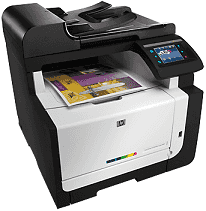
The LaserJet Pro CM1415fn printer has a design to perform excellently with the Microsoft Windows XP (32-bit). This printer takes a Pentium 233 MHz processor, 512 MB of RAM, 200 MB of free disk space. Supported Browsers are Microsoft Internet Explorer 6.0 Browser, SVGA 800 x 600 monitor with a 16-bit color video display.
HP LaserJet Pro CM1415fn Color MFP Drivers for Windows
422c961421cba6330c3bbed065ad6d94ebe3924e1be82a95ff81c7c53aa3343eac6927cc34d18df9a7b1cc71c39d97239e103f454c6f7911b23c7a650e8ab7dd41b7f6f2702e949f89cc06c5cfa7932c98fea63a6c09a2fd49c80178786713acd2f18088da8df16f0017983756626431eeeeddb0e386dd19a223c89e5a6a9c4fce728403422ec1c590fb971561abec94e476484815326373058a39afd61bccc265600b3146322a625534e02a701fc04e05403b71f61f358d6358f868ffc1c676HP LaserJet Pro CM1415fn Color MFP Drivers for macOS
99e1d18847c64a405486ae34424f0a1c8d89920d17df86c45b6b0007f101d70acba1598dc5d03fbf28fa649dafca5cd251f273066cc3a050966834a73ba66c3ee44ef23f00b656fa7bcb1fc6ca8b5871e6888393f99a2fca1c5f6513e81f4f1107652454eeb139f01d69a132166d112fdbce4a331fa95ca32cb802b57750793459b786ada4d5dc4981be25343d48705fa9753d5f4c13ef3ab1ec9c1de26feac9691ae4b17886a0108588bd6db389a3787636bcfdc5c99a24c37432a73c2fe003d879d3528f0374f8916c4807d9aed4c6801e042fd66c46a663205707cd3c6876HP LaserJet Pro CM1415fn Color MFP HP Color LaserJet Pro CM1415fn MFP toner cartridge.
HP128A Black LaserJet Toner Cartridge (~2000 pages), HP 128A Cyan LaserJet Toner Cartridge (~1300 pages), HP 128A Magenta Original LaserJet Toner Cartridge (~1300 pages), HP 128A Yellow LaserJet Toner Cartridge (~1300 pages)
Connectivity options include a Hi-Speed USB 2.0 port and a network interface card (NIC) for Ethernet network setup connectivity. Another is a wireless 802.11 network (802.11n recommended) for wireless network setup connectivity.
Furthermore, HP LaserJet Pro CM1415fn Color MFP driver is compatible with Windows Vista or Windows 7 and requires a 1 GHz 32-bit (x86) or 64-bit (x64) processor. Other requirements are 1 GB (32-bit) or 2 GB (64-bit) of RAM and 200 MB of free disk space. More so, it also supports Macintosh Mac OS X v10.5, which requires a Power PC G4, G5, or Intel Core processor.
Other versions are Mac v10.6, v10.7, and v10.8 Intel Core processor, 256 MB of RAM, and 300 MB of free disk space. Supported browsers include Safari, an 800 x 600 monitor with a 16-bit color video display. Also, it has a Network Interface Card (NIC) for Ethernet setup connectivity, CD or DVD drive. Supported software is Adobe Acrobat Reader 5.0 or later and Adobe Flash Player 10 or higher.
The physical dimensions of the printer are 608 mm (24 in) height, 442 mm (17.4 in) width, 445 mm Depth. Also, it includes 22.6 kg (49.8 lb) in weight. The paper input tray capacity is up to 150 sheets of plain paper. Or Up to 150 sheets of Legal paper, Up to 10 envelopes, Up to 15 mm (0.6 in).
The speed of this printer varies according to the complexity of the document and model. It prints in panorama size. It processes digital images, and the maximum number of copies varies by model. The maximum copy enlargement of the printer also ranges from 200 to 400 % (depending on the model). The maximum copy reduction ranges from 25 to 50 % (depending on the model).
Technical Details
| Title | HP LaserJet Pro CM1415fn Color MFP Drivers |
|---|---|
| Device Type | All-in-one printer |
| Driver Version | Varies by driver and operating system |
| Available Downloads | Drivers |
| License | Free |
| Manufacturer | HP Inc. |