
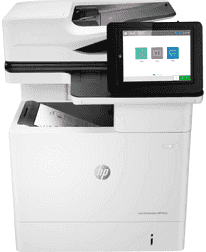
As a multifunction device with features that print, copy, and scan, it also has an enterprise design build-up. The speed of the printing process at the normal mode reaches 61 pages per minute (ppm) for monochrome and color. When there is a command to print at first from the active mode, the first page takes 5.4 seconds only. However, when the printer is waking up from sleep, the first page prints after 7.9 seconds of issuing the command.
HP LaserJet Enterprise MFP M632h Drivers for Windows
6c2810f4ea487d9efb8e4f76c2a465ba851dcbeeac9c7cbe335245c068d2ba76b6c5131fb1a47e43b86ea60ac804a0c3741f8142687dcbd1c8752195158460a3c867cb3723f5808858b5fea0196b27bbf6d299ca8be6392c4da7efda3affc2f07ad5230f5d2857e46d93a6ad839c1b2a69d2525618df71a1d3b1ea05ad853150295e4df666fa875808094cc76ae55c09d48cde9bf03432f7eef7830896974bb6ecf28f0717030232a035fad7526cd778413b4e2675042cf8312b0a0889e914d913ecf6c05f207b5f1461a1499e01750b661a113c5dc8a720b8699bdfd74f0d25f60f54f607e9fd0d98b991b0f273a370b1c1112f794d818060416b2a65cf1f9256a177a1871b207548b705683228aa1673d266d2a663ddfa94f7022a12b390b6790d4354da6f3c56d7955b4fb29cf475dcf9d07febc82e4aaa7cd653f2238540cc5c7d9a9f83c8f0133c25117e3ec2eddb63bb42f93ef455246cb578202c6e93e012cb0546d69bb5675b4d00e77aaa0c908c9e2aeb7f7aec081a2ee71ef486edeb727293767ac87183406c24c35cea7756c5b4acbcd130e968e6f166c6c95c08bea1ab4fb7079681cb60e7dcc19ffdcaa8f955a7b4c018f4b44c5ff05cf20973b5e03eff7772b8ff14e6bc09e7d3ece79fdc058ac93e597d4de58ea65cd131a1680967e8c32026bc2071ce27a65e55a2e26501f405a8a09c0324f59a974f1cc2252e3bb84737038c907650b13a150fe34cfaddc5810fa8a17e29b0e1e3e49fed9086a918c0d2b80dc034ad79fe64f90fc0fb244fb9ed7af2c3c9e71cf03979831088425bc237bfabaf7ff8fedb6675d2bc6a55836caa899688eda82c404247313e1529cc2cf7f249d20d574f41e6d32f7e9ce1341e11553bec91c6fa19a34663f50dad657f400372a066f31d5596db54ad4d289fdcdaf11f1209f7c83f8ebfaef50dad657f400372a066f31d5596db54ad4d289fdcdaf11f1209f7c83f8ebfaef50dad657f400372a066f31d5596db54ad4d289fdcdaf11f1209f7c83f8ebfaeHP LaserJet Enterprise MFP M632h Drivers for macOS
99e1d18847c64a405486ae34424f0a1c8d89920d17df86c45b6b0007f101d70aHP LaserJet Enterprise MFP M632h Specifications
In terms of copying, it produces its first page from the normal mode only as fast as 4.9 seconds. However, when waking up from the sleep mode, the first copy comes out after 10.4 seconds. This printer can produce up to 300,000 printed pages in a month at maximum delivery. However, the recommended print volume range is between 5,000 and 30,000 pages. This recommended volume may also change concerning the complexity of the document in print or color images.
The device uses laser print technology and produces a quality that is up to 1200×1200 dots per inch (dpi). In terms of the print languages, the acceptable formats may include the HP PCL 6, HP PCL 5, which requires a downloadable driver. Others are HP postscript level 3 emulation, native PDF printing, and Apple AirPrint. The display part of the printer measures about 8.0 inches of a color graphics display (CGD). This component has a touchscreen that can rotate to the desired angle of the user and an illuminated home button for a quick return.
The processor speed of the machine is 1.2 GHz while it also supports the use of the HP ePrint app as well. The replacement cartridges when the cartridges run out include the HP 37A Black original LaserJet toner cartridge for 11,000 pages. Others are HP 37X high yield cartridge (25,000 pages) and HP 37Y extra high yield black cartridge for 41,000 pages.
Technical Details
| Title | HP LaserJet Enterprise MFP M632h Drivers |
|---|---|
| Device Type | All-in-one printer |
| Driver Version | Varies by driver and operating system |
| Available Downloads | Drivers |
| License | Free |
| Manufacturer | HP Inc. |