
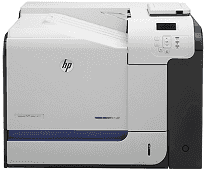
Hewlett Packard designs and develops bespoke printers for various purposes. The HP LaserJet Enterprise 500 color M551dn printer is best used in marketing offices and can work efficiently for medium to heavy printing jobs. With duplex printing, the printer can speed up the work and print the first color page in less than 11 seconds.
HP LaserJet Enterprise 500 color M551dn Drivers for Windows
6ff822e545e6f953ba79096f133f40e70c46c08d629c24447b5779605603324c8f1fab5554fd8aa213733f77611b8344c1376949aa09cd6806a5364d0e83f4f8c1d4ad0184a061a6c7bcf6892f9f54af2109abdc2257a322ee0d19adb7307285d2f18088da8df16f0017983756626431eeeeddb0e386dd19a223c89e5a6a9c4fce728403422ec1c590fb971561abec94e476484815326373058a39afd61bccc2eb727293767ac87183406c24c35cea7756c5b4acbcd130e968e6f166c6c95c08bea1ab4fb7079681cb60e7dcc19ffdcaa8f955a7b4c018f4b44c5ff05cf20973b5e03eff7772b8ff14e6bc09e7d3ece79fdc058ac93e597d4de58ea65cd131a1680967e8c32026bc2071ce27a65e55a2e26501f405a8a09c0324f59a974f1cc2252e3bb84737038c907650b13a150fe34cfaddc5810fa8a17e29b0e1e3e49fed9086a918c0d2b80dc034ad79fe64f90fc0fb244fb9ed7af2c3c9e71cf03979831088425bc237bfabaf7ff8fedb6675d2bc6a55836caa899688eda82c404247313e1529cc2cf7f249d20d574f41e6d32f7e9ce1341e11553bec91c6fa19a34663dbd500b65648de46c47dff9938f43a085dbcc073ea01aedf250a97eff842d8d2df77000f993a4c410689f22ac064f74dbe6f0ed6c034503cdc9934d7c1b8a763HP LaserJet Enterprise 500 color M551dn Drivers for macOS
99e1d18847c64a405486ae34424f0a1c8d89920d17df86c45b6b0007f101d70a5a4eba4abd21a8199e7bc5fe5ec819eee1b20d5b3f38158198216e7e088f785c3f1c10c2153442de270d31f816703e1e81c8cd3c8f31a141134def73caeb2398cba1598dc5d03fbf28fa649dafca5cd251f273066cc3a050966834a73ba66c3eHP LaserJet Enterprise 500 color M551dn toner cartridge.
HP507A Black LaserJet Toner Cartridge (~5500 pages), HP 507A Cyan LaserJet Toner Cartridge (~6000 pages), HP 507A Magenta LaserJet Toner Cartridge (~6000 pages), HP 507A Yellow LaserJet Toner Cartridge (~6000 pages)
The HP LaserJet Enterprise 500 color Printer M551dn driver has full compatibility with various Windows and Macintosh operating systems. For Windows users, Windows XP, Vista and Windows 7 require a minimum of 200 MB of free storage for installation. In addition to them, the latest Windows 8 and 10 can also support the printer. For Macintosh users, Mac OS X 10.5 and 10.6 should have a minimum of 150 MB of free disk space. The latest Macintosh version 10.14 (Mojave) can support the printer.
HP LaserJet Enterprise 500 color M551dn Printer’s printing speed augments the productivity of this printer. For both monochrome and colored prints, the speed can reach up to 33 pages per minute for letter sized pages and up to 34 ppm for A4 pages.
The laser printing technology enables it to print with the best resolution of 1200 x 1200 dpi. This print resolution is similar for both black and white and colored prints. There are two input trays with one having a capacity of 100 multipurpose sheets. The second tray can hold up to 500 plain sheets.
The plain sheets supported by the HP LaserJet Enterprise 500 color M551dn are light, bond, recycled, glossy and cardstock sheets. Along with them, it can also print on envelopes, letterheads, transparency sheets, labels, and opaque film.
For external connectivity, it has 2 USB ports, and the colored control panel helps control the operations. The inbuilt memory of this printer is 1 GB which helps the users store documents in the queue.
Technical Details
| Title | HP LaserJet Enterprise 500 color M551dn Drivers |
|---|---|
| Device Type | Printer |
| Driver Version | Varies by driver and operating system |
| Available Downloads | Drivers |
| License | Free |
| Manufacturer | HP Inc. |