
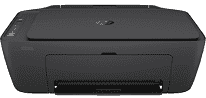
The HP DeskJet Ink Advantage 2774 printer model belongs to the ink advantage series of printers with multifunctional purposes. The machine contains HP 667 setup black and tri-color cartridges, a regulatory flyer, a reference guide, a setup guide, and a power cord of 1.5 m. Also, the connectivity options include a hi-speed USB 2.0 port and an inbuilt wireless feature with an 802.11a/b/g/n component. Most importantly, HP DeskJet Ink Advantage 2774 has an internal driver for manual duplex printing at an optimum performance level.
HP DeskJet Ink Advantage 2774 Drivers for Windows
fcfb9d9a6da978c48bd0ffd206b2fa218917eb5ace89b710e234aa96594841d9dc2cdfc69dc73337dd97816a138a57bd3d4fb3380201560264f26d4433e1f7fe2f92fdda886ff61322267491d919546ee90c5c8a688eaf9d89f24a8cde5b5c842f92fdda886ff61322267491d919546ee90c5c8a688eaf9d89f24a8cde5b5c84HP DeskJet Ink Advantage 2774 Drivers for macOS
0a8609067d72cfa008c5d5f0eb2136fd03b29399424f60659bb121d5c101fe97HP DeskJet Ink Advantage 2774 Specifications
In copying, this machine supports auto-enlargement and can produce up to 9 copies from a single original document. It can also produce an output resolution of up to 300 x 300 dots per inch (dpi) under ideal conditions. Also, it has an acoustic power emission of 6.2 B(A) during active printing. In contrast, the acoustic pressure emission is 48 dB(A). Besides, the recommended operating humidity ranges between 20 and 80% without condensation.
While the printer is not operating, the acceptable humidity range is between 5 and 90% with no condensation. The machine allows a temperature range between 15 and 30°C when the printer is in operation. But while in storage, the recommended temperature range is between -40 and 60°C. Also, the machine has no faxing feature, while the internal memory is about 86 MB with a 160 MB flash memory.
Meanwhile, the maximum memory of the HP DeskJet Ink Advantage 2774 model is up to 512 MB. On the other hand, it works with mobile printing services such as Apple AirPrint, HP Smart app, and Chrome OS. It also supports the network protocols that include a wireless network for best performance. Meanwhile, the input tray of the machine can hold up to 60 sheets of plain paper and 20 index cards. But the output capacity of the device can hold up to 25 sheets.
Technical Details
| Title | HP DeskJet Ink Advantage 2774 Drivers |
|---|---|
| Device Type | All-in-one printer |
| Driver Version | Varies by driver and operating system |
| Available Downloads | Drivers |
| License | Free |
| Manufacturer | HP Inc. |