
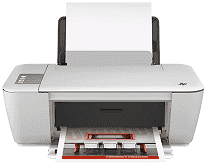
Are you searching for an all-in-one printer? Then, HP Deskjet Ink Advantage 1516 is an ideal choice for you. This printer can perform multiple tasks, such as printing, scanning and copying high-quality documents with such ease. The net weight of the device is 5.21 kg. The physical dimensions of the printer are 193 mm in height, 463 mm in width and 354 mm in depth.
HP Deskjet Ink Advantage 1516 Drivers for Windows
72c4eb5aa491f71c7eb6951bc6f6d8d1cd753f0371e144c347e7eb6cff7d8ddbad127c67102525dafd5403742cb25f13b0fc1241667207926d69c4935226a3c2373c2410b5f0eeb19bbd5bc22205e836bf29edd8676a73f6b75090c97541685fHP Deskjet Ink Advantage 1516 Drivers for macOS
99e1d18847c64a405486ae34424f0a1c8d89920d17df86c45b6b0007f101d70a1e8deecc0d7c3ea1c272f63df7bece763eb75f6656551a5f6b6e4da2f6b97f6aThe print method of the HP Deskjet Ink Advantage 1516 printer is Drop-on-demand thermal inkjet, and the print language is PCL3 GUI. Its resolution in draft mode is up to 300X300 dpi, and the resolution in normal mode is up to 600X300 dpi. The printer resolution in both plain-best and the photo-best mode is up to 600X600 dpi. With this device, you can print up to 1,000 pages per month.
As for its copy specifications, the copy speed of the printer stands at 4.5 CPM in black and 3.0 CPM in color. However, the copy speed of the device varies, and it depends on the document complexity. The copy resolution of the printer stands at 600X300 dpi in both black and color mode. And it uses digital image processing for the copy function.
The optical scan resolution of the HP 1516 printer is up to 120X1200 ppi, and the maximum scan size from a glass of the device is 21.6X29.7 cm. It supports various paper types, such as plain paper, envelopes, index cards, photo paper, and labels. The printer input tray can handle up to 50 sheets of paper and output tray can handle up to 30 sheets of paper.
The HP Deskjet Ink Advantage 1516 consumes a maximum power of 10 watts. And the input voltage requirement for the printer is 100-240 VAC at 50-60 Hz. It is also an Energy Star product that is designed to consume less power and natural resources.
Technical Details
| Title | HP Deskjet Ink Advantage 1516 Drivers |
|---|---|
| Device Type | All-in-one printer |
| Driver Version | Varies by driver and operating system |
| Available Downloads | Drivers |
| License | Free |
| Manufacturer | HP Inc. |