
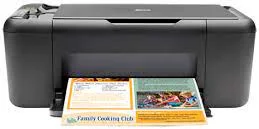
Everyone needs a printer for their home, and an inkjet printer is sufficient for most home printing requirements. Earlier inkjet printers were quite costly and large, but with the efforts of makers like HP, Canon, Brother, etc., we have entered an age of sleek and compact printers. The HP Deskjet F4488 supports a full-feature driver for Windows.
HP Deskjet F4488 Drivers for Windows
fdeca4137cfedd509b2db64e99091365bd96bfa94a07b3b34b82268ee4e9ba23e1a61de2917f0cd904fd1ec5c4e18ff2f79f3f4c156fb49dc0ee789b0c6ab4504fe1076bb8a2445e19ff3e59afef34ac1fcb140eec56718d2b9fa36b901fdc1dHP Deskjet F4488 Drivers for macOS
fa2e0307187b31dc2b1c85ddbca2775e0fa4c5080332c857969420d4f8835615HP Deskjet F4488 Specifications
There are many options to choose from when buying a new printer, but that can also make the task difficult. Among them, inkjet printers from HP like HP Deskjet F4488 offer an affordable and versatile machine that can take care of all your printing, scanning and copying needs. Here in this post, we are going to review HP Deskjet F4488 to help you decide whether it is an excellent choice for your home or not.
HP Deskjet F4488 is a simple but efficient all-in-one inkjet printer that offers the capabilities of being a printer, scanner, and a copier at the same time. The printer is ENERGY STAR qualified and made from 50 percent recycled plastic. It helps you go green and reduce the impact on the environment.
Moreover, it also has a paper saving mode that lets you print multiple web pages onto each side of a sheet. It is a very compact printer with dimensions of 22 x 17 x 6.5 inches and a weight of 4.9 kg. It’s thin and light enough to be easily carried from one place to another. These printers are ideal for home or personal use due to their small size and affordable operations.
HP Deskjet F4488 uses the latest HP inkjet technology that produces high-quality prints of both text and graphics. Both color and black and white pages can be printed from this printer at a maximum speed of 22 ppm for color and 28 ppm for black. The paper handler can hold up to 80 sheets, and the output tray supports 15 sheets. The printer includes a two-cartridge ink setup – one for black and a tri-color cartridge.
The black cartridge can print up to 200 pages whereas the tri-color ink cartridge can print up to 150 pages. The new cartridges won’t cost much as the HP original ink cartridges are cheaper than other companies’ ink cartridges and will significantly reduce your home printing costs. So, you will save not only on printer costs but also on ink cartridge replacements, which usually account for most of a printer’s costs.
The HP Deskjet F4488 driver also features manual duplex printing support as well as borderless printing up to 8.5 x 11 inches. The scanner can also scan media up to 8.5 x 11 inches with a preview available in just 27 seconds. The copier has a speed of 28 CPM for black and 22 CPM for color, which is the same as the print speed. The maximum number of copies that can be made at a time is nine.
But it isn’t entirely free from any cons. To name a few, it doesn’t have any wireless connectivity support. The scan applications aren’t well developed and sometimes freeze. Though the ink is relatively cheaper, this printer chomps it down very fast. The scanner quality is substandard, and the photocopy feature isn’t anything new in HP Deskjet F4488.
Technical Details
| Title | HP Deskjet F4488 Drivers |
|---|---|
| Device Type | All-in-one printer |
| Driver Version | Varies by driver and operating system |
| Available Downloads | Drivers |
| License | Free |
| Manufacturer | HP Inc. |