
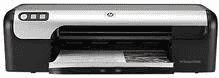
The HP Deskjet D2468 is a beautiful device for China and has the product number CB612D, which sets it apart among other members of the series. There are also outstanding features this printer has, such as borderless printing on the supported paper sizes. Others include an ink level indicator that shows the user the gradual changes in the print cartridge, and any condition can be easily detected.
HP Deskjet D2468 Drivers for Windows
901f2e27196a8742f3af3208d78330d1f66cb458aa60132304a1391ac8252531433a2f1e3cc02acb635d5fa56bc03cb80bf6054fd9e1e19e31e922f0c8afdd3a1e9da68d1fe6bb3cc93cddebb7c8ea6f58ffb7990aa341f02d1695e30577ca5976d740509fee2dd5729e08b30f8adcb2e98b905a940d5970f8e0d88a9eb023720a105758d2cdd2b0ff639e95c6628a8e776d7a50f29346025fdc3bea14d6b747HP Deskjet D2468 Drivers for macOS
b43f02c0270dade7cc28073eb01182a81c22aa7c8208e22344b843105200af02666ad4ba15b14742461877dc6e5b3a2560fb0ccf6f516511d16fa3e9f9287ffbab4a9351499f371beec349b95638ebd99982f7155f5c8ea42056fa615077d072Another reason why you may like to consider this printer model is the presence of HP Photosmart Express software launch and Print cancel buttons. The hi-speed USB port as a means of connectivity is also present on the rear side of the printer. The monthly duty cycle of the device is up to 1000 pages and that is worth it on average.
Bear in mind that this printer has two different ink cartridges for black and tri-color printing and the performance of the HP printer depends on many factors. However, the actual yield of the printer varies depending on the configuration of the systems, the software and the complexity of the document. This printing performance relates to the set mode of the device and determines the rate of the printing processes majorly.
Printing on plain paper at the fast draft mode is at the resolution of 600 x 300 dots per inch (dpi). The normal and fast normal methods for plain paper are also at a resolution of 600 x 600 dpi while the best approach is at 1200 x 1200 dpi. The maximum dpi mode produces a resolution of 4800 x 1200 optimized dpi with the aid of the Photo REt software. The printer has a height of 5.519 inches, the width is 16.86 inches, the depth is 7.57 inches, and the weight of the device is about 5.51 lbs.
Technical Details
| Title | HP Deskjet D2468 Drivers |
|---|---|
| Device Type | Printer |
| Driver Version | Varies by driver and operating system |
| Available Downloads | Drivers |
| License | Free |
| Manufacturer | HP Inc. |